

My backlog of data engineering design patterns candidates starts to fill in and when it happens, it's *the* moment to make some space for new ideas. That's why today you won't read about Apache Spark or Databricks but about a data engineer design pattern.
What would it take for you to trust your Databricks pipelines in production?
A 3-day bug hunt on a 3-person team costs up to €7,200 in lost engineering time. This workshop teaches you to prevent that — unit tests, data tests, and integration tests for PySpark and Databricks Lakeflow, including Spark Declarative Pipelines.

Konieczny
Context
Your primary data source is a group of data producers continuously generating some data. A great example here are IoT sensors that emit some events at regular intervals without interruption. Typically, if you need to perform some ad-hoc transformations, your workload might look like in the next schema:

Simple as it, you have a single streaming consumer that continuously processes arriving data. The first challenge appears when you need to integrate less regularly arriving data, for example files generated once an hour. In that case you may be tempted to implement a kind of Lambda architecture with a batch consumer writing to the same or different output:
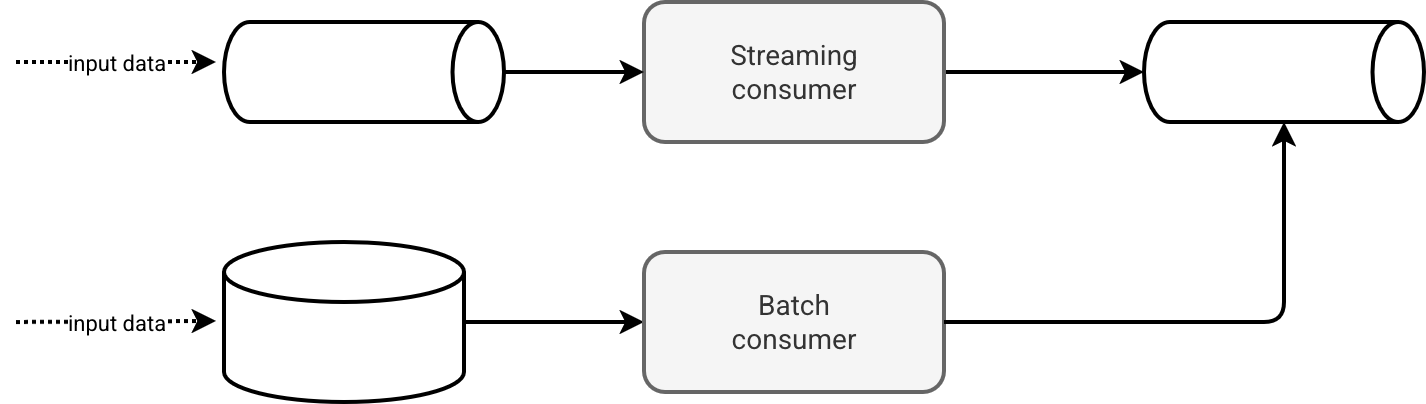
Do not get me wrong, this approach is OK. It clearly separates two different worlds of fast and slow data. By this isolation, the solution also improves fault-tolerance as both jobs don't interfere with each other. However, it adds some serious operational overhead:
- You'll have to organize your data transformation logic the way it can be shared by both pipelines. In modern data processing frameworks it's not a problem thanks to common data abstraction (DataFrames). However, your code base will get an additional file or module you will always look at whenever you need to make a change.
- Streaming job runs on its own, i.e. you deploy it once and later ensure it restarts automatically on transient errors. It's not the same story for the batch job because you need an additional data orchestration layer for it. Your data platform may provide it natively so that you stay within the same technical environment but you can also be in a situation when several parts of the output dataset will be spread across various technical components.
- Running batch consumer efficiently, even though it sounds simple, also has some logical challenges. What if your file doesn't arrive within an hour? Will you process it in the next batch or block the current batch execution as long as the file is not ready?
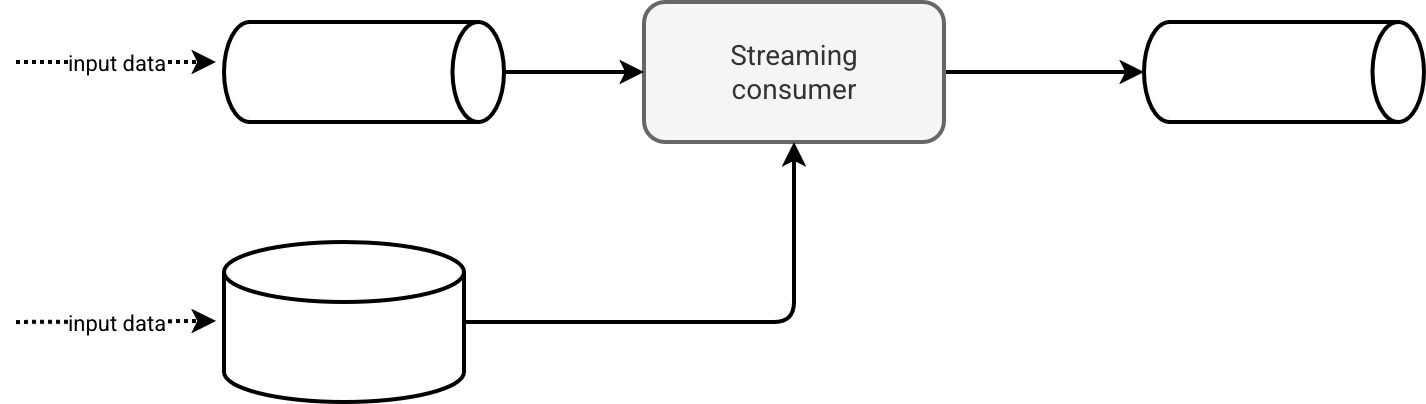
For all those reasons it wouldn't be simpler to do this:
Implementation
Your biggest fear might be the batch workload eating the throughput so far reserved exclusively to the streaming part. Fair enough but you don't have to process the whole batch dataset at once. Instead you can stream it, so process its chunks. That way you don't overwhelm the streaming data with less irregular but bigger batch datasets.
Consequently, the implementation consists of the following steps:
- Finding out the throughput limit for the batch workload, either with a physical (e.g. 10MB at once) or logical (e.g. 10 rows at once) size.
- Adapting the compute resources if needed. After all, you process an additional data source. Even though you limit the size, there will still be some batch overhead to deal with.
- Preparing the common schema of the batch and streaming data.
- Combining batch and streaming DataFrames, for example with union-like function.
After the last step you should be able to apply the same data transformation rules for both datasets - from that moment represented as a single data processing abstraction.
Consequences
Despite an apparent simplicity, the Hybrid continuous consumer has some gotchas. First, any error in the batch dataset can lead to the whole job downtime. The solution here is a properly implemented Dead-Letter pattern that I explain more in Chapter 3 of the Data Engineering Design Patterns book.
Besides, the Hybrid continuous consumer pattern works if it respects your SLAs. If for whatever reason you are supposed to ingest batch data within minutes after the arrival, it might be better to keep the Lambda-like architecture so that you can run the job on a sufficiently powerful compute cluster.
Third - and maybe I should have started by this - your batch data source must be streamable. If for whatever reason you need to write a complex code to implement incremental reads, or deploy an even more complex architecture to enable streaming, then you should evaluate the pros/cons, and maybe return to the batch pipeline [assuming the orchestration overhead has a lower cost].
Example with PySpark, Apache Kafka, and JSON
Let's first see the implementation with Apache Spark Structured Streaming which implements the micro-batch mode by default. The first data source is the continuous Apache Kafka stream declared as:
input_data_stream = (spark_session.readStream
    .option('kafka.bootstrap.servers', 'localhost:9094')
    .option('subscribe', 'visits')
    .option('maxOffsetsPerTrigger', 10)
    .option('startingOffsets', 'EARLIEST')
    .format('kafka').load())
Next comes the batch data source:
formatted_visits_from_json = (spark_session.readStream.schema(visit_schema)
  .option('maxFilesPerTrigger', 1)
  .format('json').load(historical_data_dir))
From both snippets you can notice two interesting things. First is that both use throughput limits. It's important because the micro-batch runs against limited compute resources and we simply don't want it to take the whole dataset available in Apache Kafka at given moment. The second interesting observation is the API. Both readers use the streaming API which brings an automatic checkpoint management.
Once both data sources are declared, you can combine them with a union operation like in the next snippet:
visits_from_json_files = load_historical_data(spark_session).withColumn('origin', F.lit('batch'))
real_time_visits_from_kafka = load_real_time_data(spark_session).withColumn('origin', F.lit('real_time'))

visit_to_write = (visits_from_json_files.unionByName(real_time_visits_from_kafka,
                          allowMissingColumns=False).withColumn('processing_time', F.current_timestamp()))
You'll find the full demo code on Github.
Example with Apache Flink, Apache Kafka, and JSON
When it comes to Apache Flink, it uses the dataflow processing model which is a more continuous streaming mode compared to the micro-batch. Therefore, we cannot limit the throughput here by the number of files in a unit of processing because there is no native unit of processing (technically you could simulate one with windows, but let's keep things simple!). Thankfully, Apache Flink also has a native way to control the throughput. It's the parallelism. The first part of the implementation consist then on setting a low parallelism to the batch data source:
def create_json_visits_reader(env: StreamExecutionEnvironment) -> DataStream:
  json_visits_reader = (
     env.from_source(
      source=FileSource.for_record_stream_format(
     StreamFormat.text_line_format(), '/tmp/dedp/candidates/hybrid-continuous-consumer/apache-flink/input').monitor_continuously(Duration.of_minutes(1))
            .build(),
            watermark_strategy=WatermarkStrategy.no_watermarks(),
            source_name="json-file-source"
        )
        # Let's reduce the parallelism here and process each file inside one thread to
        # not impact the Kafka consumer
        .set_parallelism(1)
        .map(JsonToVisitMapper())
        .set_parallelism(1)
    )
    return json_visits_reader
When it comes to the Apache Kafka reader, it should have a higher parallelism since it's the data source we cannot sacrifice the latency for. Just a quick snippet to simplify you the understanding of the final piece:
def create_kafka_visits_reader(env: StreamExecutionEnvironment) -> DataStream:
    visits_input = (KafkaSource
     .builder()
     .set_bootstrap_servers('localhost:9094')
     .set_group_id('visits_reader')
     .set_value_only_deserializer(SimpleStringSchema())
     .set_topics('visits')
     .set_starting_offsets(KafkaOffsetsInitializer.earliest())
     .build())
     # ...
    kafka_visits_mapped = visits_data_source.map(JsonToVisitMapper())

    return kafka_visits_mapped
Now comes the final part where we combine batch and streaming data with a union operation:
json_visits = create_json_visits_reader(env=env)
kafka_visits = create_kafka_visits_reader(env=env)

combined_visits: DataStream = json_visits.union(kafka_visits)
And from that moment, the parallelism gets back to the default level.
That's the first but certainly not last blog post about Data Engineering Design Patterns candidates. Here we saw a different way of building an unified data processing pipeline for the same logical type of the dataset but stored at two different storage types, fast and slow to put it simply. Next time - but I have to think about it more thoroughly - I have something in backlog about overwrites.
Data Engineering Design Patterns

Looking for a book that defines and solves most common data engineering problems? I wrote
one on that topic! You can read it online
on the O'Reilly platform,
or get a print copy on Amazon.
I also help solve your data engineering problems contact@waitingforcode.com 📩