

Software applications, including the data engineering ones you're working on, may require flexible input parameters. These parameters are important because they often identify the tables or data stores the job interacts with, and also show what the expected outputs are. Despite their utility, they can also cause confusion within the code, especially when not managed properly. Let's see how to address them for PySpark jobs on Databricks.
What would it take for you to trust your Databricks pipelines in production?
A 3-day bug hunt on a 3-person team costs up to €7,200 in lost engineering time. This workshop teaches you to prevent that — unit tests, data tests, and integration tests for PySpark and Databricks Lakeflow, including Spark Declarative Pipelines.

Konieczny
Example 101
That's probably the most classical example for dealing with input parameters on Databricks for PySpark jobs packaged as wheels:
import argparse
parser = argparse.ArgumentParser()
parser.add_argument("--orders_table", required=True, help="Input table with the orders to process.")
parser.add_argument("--output_orders_table", required=True, help="Output table where the transformed orders will be processed.")

if __name__ == "__main__":
    args = parser.parse_args()
    orders_table = args.orders_table
    output_orders_table = args.output_orders_table

    print(f'Reading data from {orders_table} and writing to {output_orders_table}')
Now, when you invoke this function with the following parameters, --orders_table orders --output_orders_table orders_transformed, you should see this:
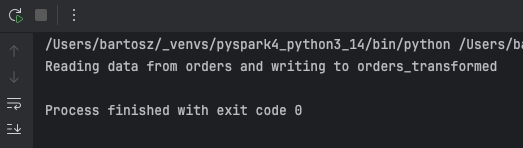
That way you can propagate the input parameters to other parts of your PySpark job. The problem is, what to do when you have many different parameters to cover? Put differently, your Python project supports various PySpark jobs that don't share the same input parameters.
Parameters-per-job strategy
The first, and maybe the most obvious solution, is to use create a dedicated arguments parser per job endpoint, such as:
def transform_orders():
    parser = argparse.ArgumentParser()
    parser.add_argument("--orders_table", required=True, help="Input table with the orders to process.")
    parser.add_argument("--output_orders_table", required=True,
                        help="Output table where the transformed orders will be processed.")
    args = parser.parse_args()
    run_orders_job(input_table=args.orders_table, output_table=args.output_orders_table)


def prepare_customer_data():
    parser = argparse.ArgumentParser()
    parser.add_argument("--customers_csv_full_path", required=True, help="Full path to the customers' CSV file.")
    args = parser.parse_args()
    run_prepare_customers_data_job(customers_csv_full_path=args.customers_csv_full_path)
So far so good. The code looks simple and remains testable locally if we had to test the runners. But let's imagine now another scenario. Our input arguments look like here...:
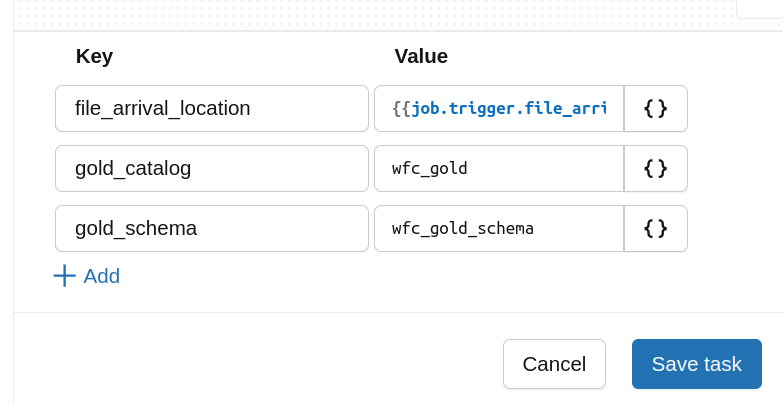
...and they are shared by different jobs.
Sharing parameters
To handle this parameters sharing scenario you can use a factory method to generate the common input attributes instead of creating the ArgumentParser from scratch every time:
def create_gold_table_parser() -> argparse.ArgumentParser:
    parser = argparse.ArgumentParser()
    parser.add_argument("--gold_catalog", required=True, help="The gold catalog in the Unity Catalog to the tables.")
    parser.add_argument("--gold_schema", required=True, help="The gold schema in the Unity Catalog to the tables.")
    return parser

def transform_orders():
    parser = create_gold_table_parser()
    parser.add_argument("--orders_table", required=True, help="Input table with the orders to process.")
    parser.add_argument("--output_orders_table", required=True,
                        help="Output table where the transformed orders will be processed.")
    args = parser.parse_args()
    fully_classified_output_table = f'{args.gold_catalog}.{args.gold_schema}.{args.output_orders_table}'
    run_orders_job(input_table=args.orders_table, output_table_full_path=fully_classified_output_table)
That's better, indeed. The pretty generic catalog and schema information are now wrapped in a common arguments generator. But as previously, another point arises. The fully_classified_output_table declaration before the runner is OK but what if we wanted to wrap it too, and use a dedicated configuration class?
🤔 Why not the full path?
You are certainly telling yourself that the full path could be passed as a parameter in the output_orders_table. That's correct but you can also imagine that in your code you need to reference other tables from the gold layer and having this information passed in the input can be useful.
Configuration class
You may prefer working with configuration classes to avoid referencing the input arguments from this untyped Namespace class which is returned when you call the parser.parse_args(). If you use dataclasses, there is no automatic way to convert the parsers to a dataclass instance. For that reason we need to write some code first, starting by the configuration class declaration:
@dataclass
class GoldDataJobConfiguration:
    silver_catalog: str = dataclasses.field(
        metadata={'help': 'The name of the Unity Catalog for the silver layer.'}
    )
    silver_schema: str = dataclasses.field(
        metadata={'help': 'The name of the Unity Catalog schema for the silver layer.'}
    )
    volume_path: None | str = dataclasses.field(
        metadata={'help': 'The volume for the enrichment dataset.'}
    )
    retries: int = dataclasses.field(
        metadata={'help': 'Number of retries for the internal mapping function.'}
    )

    def fully_classified_silver_table(self, table_name: str):
        return f'`{self.silver_catalog}`.`{self.silver_schema}`.`{table_name}`'
The declaration leverages the field method to simplify fields identification. Since we're going to retrieve the types from the class, we use the field function only as a help text provider. After this purely declarative step it's time to code the ArgumentParser. To create it dynamically from a dataclass we need to iterate over all fields and do some type resolution:
    @classmethod
    def get_arguments_parser(clz) -> ArgumentParser:
        parser_for_the_config = argparse.ArgumentParser()
        for field in dataclasses.fields(clz):
            required = True
            argument_type = field.type
            # Special handling for an Optional[...] type to extract the underlying type
            if typing.get_origin(field.type) is Union:
                required = False
                argument_type = [t for t in typing.get_args(field.type) if t is not None][0]
            parser_for_the_config.add_argument(f'--{field.name}', type=argument_type,
                                               required=required, help=field.metadata.get('help'))
        return parser_for_the_config
The code is relatively simple if you ignore the aspect with optionals. Since the parser doesn't accept the optional type as is, we need to do some preparation work to extract the exact type and add the optional flag to the argument. Once assembled, you can create the configuration class as:
 parser = GoldDataJobConfiguration.get_arguments_parser()
 args = parser.parse_args()
 job_configuration = GoldDataJobConfiguration(**vars(args))
To simplify your parsing logic you may be tempted to remove the type=argument_type declaration. Please don't. Otherwise your parser will accept anything, so for example we could specify a string instead of the numeric retries, such as --silver_catalog catalog_1 --silver_schema 123 --retries three. If you try to run this code with the explicit type definition, your job will fail with an error similar to this:
usage: args_as_config_class.py [-h] --silver_catalog SILVER_CATALOG
                               --silver_schema SILVER_SCHEMA
                               [--volume_path VOLUME_PATH] --retries RETRIES
args_as_config_class.py: error: argument --retries: invalid int value: 'three'
📢 Automated alternative to consider
An alternative that I haven't tested yet for building custom configuration objects from the input parameters is Python Fire. If your use case requires some more advanced parsers or classes, Python Fire can be a better choice than the custom code presented before.
Different properties per environment
So far we have addressed different challenges that led us to a typed configuration object created from input parameters. But there remains one last problem to solve, the default parameters that might be overwritten by the CLI arguments. One of the simplest solutions for that would be setting the default in the field(default=...) declarations. However, it may not be flexible enough as it'll set the same value for everything, even for the values that should be different in each environment. To make this example even more concrete, we could imagine the retries parameter that should be set to 1 on all environments but the production where it should be set to 3. Consequently, we would like to use configuration files and achieve something like this:
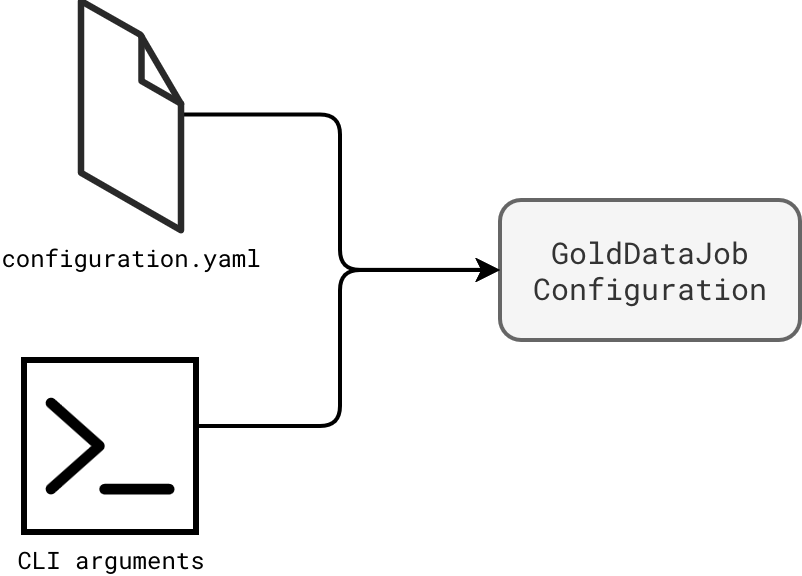
The content of the configuration file contains default values shared across environments (schema and retries) and unique per environment (catalog names):
env_shared:
  silver_schema: schema_1
  retries: 1

dev:
  silver_catalog: catalog_1_dev

prod:
  silver_catalog: catalog_1_prod
Now comes the CLI arguments that may or may not overwrite the defaults:
--silver_schema silver_user --retries 3 --env dev
As you can see, we want to use a dedicated Unity Catalog schema and also a custom number of retries, for example because we need to run this code in our user-scoped Databricks Asset Bundle. To achieve this, the first thing to do is to transform the required parser arguments to optional ones:
parser_for_the_config.add_argument(f'--{field.name}', type=argument_type, required=False, help=field.metadata.get('help'))
Now, we have to focus on combining both sources. The code, respectively, takes the default parameters from the file, the environment parameters from the file, and finally on top of them, applies the CLI arguments:
def create_parameters_for_class(parser_namespace: Namespace,) -> dict[str, typing.Any]:
    with (open(parser_namespace.config_file) as stream):
        config_from_file = yaml.safe_load(stream)
        job_configuration = {}
        if 'env_shared' in config_from_file:
            job_configuration.update(config_from_file['env_shared'])
        if parser_namespace.env in config_from_file:
            job_configuration.update(config_from_file[parser_namespace.env])
        defined_cli_params = {item[0]: item[1] for item in vars(parser_namespace).items() if item[1]}
        job_configuration.update(defined_cli_params)
        return job_configuration
That way the job created from the next snippet contains the mix of defaults and custom configuration values:
config_values = create_parameters_for_class(GoldDataJobConfiguration.get_arguments_parser().parse_args())
job_configuration = GoldDataJobConfiguration(**config_values)
print(job_configuration)
# Prints
# GoldDataJobConfiguration(env='dev', silver_catalog='catalog_1_dev', silver_schema='silver_user', retries=3)
When it comes to implementing input parameters handling in Databricks jobs, the task sounds easy. You just need a parser and retrieve the parameters from the created Namespace object. However, depending on the project, the complexity can grow and hopefully the strategies presented in this blog post will help you address the incoming challenges!
Data Engineering Design Patterns

Looking for a book that defines and solves most common data engineering problems? I wrote
one on that topic! You can read it online
on the O'Reilly platform,
or get a print copy on Amazon.
I also help solve your data engineering problems contact@waitingforcode.com 📩