

Even though eight years have passed since my blog post about various join types in Apache Spark SQL, I'm still learning something new about this apparently simple data operation which is the join. Recently in "Building Machine Learning Systems with a Feature Store: Batch, Real-Time, and LLM Systems" by Jim Dowling I read about ASOF Joins and decided to dedicate some space for them in the blog.
What would it take for you to trust your Databricks pipelines in production?
A 3-day bug hunt on a 3-person team costs up to €7,200 in lost engineering time. This workshop teaches you to prevent that — unit tests, data tests, and integration tests for PySpark and Databricks Lakeflow, including Spark Declarative Pipelines.

Konieczny
ASOF Join is an acronym meaning "join as of". For the sake of simplicity, the blog post refers to it as ASOF Join.
ASOF Join 101
Since the ASOF Join implementation in Apache Spark was motivated by improving the Pandas API parity, let's start our exploration with a Pandas example.
Let's suppose you're a football (or soccer for my US readers) fan and you want to know how many goals a player scored after each matchday. The problem is, to save some space you only update the scorers table when it changes. For that reason, the equality join (=) won't work because for a given matchday you might not have the matching scorer on the list. Put differently, both matchday and scorers tables won't necessarily have the same matchdays, exactly like in the following schema:
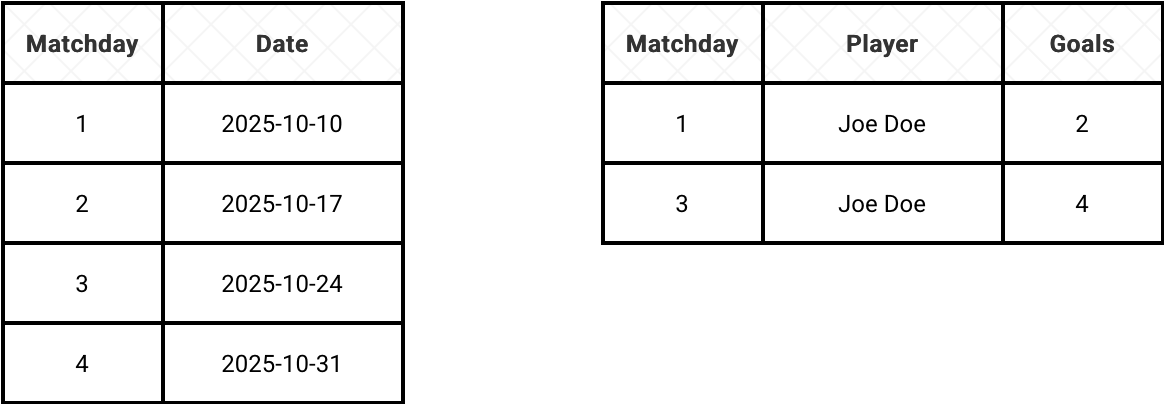
In Pandas we could represent the tables as the following two DataFrames:
matchdays_df = pd.DataFrame([
    {'matchday': 1, 'date': '2025-10-10'}, {'matchday': 2, 'date': '2025-10-17'},
    {'matchday': 3, 'date': '2025-10-24'}, {'matchday': 4, 'date': '2025-10-31'}
])
scorers_df = pd.DataFrame([
    {'matchday': 1, 'player': 'Joe Doe', 'goals': 2}, {'matchday': 3, 'player': 'Joe Doe', 'goals': 4},
])
If you are not a Pandas aficionado, you would probably try to combine both DataFrames with a simple merge. Unfortunately, since it uses an equi-join, the returned results wouldn't include the scores for the matchdays number 2 and 4:
merged_inner = pd.merge(matchdays_df, scorers_df, on='matchday', how='inner')
print(merged_inner)

# prints
"""
   matchday        date   player  goals
0         1  2025-10-10  Joe Doe      2
1         3  2025-10-24  Joe Doe      4
"""
Eventually, you might end up solving the issue by repeating rows with a window function to perform the equi-join but in reality it's not necessary! Pandas natively supports the ASOF Join with the merge_asof function. Consequently to get the goals scored by a player after each matchday you might simply write:
merged = pd.merge_asof(matchdays_df, scorers_df, on='matchday', direction='forward')
print(merged)

# prints
"""
   matchday        date   player  goals
0         1  2025-10-10  Joe Doe    2.0
1         2  2025-10-17  Joe Doe    4.0
2         3  2025-10-24  Joe Doe    4.0
3         4  2025-10-31      NaN    NaN
"""
As you can see, without any additional effort you correctly combined the scorers for each matchday. In other words, the merge_asof acts like a join using the closest keys for the join column. What you should also notice from this short snippet is the direction attribute that defines the closest rows in the joined table (scorers in our case). This attribute supports: forward, backward, and nearest and in the next schema you can see what it gives when applied to our example:
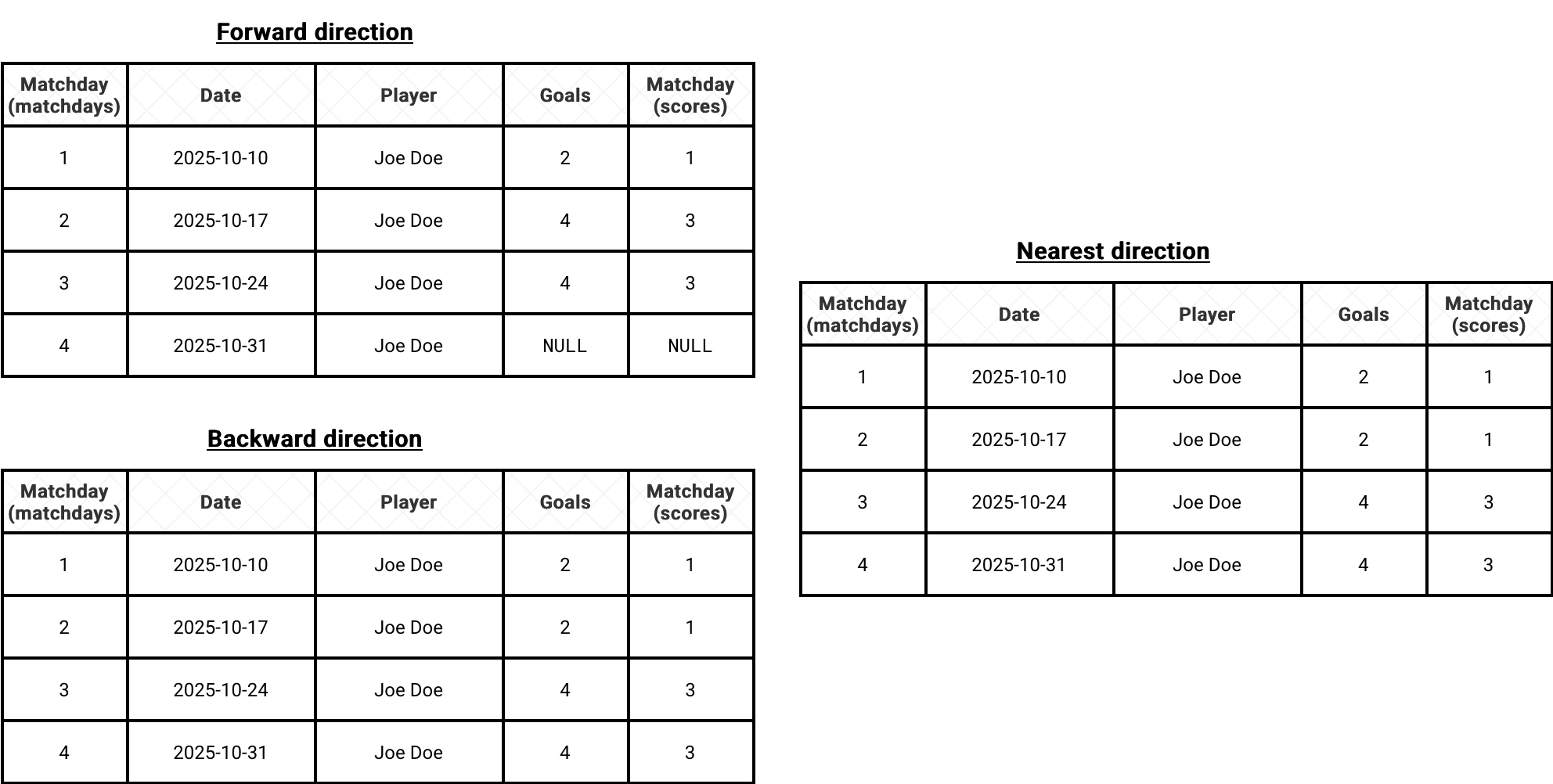
Translated to our football example:
- the forward direction takes the scores after each matchday,
- the backward direction takes the scores before each matchday
- the nearest direction takes the scores before, at, or after each matchday
By default, the join conditions are represented as equal-or. For that reason, matchday 1 always has a value. If you turn this feature off by setting allow_exact_matches=False, for the backward mode the scored goals in the first row will be undefined:
   matchday        date   player  goals
0         1  2025-10-10      NaN    NaN
1         2  2025-10-17  Joe Doe    2.0
2         3  2025-10-24  Joe Doe    2.0
3         4  2025-10-31  Joe Doe    4.0
ASOF Join everywhere
Pandas is one of many compute engines supporting the ASOF Joins. Other engines where you will find the ASOF Join are DuckDB, Snowflake, and Feldera quoted by Jim Dowling in his book.
Deciphering ASOF join in PySpark
When it comes to Apache Spark, the ASOF Join is probably one of rare features available in PySpark but still (version 4.0.0) missing in the Scala and SQL APIs. It was implemented in the version 3.3.0 by Takuya Ueshin as part of the work to improve the Pandas API coverage in PySpark (SPARK-36813).
For that reason, the function is publicly exposed for Pandas on PySpark only. To use it, you need to operate on the pyspark.pandas module like shows the following snippet:
import pyspark.pandas as ps
merged = ps.merge_asof(matchdays_df, scorers_df, on='matchday', direction=direction)
Under-the-hood, the PySpark's merge_asof delegates the execution to _joinAsOf. Put differently, the previous call could be replaced with:
 asof_join = matchdays_df._joinAsOf(
   other=scorers_df,  how='left', leftAsOfColumn='matchday', rightAsOfColumn='matchday',
   direction=direction
 )
ASOF Join anatomy
The most important concept to grasp while understanding how the ASOF Join works is the distance calculation between the join attributes. In our example, we want to find the scores close to each matchday. Before entering into implementation details, let's take a look at the next picture that shows what happens if we combined matchdays and scorers with an additional dynamically computed distance column:
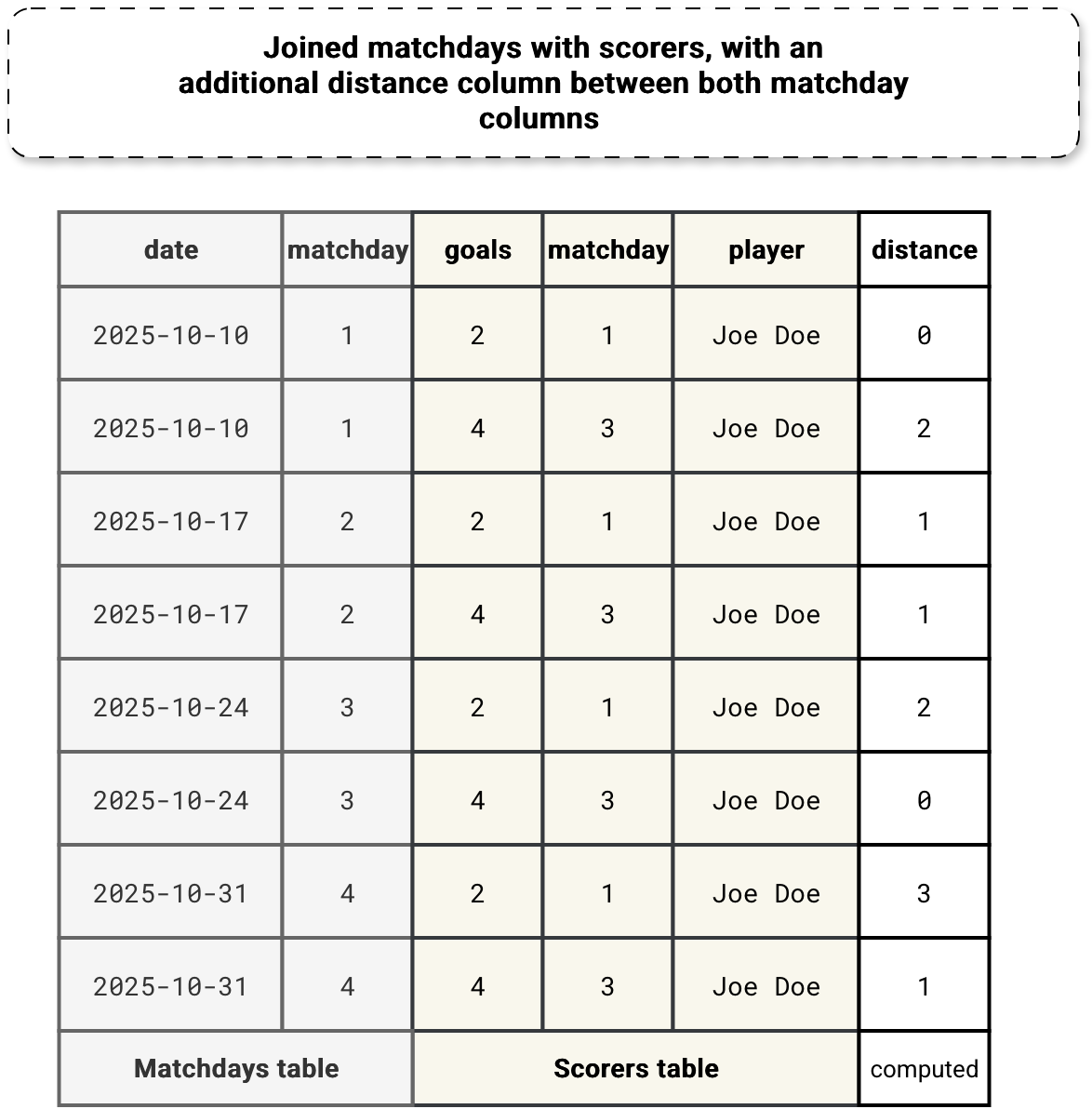
Now the question is, how to generate this distance between the columns without an equi-join? Well, technically an equi-join would lead to a distance of 0 each time, so it's even a wrong question asked. The problem remains, though. To avoid equi-join, the logical query planner rewrites the initial asof join. Consequently, the logical plan transforms from this...:
AsOfJoin true, LeftOuter
:- LocalRelation [matchday#0, date#1]
+- Project [_1#5 AS matchday#15, _2#6 AS player#16, _3#7 AS goals#17]
   +- LocalRelation [_1#5, _2#6, _3#7]
...to this:
Project [matchday#0, date#1, __nearest_right__#75.matchday AS matchday#78, __nearest_right__#75.player AS player#79, __nearest_right__#75.goals AS goals#80]
+- Join LeftOuter, (matchday#81 <=> matchday#0)
   :- LocalRelation [matchday#0, date#1]
   +- Aggregate [matchday#81], [min_by(named_struct(matchday, matchday#15, player, player#16, goals, goals#17), if ((matchday#81 > matchday#15)) (matchday#81 - matchday#15) else (matchday#15 - matchday#81)) AS __nearest_right__#75, matchday#81]
      +- Join Inner
         :- Aggregate [matchday#0], [matchday#0 AS matchday#81]
         :  +- LocalRelation [matchday#0]
         +- LocalRelation [matchday#15, player#16, goals#17]
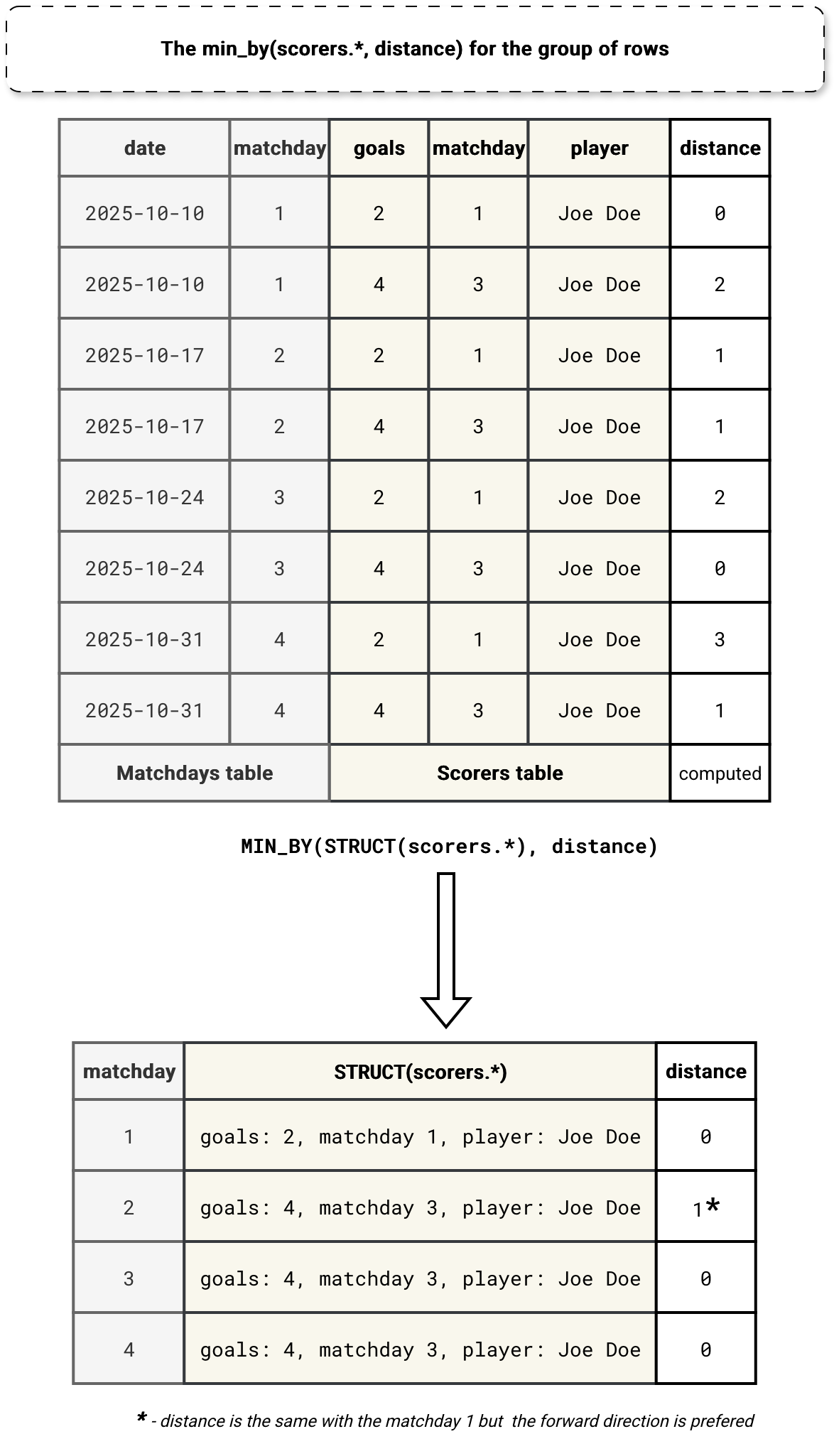
Inside the rewritten query you can notice a MIN_BY aggregation. The purpose of it is to get the value (STRUCT(scorers)) corresponding to the smallest distance expressed by the ordering column on the matchday. Overall, this process of combining rows and getting the smallest distances can be summarized as:
The ASOF join is yet another join type available in Apache Spark. Definitively, it's the least standard among the ones I detailed in my blog post Join types in Spark SQL 8 years ago, but at the same time, it helps querying timeseries data.
Data Engineering Design Patterns

Looking for a book that defines and solves most common data engineering problems? I wrote
one on that topic! You can read it online
on the O'Reilly platform,
or get a print copy on Amazon.
I also help solve your data engineering problems contact@waitingforcode.com 📩