

Databricks Jobs is still one of the best ways for running data processing code on Databricks. It supports a wide range of processing modes, from native Python and Scala jobs, to framework-based dbt queries. It doesn't require installing anything on your own as it's a full serverless offering. Finally, it's also flexible enough to cover most of the common data engineering use cases. One of these great flexible features is support of different input arguments via For Each task.
What would it take for you to trust your Databricks pipelines in production?
A 3-day bug hunt on a 3-person team costs up to €7,200 in lost engineering time. This workshop teaches you to prevent that — unit tests, data tests, and integration tests for PySpark and Databricks Lakeflow, including Spark Declarative Pipelines.

Konieczny
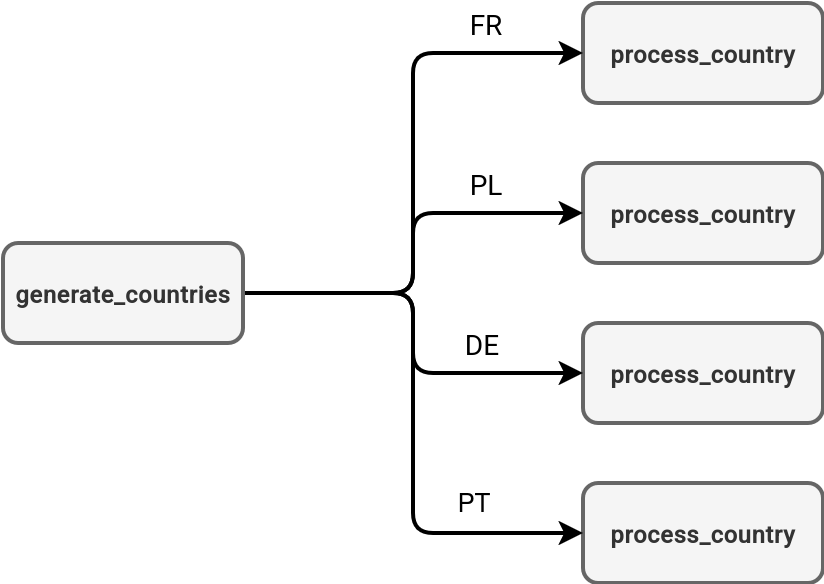
You can think about the for each task like foreach loops in programming languages where you iterate over a set of defined variables. The difference is the concurrent execution of the tasks triggered by the for each task.can run your job's tasks concurrently. In the next schema you can see an example of a country-based processing where the first task generates a list of supported countries, and other ones process each of the returned items:
Basics
The easiest way to discover the for each task is the Databricks UI. When you create a new job, you can choose a for each task type and configure it in a two-steps operation:
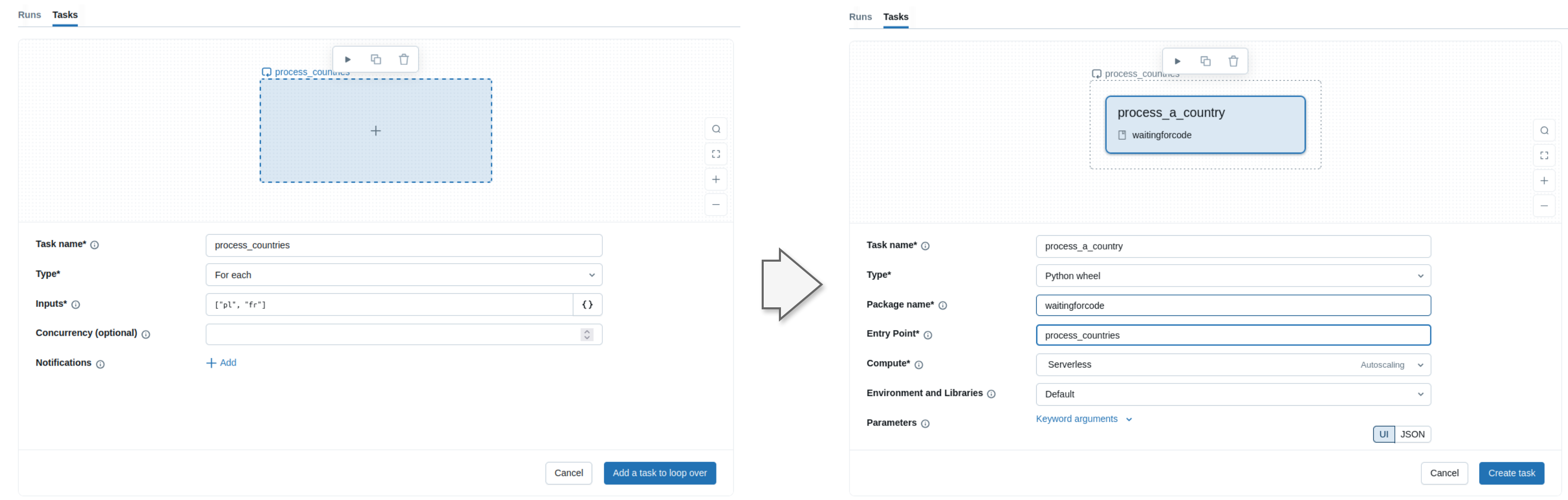
The first step consists of defining the so-called for each task where you specify the parameters to loop over. In the second step you need to define a nested task that will be triggered once for each input parameter.
In the screenshot I hardcoded the input variables but in the real world it's rarely an accepted solution. More often you'll need to generate them dynamically, probably from an upstream task. The for each task supports this scenario as well with the task value references, so the parameters you can set in a different task with the help of dbutils.jobs.taskValues.set function. Let's see an example.
First, the task that generates the list of countries we want to process individually. To keep things simple I'm hardcoding them here but you might imagine various scenarios from reading configuration files on the volumes to processing a Delta Lake table and filtering out itrelevant rows:
import json

def generate_country_list():
    country_codes = ['PL', 'US', 'UK', 'FR']
    codes_json = json.dumps(country_codes)
    print(f"Generated list of codes: {country_codes}")
    from databricks.sdk.runtime import dbutils
    dbutils.jobs.taskValues.set(key='countries_list', value=codes_json)
    print("Country codes successfully exported as a task value.")
Next comes the country processing task. Again, we're interested here in only taking the input parameter and printing it to the console. In a more realistic scenario you will be able to do more business meaningful stuff, such as generating a Delta Lake table, or a file:
import argparse

def process_country():
    parser = argparse.ArgumentParser()
    parser.add_argument("--country", required=True)
    args = parser.parse_args()
    print(f'Processing {args.country}')
Finally, the Databricks Asset Bundle definition that references both tasks in a job:
resources:
  jobs:
    countries_processor:
      name: countries_processor
      tasks:
        - task_key: country_list_generator
          environment_key: Default
          python_wheel_task:
            package_name: wfc
            entry_point: generate_countries
        - task_key: process_generated_countries
          depends_on:
            - task_key: country_list_generator
          for_each_task:
            inputs: '{{ tasks.country_list_generator.values.countries_list }}'
            concurrency: 2
            task:
              task_key: process_country
              environment_key: Default
              python_wheel_task:
                package_name: wfc
                entry_point: process_country
                named_parameters:
                  country: "{{input}}"
      environments:
        - environment_key: Default
          spec:
            client: "4"
            dependencies:
              - ../dist/*.whl
When you deploy the bundle with databricks bundle deploy -t sandbox, you should see the job ready to be triggered:
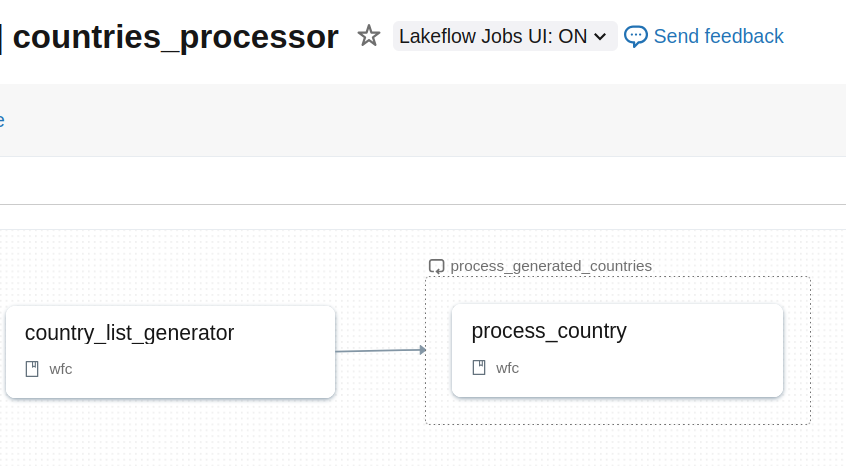
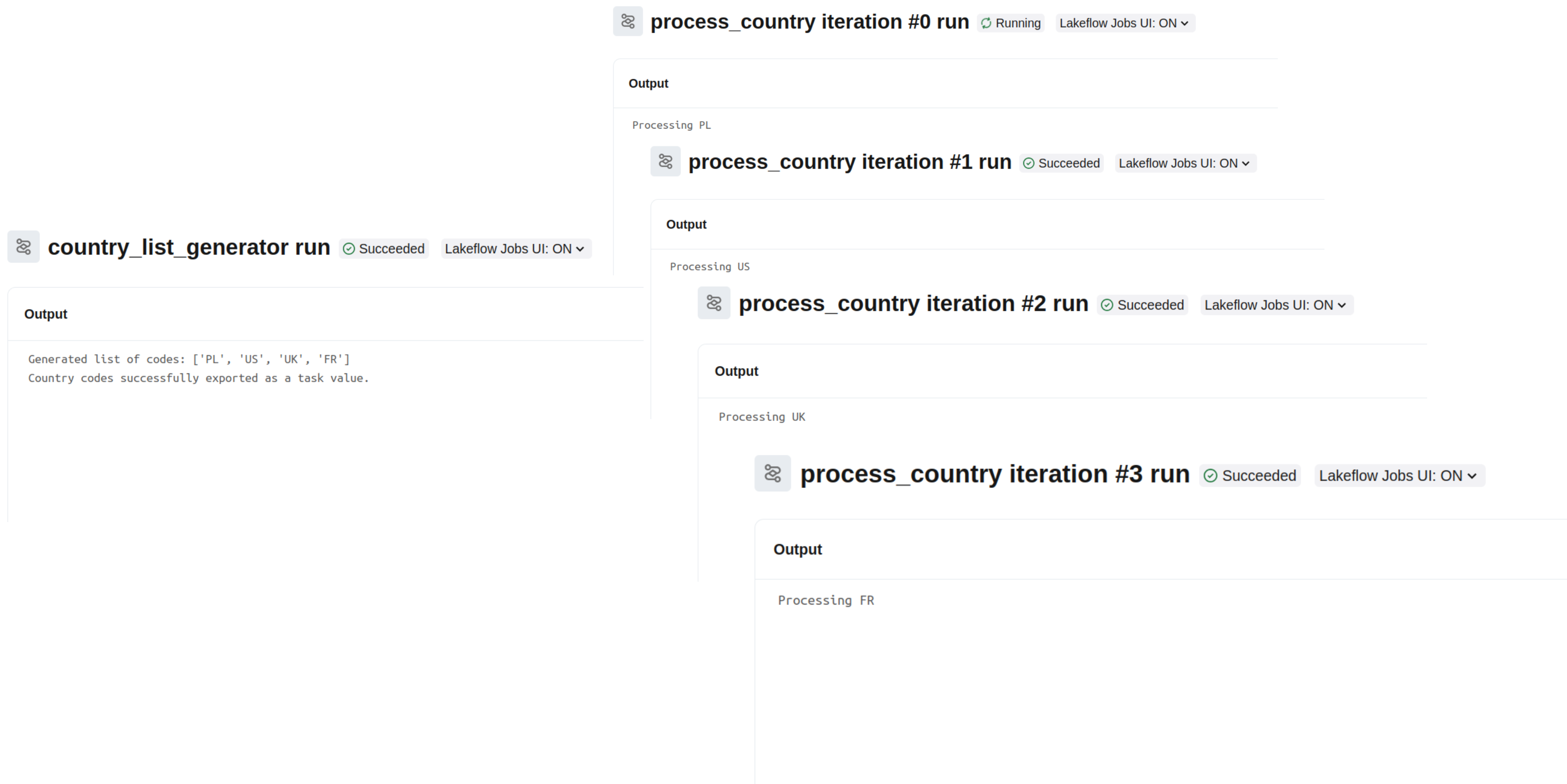
When you run it and take a look at the output of the individual tasks, you should see:
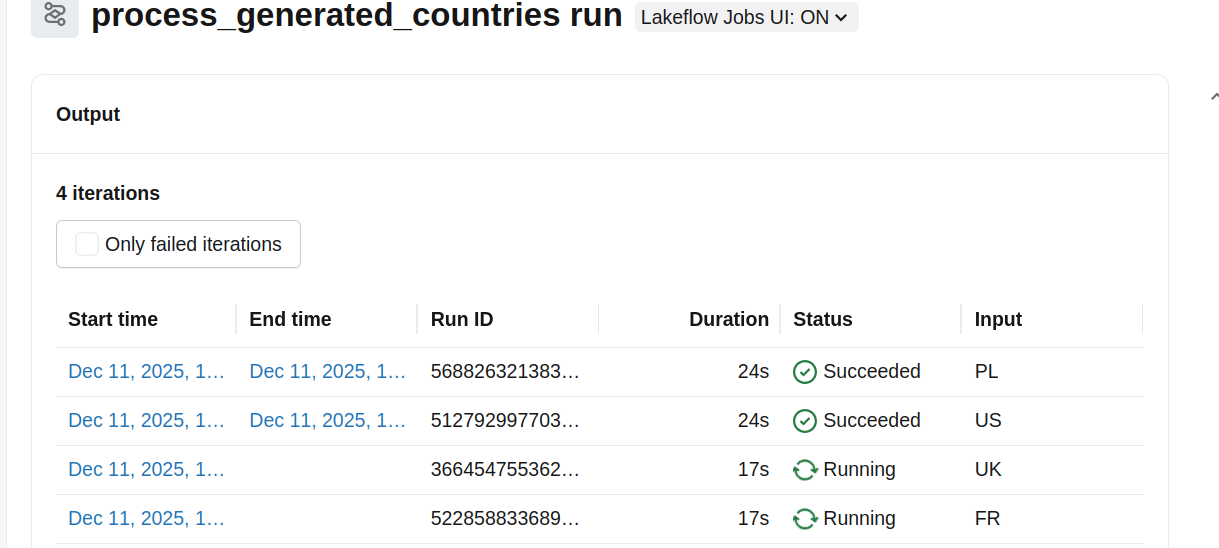
Limits
Unfortunately, life's not all sunshine and rainbows. The for each task also has limitations that may require some workarounds. The first limitation you may face is the Dependency. The dependency scope is located at the For each task level and it cannot be extended to the individual nested tasks. Put differently, you cannot have a heterogeneous downstream workflow as in the next diagram:
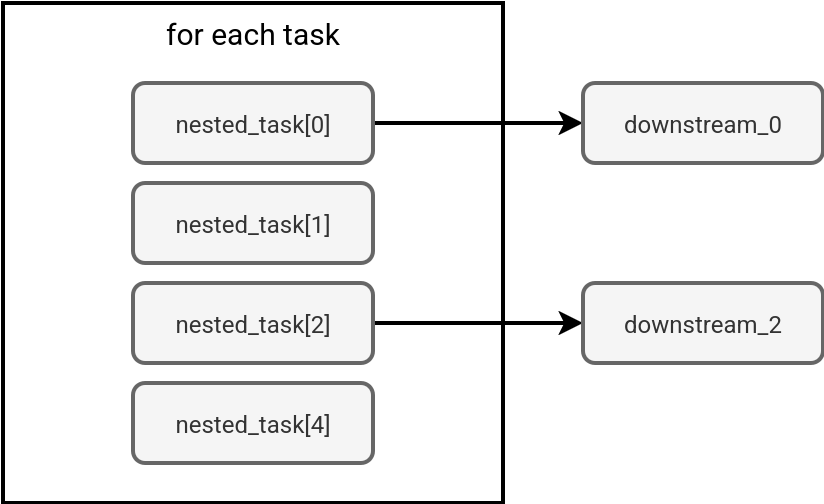
If you try to implement this kind of workflow in Databricks Asset Bundles, you'll face an error similar to:

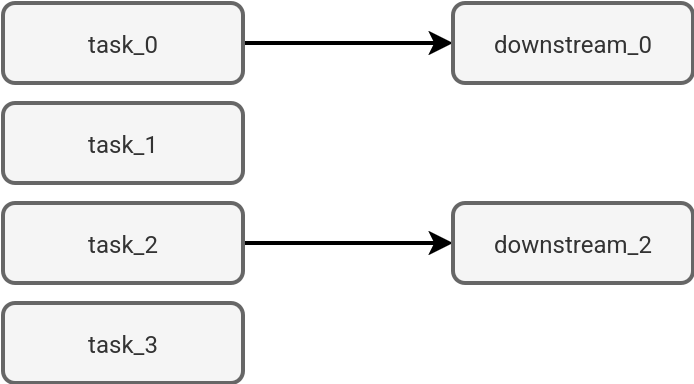
If you really need this kind of conditional workflow, you can solve it with classic task types:
A related limitations the impossibility to condition the for each task outcome depending on how many nested tasks succeeded. For example, you might need to run a downstream processing despite one nested task failure. Thankfully, there is a way to partially overcome this with task dependencies and one of the relevant levels (all succeeded, all done). That way you can run the downstream logic even if one nested task fails or if only one nested task succeeds.
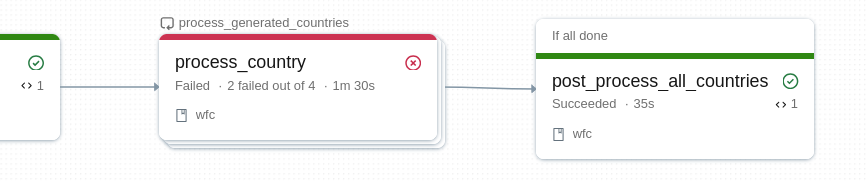
But again, keep in mind the For Each task is a single unit so the AT_LEAST_ONE_SUCCESS won't trigger any downstream dependencies:

🗒 Remember the outcome evaluation
By the way, another important thing to know is the outcome evaluation. A for each task is considered as successful when all its nested tasks succeeded. Otherwise, Databricks marks it as failed
Last but not least, the parameters. If they are simple, such as ISO country codes from my example, you shouldn't be bothered by this aspect. However, when you need to pass more complex structures like nested JSON structures bigger than 48 KB (it's a limit for the values that the references represent), you might need a workaround. In this workaround, instead of passing the whole JSON structure, you can pass only the identifiers for each entry and add an extra parameters reading logic in the nested tasks, a bit like here:
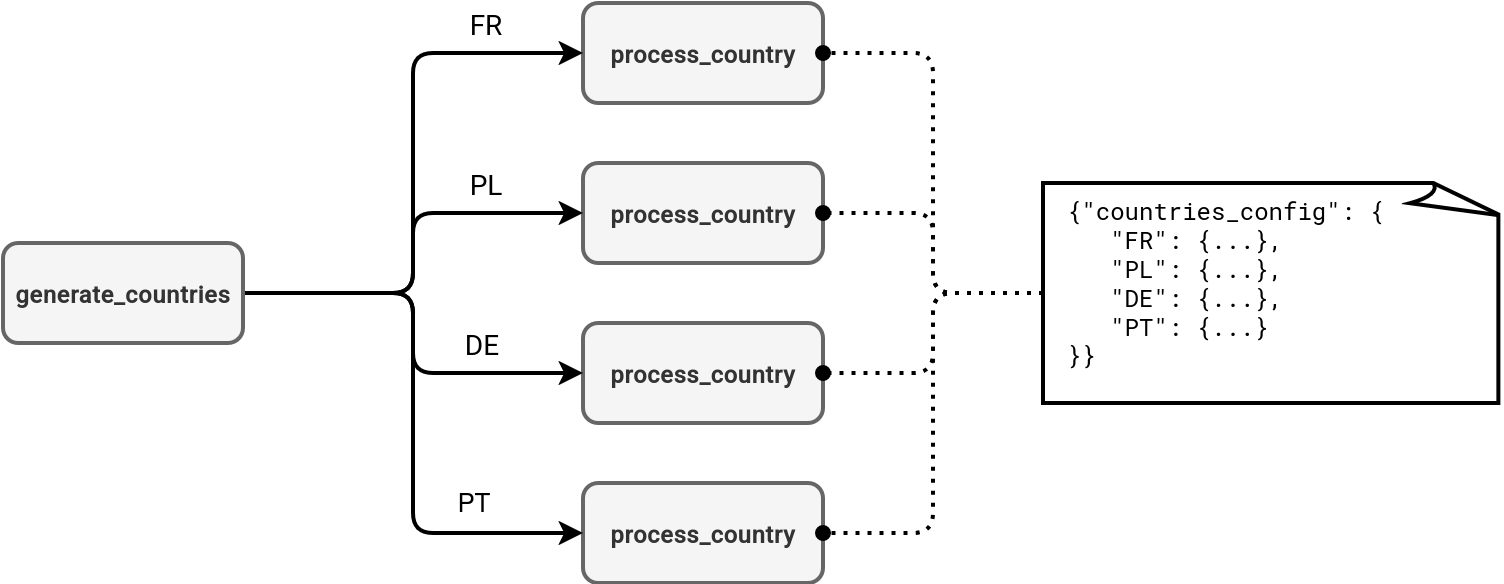
That's maybe a little bit extreme scenario but it's worth knowing especially for POCs that often run on a much smaller subset of parameters than the real-world scenarios.
Finally, there is monitoring. If you take a look at the high-level job view and one of the nested tasks failed, you won't see which one. To get more detail, you'll need to make an additional action and display all nested tasks:
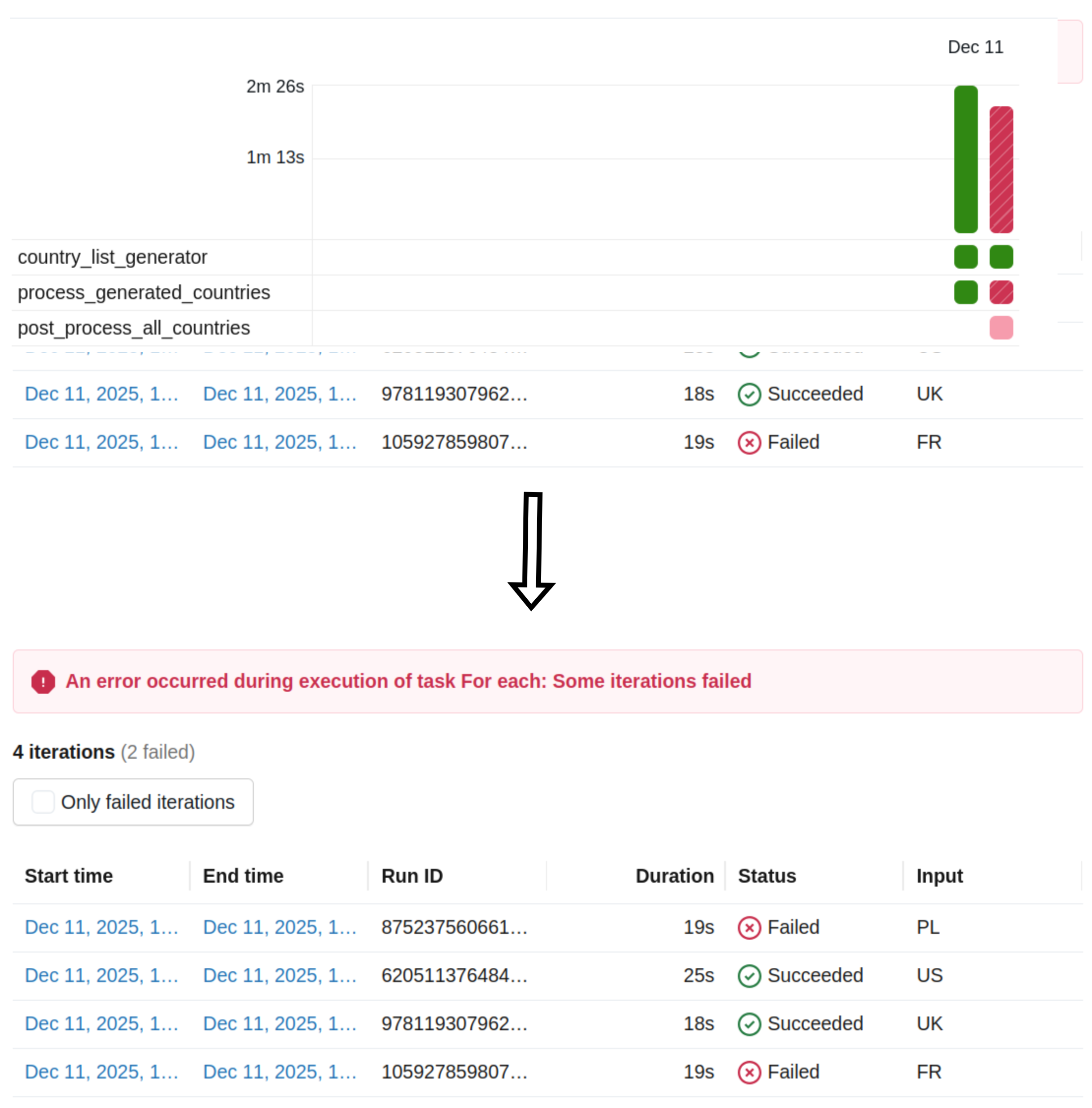
The For Each task is another powerful feature in Databricks Jobs that in a purely declarative way in Databricks Asset Bundles helps building advanced concurrent processing scenarios. But before you decide to use it, take a look at the shortcomings to judge whether a simple task wouldn't fit better into your use case.
Data Engineering Design Patterns

Looking for a book that defines and solves most common data engineering problems? I wrote
one on that topic! You can read it online
on the O'Reilly platform,
or get a print copy on Amazon.
I also help solve your data engineering problems contact@waitingforcode.com 📩