

If you are running data processing jobs on Lakeflow Jobs, you certainly noticed these two options that might look the same but in fact have two different purposes. If not, it's even better because I'm now sure the blog post will be useful for you!
What would it take for you to trust your Databricks pipelines in production?
A 3-day bug hunt on a 3-person team costs up to €7,200 in lost engineering time. This workshop teaches you to prevent that — unit tests, data tests, and integration tests for PySpark and Databricks Lakeflow, including Spark Declarative Pipelines.

Konieczny
Repair - for failures
The repair feature, you have used it at least once in your Databricks life, that's for sure. Whenever the job status changes to failed, there is a repair button that appears on the UI:

When the failed task was an upstream task, repairing it will by default trigger restarting all downstream tasks that haven't run before. But an important thing to know is the ability to repair a successful task as well. In that case you can decide whether you want to replay only the repaired task, or the whole execution chain.
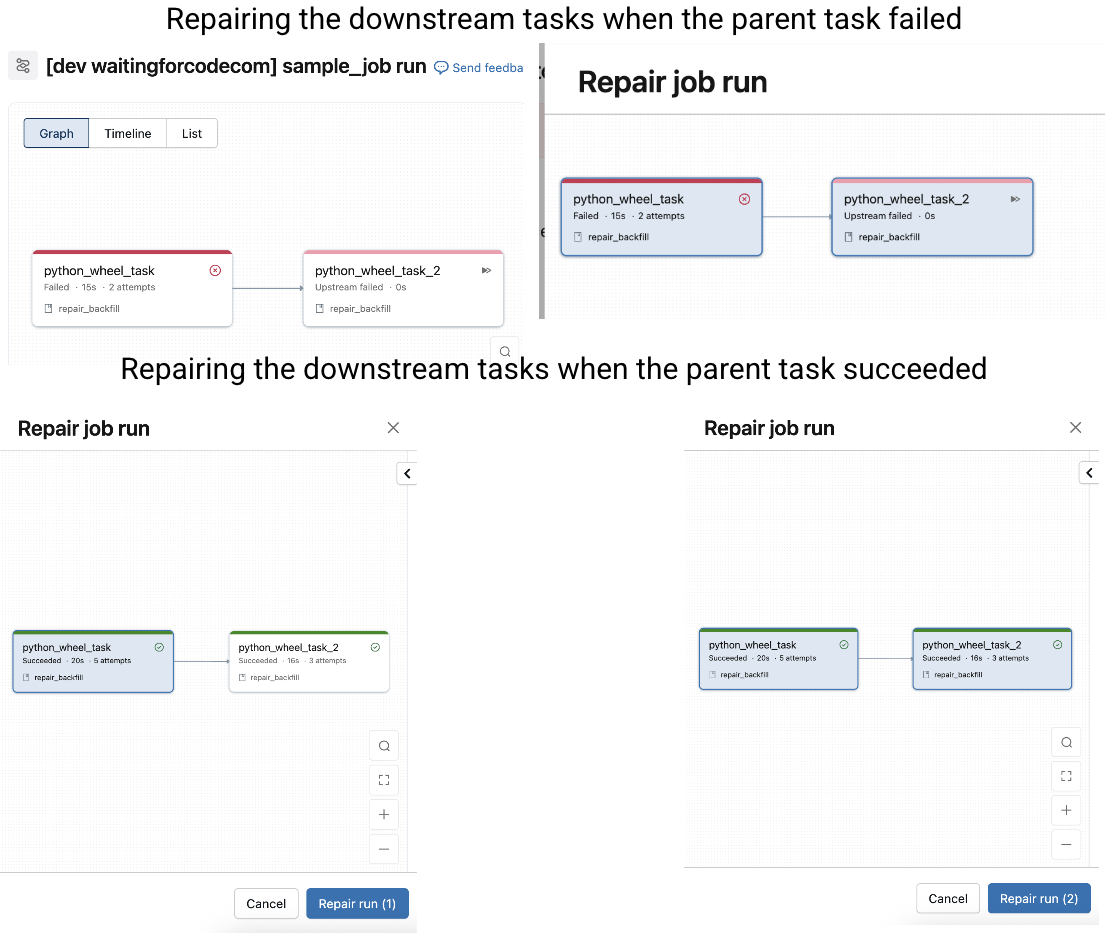
If you don't change anything, Databricks uses the configuration of the previously executed task. It's not convenient if the failure results from the task parameters, such as a mistakenly spelled file name or even a small cluster. Thankfully, you can change task parameters as well as the cluster configuration before repairing them. Below an example of a task where I disabled the failure flag:

💡 Immutable parameters
If you want to implement a job resilient to failures and retries (repairs), use immutable parameters. An example of immutable parameters is {{job.start_time.iso_datetime}} because it stays the same no matter how many times you repaired the job. An example of a mutable parameter is NOW() function because it changes at every run.
Even though the repair seems harmless, it involves a few important aspects you must be aware for a better observability of your data platform:
- Total execution time displayed on the page of your job is the time difference between the first and the last repaired execution. It's particularly important when you repair the job after a long interruption. Below you can see the execution time for I job retried for 13 minutes:

- When your job triggers another job and the triggered job fails, the single reprocessing way is to repair the upstream trigger task. The repair mode for the downstream task will be disabled in that case.

Backfill - for past data
Reprocessing works for already executed jobs. When you need to generate historical data which comes before the deployment date, you have to use a different Databricks feature which is the backfilling. To run a backfill you need to navigate to the job page and later configure the backfill as shows the next schema:
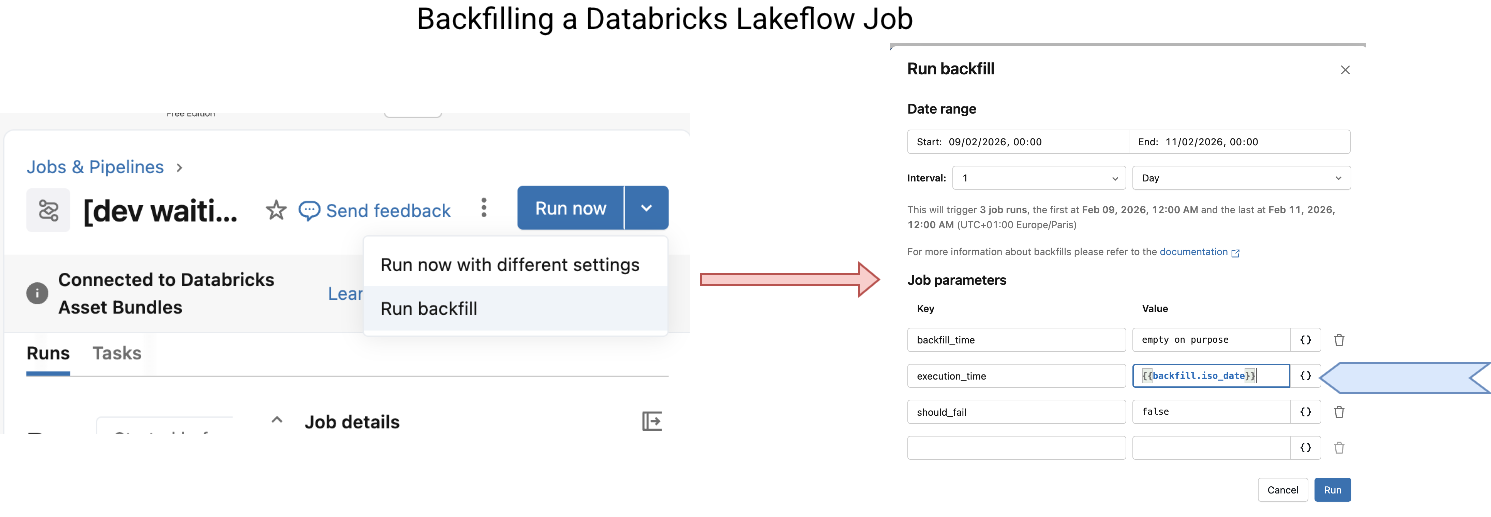
Besides the state transition after clicking on the "Run backfill", the screenshot also shows a specific point of the backfill job which are the {{ backfill }} task values. If you need a date time historical reference, you cannot use the usual {{ job }} parameters as they refer to the current execution time. The {{ backfill }}s are directly set by the backfilling engine, meaning they can come from the past.
In addition to the dedicated values, beware of the concurrency. Backfilling concurrency is part of the job maximal concurrency. Therefore, it can run many reprocessing instances in parallel which might lead to conflicting writes to your Delta Lake table, or even to breaking the processing semantics if each job execution depends on the past run.
 Knowing that, you certainly ask yourself now, what if backfilling is running and my normal job is about to start? Will they run at the same time, because backfilling concurrency doesn't impact the normal runs? Or maybe will the normal job wait for the backfill to complete before starting? The correct answer is, the backfilling blocks the normal run. The concurrency limits are applied jobwise and not to a specific job execution mode:

But it doesn't mean your regular job will have to wait for all backfilings to complete. Let's take a max concurrency of 1. When you schedule a backfill of 4 runs and then start your regular job, the first backfill job will run and the regular job will be queued. Once the first backfill completes, the regular job will take over. You can see it below where the normal run follows the first backfill but precedes two remaining backfills:

When it comes to repairing backfills, the first thing is that you won't be able to repair successful backfills. The repair button will simply be disabled explaining that the job was triggered by another job (which is true if you look at the Launched column from the previous screenshot):

What if a backfill's task failed? If your intuition tells you the repair won't work, you're right. For the same reason, the job was triggered externally. Consequently, to fix it you need to repair the trigger job:

From the previous screenshot you can also discover an interesting detail on how the backfills are implemented under-the-hood. Yes, the backfilling job runs a for each loop task where it triggers backfill jobs.
Finally, as for repairs, there are a few things to know:
- Obviously, to implement a backfill on top of historical data, it's better your job uses time to isolate backfilled partitions. (even though you don't need to have partitions directly, but time simplifies understanding on what is going on)
- All-or-nothing execution semantics. You can't isolate a single task to backfill. If you need this kind of flexibility, you can solve it by adding a is_backfill input parameter to the job so that you can apply a skip logic in some tasks.
- Databricks recommends using the append once flows created specifically for backfilled time ranges. (cf. Backfilling historical data with pipelines)
- All-or-nothing - remember. If your backfilled job triggers other jobs, which in their turn might also trigger other jobs, remember the backfilling semantics is all-or-nothing! It means that you will reprocess the whole execution chain, not only the targeted job. Put differently, the targeted job won't ignore the trigger job tasks. Consequently, it may lead to long backfilling times and also increased cost. If you don't need to reprocess depending jobs, remember to add the on/off behavior shortly explained previously.
Our data engineering life would be easier if we could only deal with the future. However, we are often asked to reprocess the past, either because of an error, or because of historical data needs. Databricks covers this past data processing with repair task for failures, and backfilling for the historical data processing.
Data Engineering Design Patterns

Looking for a book that defines and solves most common data engineering problems? I wrote
one on that topic! You can read it online
on the O'Reilly platform,
or get a print copy on Amazon.
I also help solve your data engineering problems contact@waitingforcode.com 📩
Read also about Repairing and backfilling on Lakeflow Jobs here:
- Backfill jobs Backfilling historical data with pipelines How are failures handled for continuous jobs?
Related blog posts:
- Lakeflow Jobs, when it can and can't be a default data orchestration setup?
- Medallion layers, do you need them all?
- Python script tasks on Databricks