

You have set up your Databricks platform and are about adding a new epic to your backlog, "Implement a data orchestration layer". Before you hit the add button, let's stop for a while and see if you really need this dedicated layer.
What would it take for you to trust your Databricks pipelines in production?
A 3-day bug hunt on a 3-person team costs up to €7,200 in lost engineering time. This workshop teaches you to prevent that — unit tests, data tests, and integration tests for PySpark and Databricks Lakeflow, including Spark Declarative Pipelines.

Konieczny
💎 This blog post completes a great article by Daniel Beach Databricks Workflows vs Apache Airflow... or both?.
Lakeflow Jobs 101
If you needed to explain Lakeflow Jobs orchestration on the go, you could say:
- The orchestration is a fully managed serverless offering. You don't need to run a dedicated scheduler worker to be able to execute your jobs at a specific schedule.
- It supports orchestration from packaged applications (JARs or wheels), notebooks, SQL queries, Lakeflow, Spark Declarative Pipelines, dbt scripts, Python scripts, Lakeflow Connect data ingestion, or even Power BI refreshes.
- Jobs can be scheduled with a CRON expression, executed manually, or start automatically, upon uploading a file to a volume.
- Jobs support running batch and streaming workflows. The execution environment is fully isolated from the orchestrator, i.e. even if a task requires heavy resources, it won't consume them from the data orchestrator.
- Jobs support dependencies and can be chained, i.e. one job's run can start another job.
- Access to the jobs can be managed with different permission scopes (read-only, manage).
- Jobs natively integrate with Databricks observability stack, including mail notifications, dashboard views, and logging to the configured runtime.
- Declarative support for different runtime types, from classical compute clusters to serverless environment.
- Support for parameters that you can leverage for idempotent processing, such as job execution time. Besides, the parameters created by a task can be shared downstream with other tasks.
- Native backfilling support with a dedicated Run backfill and highly configurable feature:
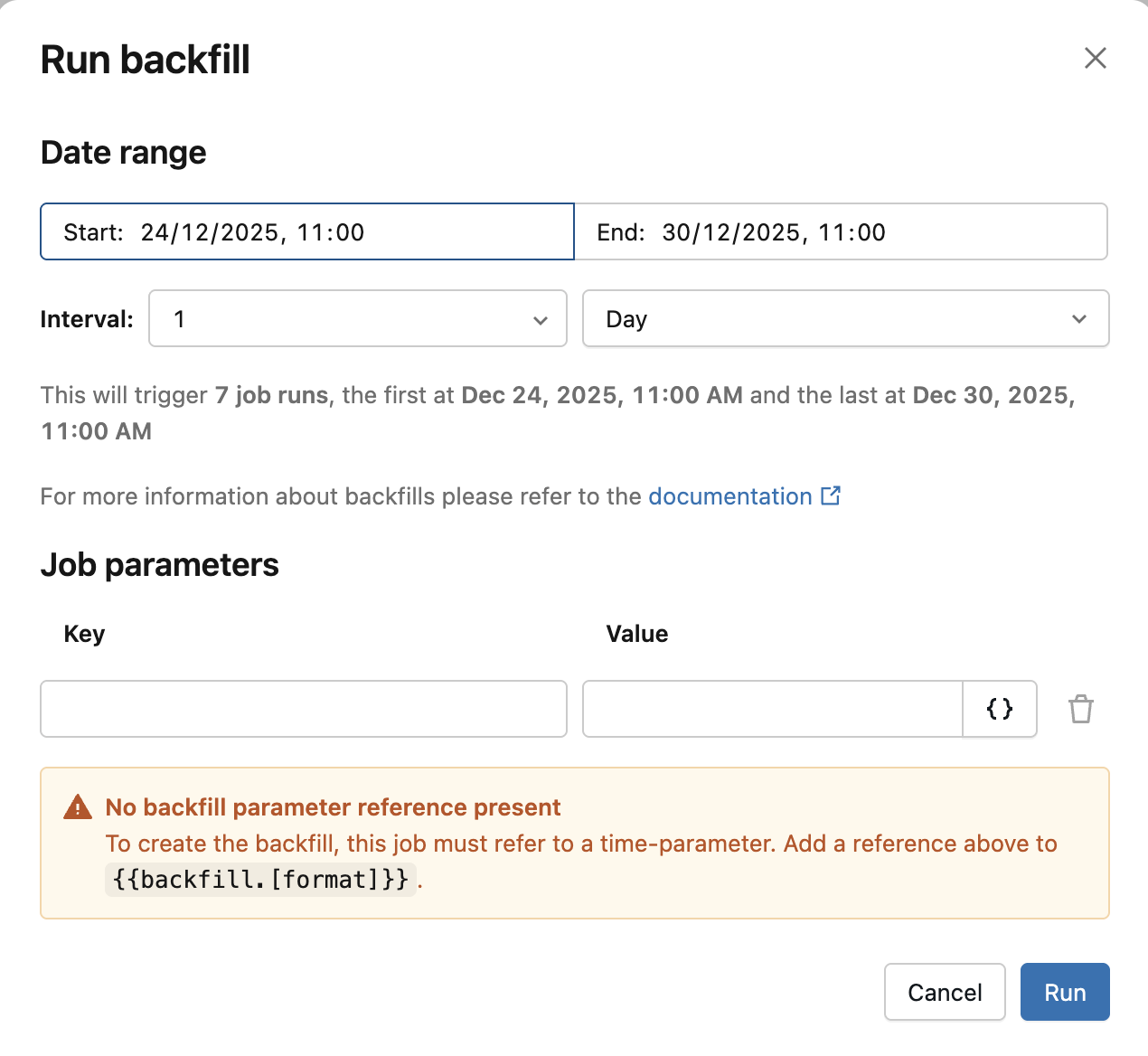
Can Lakeflow Jobs be your default choice for data orchestration? As usual, the answer is it depends.
When it's enough
When you build your data platform on Databricks, Lakeflow Jobs should be enough. Generally, as long as you don't need to leave Databricks environment too much, leveraging Lakeflow Jobs will be the best choice, and so for several reasons:
- It's fully managed, i.e. you don't need to worry of setting the infrastructure up (e.g. managed Apache Airflow on the cloud), or of defining your orchestration workflows in Terraform code alongside the data processing layer (e.g. AWS Step Functions). Databricks handles this additional complexity by providing a fully serverless orchestration backed by Declarative Automation Bundle that manages both orchestration and jobs packaging. It's like a micro-service defining both your processing and orchestration logic.
- It's easier to operate. Running a Databricks job from an external orchestrator is possible but involves many challenges for day-to-day usage, starting from permissions, status monitoring, to logs and metrics collection. If you opt for Lakeflow Jobs, everything stays in the single place, without you having to deal with any additional synchronization logic.
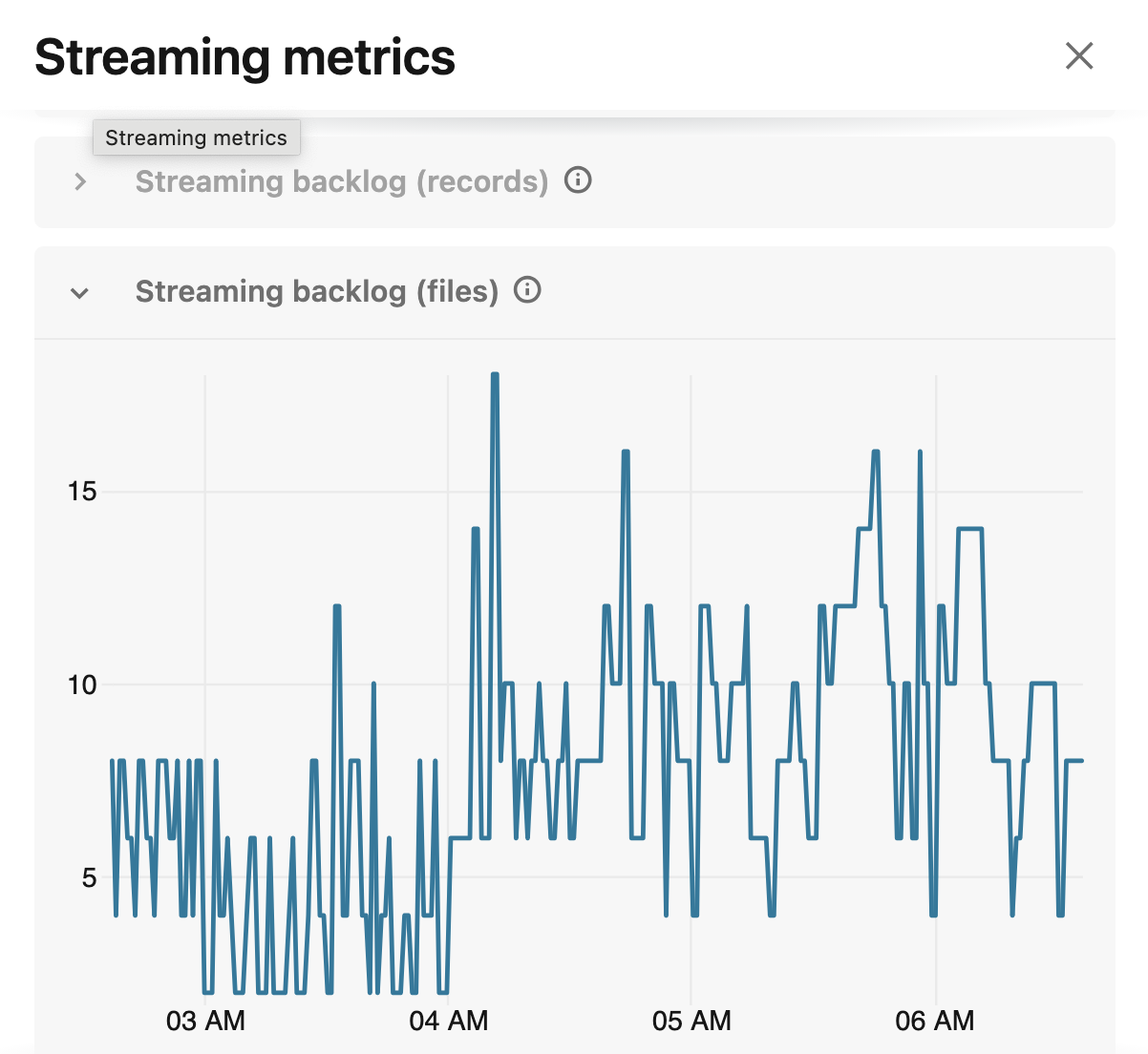
- It provides native observability features. For example, the lineage, job health with metric thresholds and data quality monitoring. Below an example of streaming metrics generated out-of-the box by Lakeflow Jobs:
- It's distributed by nature. In a development environment - as long as you keep the mode: development in your DAB - you don't have to worry if another engineer overwrites your pipelines.
When you need more
Even though Lakeflow Jobs orchestrator is a great fully-managed and well-integrated component on Databricks, there are use cases when it won't be enough. Typically, when you consider:
- Implementation effort. Things may become overly complex to write in Lakeflow Jobs compared to data orchestrators, e.g. complex branching logic where the job may follow one of at least three different routes, or when you need to run a different downstream task depending on the upstream's success or failure status.
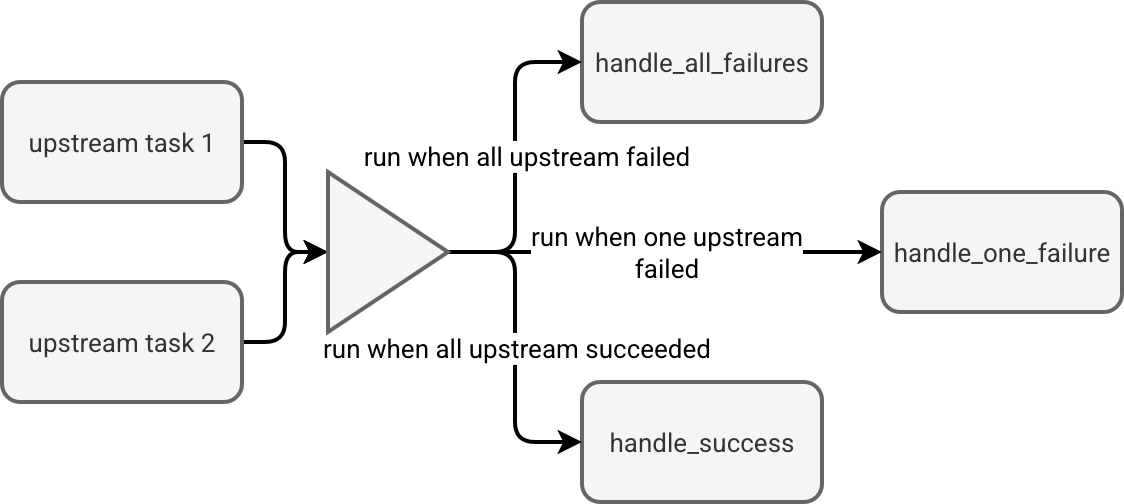 It's achievable with some additional logic at the task level but it's definitively something more challenging to implement than with using a declarative API other data orchestrators offers (e.g. Apache Airflow's trigger rules). Even though it shouldn't be the single criteria for implementing another data orchestration layer, the amount of complexity introduced to your system can justify extending your orchestration capabilities.
 - Infrastructure coverage. This is a no-brainer. If you need to run custom jobs on an AWS Batch, or process small data with an Azure Function, Lakeflow Jobs won't be good at those things. Even though it should be technically possible to leverage your cloud provider's API to manage other resources than Databricks itself, it may require some additional implementation effort (and here we back to the previous point).
- State. Lakeflow Jobs orchestration is stateless. If you pause your job scheduled with CRON and unpause it a week later, the job will start at the next available schedule. You still have a way to start a dedicated backfill run to fill the gaps but stateful data orchestrators manage this on their own. It's the case of the catchup parameter in Apache Airflow that would automatically retrigger past calculations in the our pause/unpause scenario.
- API. Even though you can technically orchestrate Lakeflow Jobs with Databricks Python API, it's still not the default choice that will require some additional effort for creating all necessary abstractions in the code. Other data orchestrators - looking at you Apache Airflow - come with a dedicated programmatic API that, depending on your needs, can be declarative, imperative, or both.
- Choice limitation. It's also a bit related to the previous point but it deserves a special mention. By opting for Lakeflow Jobs only, you might direct your problem solving mindset towards options natively available on Databricks (wheel jobs, SQL scripts, you name it). On another side, having this orchestration at a lower level, you may be more open to trying solving each problem with the most adapted tool (e.g. frequent small data processing on a serverless function which may end being cheaper than on Databricks Serverless runtime).
To answer the initial question if Lakeflow Jobs can be your single orchestrator, well, it depends! It depends on the vision of your final data platform; if it's fully Databricks, there is no sense of bringing another data orchestration component. If Databricks is only a part of your ecosystem, then an additional low-level orchestrator may be a better choice. Same for the complexity; if you can cover all your use cases pretty easily with Lakeflow Jobs capacities, no need to make your life harder with another data orchestrator. If defining your orchestration logic with Lakeflow Jobs takes three straight days every time because you need to write a lot of code, test, and package it, then devoting this time to bootstrap a dedicated orchestrator might be a better option - particularly now when it comes as a native cloud data offering.
Data Engineering Design Patterns
Looking for a book that defines and solves most common data engineering problems? I wrote
one on that topic! You can read it online
on the O'Reilly platform,
or get a print copy on Amazon.
I also help solve your data engineering problems contact@waitingforcode.com 📩
Read also about Lakeflow Jobs, when it can and can't be a default data orchestration setup? here:
- What's New - Lakeflow Jobs Provides More Efficient Data Orchestration Databricks Workflows vs Apache Airflow...or both?
Related blog posts:
- Medallion layers, do you need them all?
- Python script tasks on Databricks
- SQLFluff, i.e. keeping SQL queries clean