

Prior to 2025, when you wanted to trigger a Lakeflow Job upon an update made on a table, you had to use the trigger job task from your pipeline. Last year has changed this and you can now use a new type of the trigger, the table trigger.
What would it take for you to trust your Databricks pipelines in production?
A 3-day bug hunt on a 3-person team costs up to €7,200 in lost engineering time. This workshop teaches you to prevent that — unit tests, data tests, and integration tests for PySpark and Databricks Lakeflow, including Spark Declarative Pipelines.

Konieczny
To better understand when it's useful, picture this pretty frequent scenario where different teams creates upstream tables for your dataset (it's an example of the Aligned fan-in design pattern):
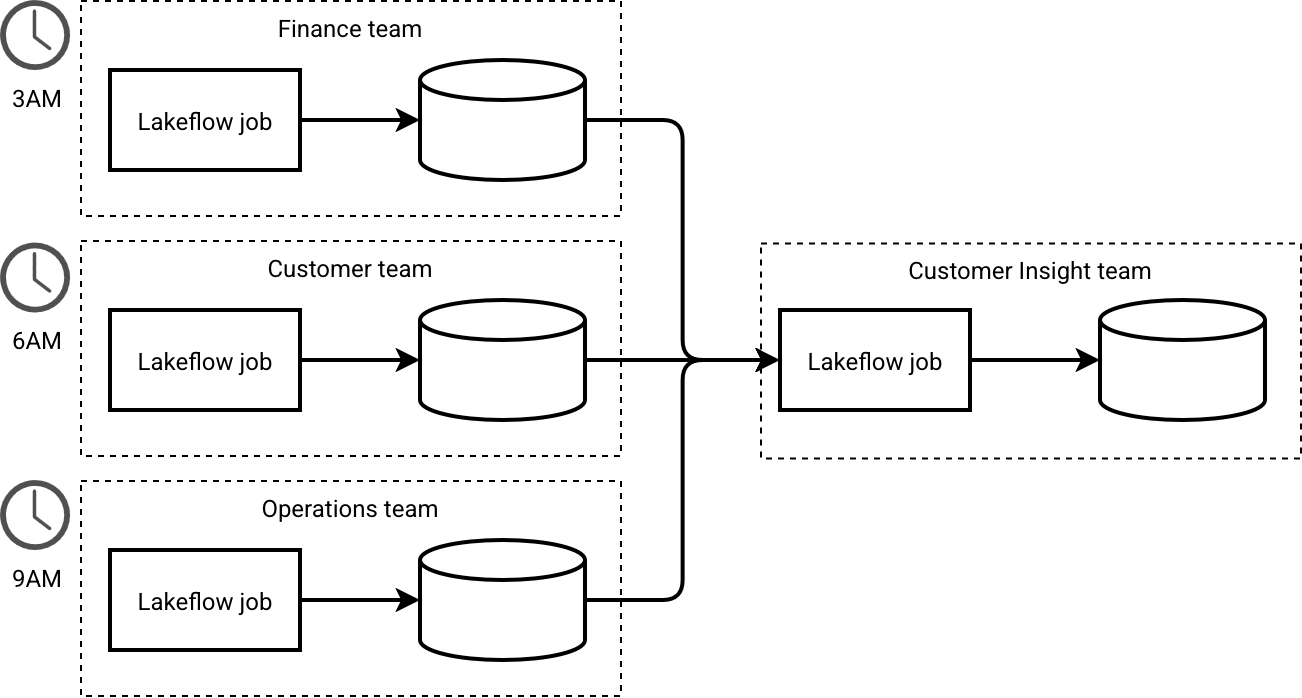
A naive strategy to handle this scenario would be to define the CRON schedule to after 9AM. That way your job can start automatically after the last dependency. However, there is a glitch. What if the Operations team has some problems with the update and their job takes twice much time than usual? You will run your part on stale operations data and it may be something you don't want. Same happens when one of the dependencies fails.
To mitigate those issues in the CRON-based world you would use the Readiness marker design pattern. It would verify each of the dependencies and prevent the job from advancing when the tables haven't been updated. Currently, that's OK. It does the work but the problem is, it costs you development time. To implement this strategy, follow these steps:
- Create the Readiness marker task: Implement the task responsible for setting or checking the marker.
- Track table versions: Persist the last processed version of each table.
- Support reprocessing: Build in a mechanism to bypass the marker whenever you need to force a full data reload
- Ignore retries: if you monitor task retries, you must ensure to ignore the ones related to the Readiness marker task - at least as long as it doesn't reach the last allowed retry.
Sounds like a bit of work, doesn't it? Thankfully, Databricks Table update trigger is something that can help avoid managing things manually!
Table trigger 101
Since the picture worths more than thousands words, let's take a quick look at the Table's update trigger in Databricks API:
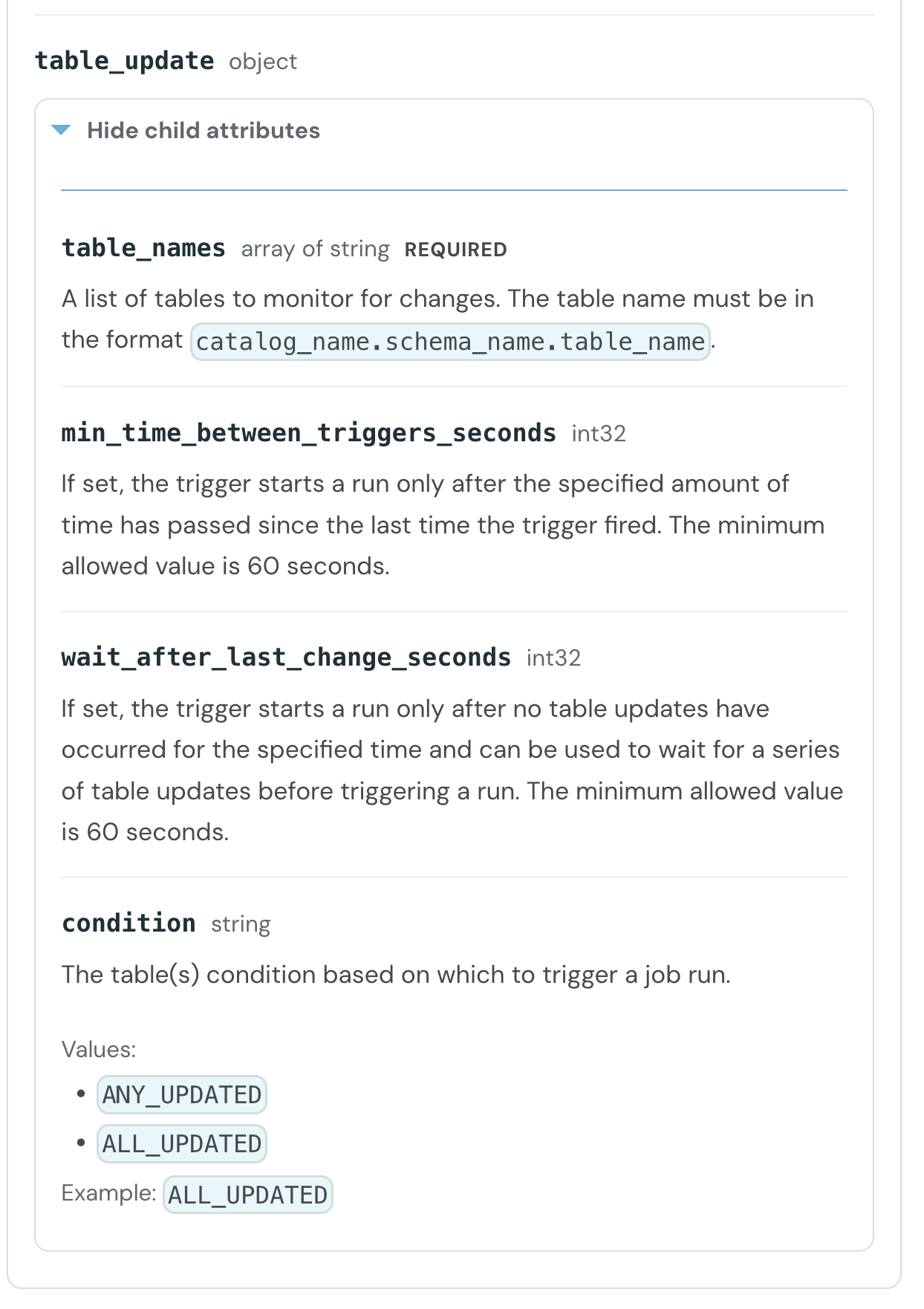
To put it short, if you want to use the Table update trigger, you need to:
- Define one or many tables your job depends on.
- Define the trigger strategy; in case of many upstream tables you can wait for all tables to be updated, or at least to one of them
- Define how frequently run the pipeline; you can pause the trigger for some time (wait_after_last_change_seconds, aka cooldown period) even when there are some updates, or you can also postpone the run when there are no updates (min_time_between_triggers)
Only the data change events, such as merge, delete, update, or insert, are actionable trigger actions. Any housekeeping work such as vacuum or optimize won't run the trigger.
The triggered job can get the modified tables from the {{job.trigger.table_update.updated_tables}} variable. Under the ANY_UPDATED condition, this variable stores only the specific tables that changed to trigger the job.
Supported resources
When it comes to the tables, currently the trigger supports: Unity Catalog Delta and Iceberg managed tables, Unity Catalog Delta Lake external tables, materialized views, streaming tables, and Unity Catalog views or metric views that depend on supported tables.
Keep in mind that the trigger resources are considered as a whole. Let's consider this setup:
CREATE OR REPLACE VIEW v_view_src AS
SELECT id, updated_at FROM view_src_a
UNION ALL
SELECT id, updated_at FROM view_src_b;
...and the corresponding trigger configuration:
trigger:
  table_update:
    table_names:
      - ${var.catalog}.${var.schema}.v_view_src
    condition: ALL_UPDATED
Your Lakeflow job will start when one of the view tables gets an update. It won't wait for both to be updated! If it's your requirement, you should put both tables in the trigger.
Demo
That's the theory but as you all know, the difference between the theory and the practice is that in theory everything works, and in practice it's not always the case. No better way to invalidate this statement for Table update trigger than making a demo:
Errors
Table triggers feature has some built-in protections against errors. First, if you try to deploy the bundle against non existing or non authorized tables, you will get this error:

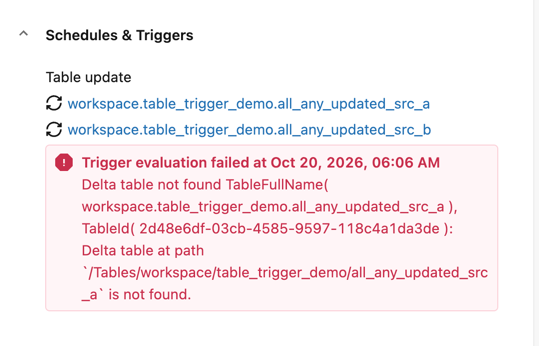
Sadly, a successful deployment doesn't mean a shiny and rosy life. Your job can lose access to the trigger table(s), or even worse, one of them may be dropped. Thankfully, Databricks alerting system handles that scenario pretty well. It will first annotate the trigger with an appropriate error message:
Besides, the notification system will also alert you with an email:
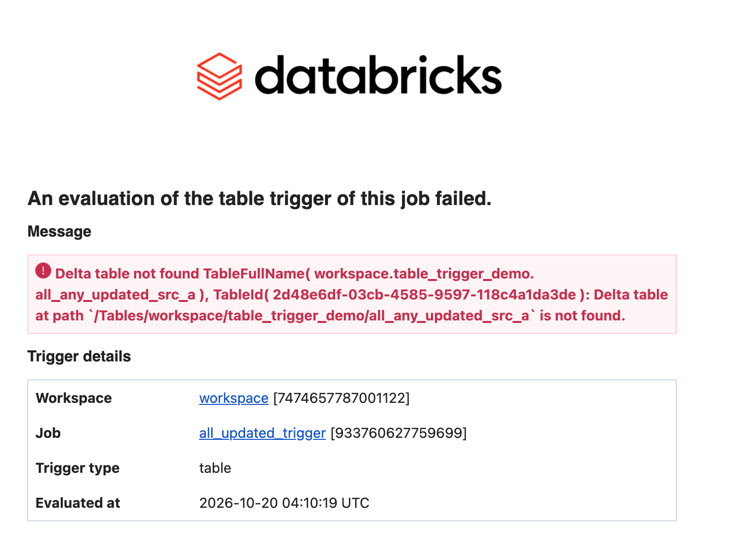
Table triggers are yet another great addition to the scheduling toolset on Databricks Lakeflow Jobs. They greatly simplify dependencies management, particularly with complex Aligned fan-in scenarios where upstream tables are managed by different teams. Moreover, it follows the steps of the file trigger for cooldown and concurrency management.
Data Engineering Design Patterns

Looking for a book that defines and solves most common data engineering problems? I wrote
one on that topic! You can read it online
on the O'Reilly platform,
or get a print copy on Amazon.
I also help solve your data engineering problems contact@waitingforcode.com 📩
Read also about Table update trigger for Lakeflow Jobs here:
Related blog posts:
- Lakeflow Jobs, when it can and can't be a default data orchestration setup?
- Medallion layers, do you need them all?
- Python script tasks on Databricks