

You need to write a Lakeflow job that is going to start upon a file upload. Sounds easy, isn't it? But what if the same job also had to support the CRON trigger? Unfortunately, you cannot set multiple triggers on the job, so you will have to engineer the workflow differently.
What would it take for you to trust your Databricks pipelines in production?
A 3-day bug hunt on a 3-person team costs up to €7,200 in lost engineering time. This workshop teaches you to prevent that — unit tests, data tests, and integration tests for PySpark and Databricks Lakeflow, including Spark Declarative Pipelines.

Konieczny
If the announcement sounds abstract, let's make it a bit more concrete. Our job must refresh a table upon uploading a file, therefore upon an explicit user action. Databricks supports this scenario with the file triggers. In addition to this unpredictable event, the job also leverages an API for data enrichment. The data exposed by the API changes continuously but you want to have your table refreshed with the new API data at least daily. To sum-up, our use case can be represented as follows:
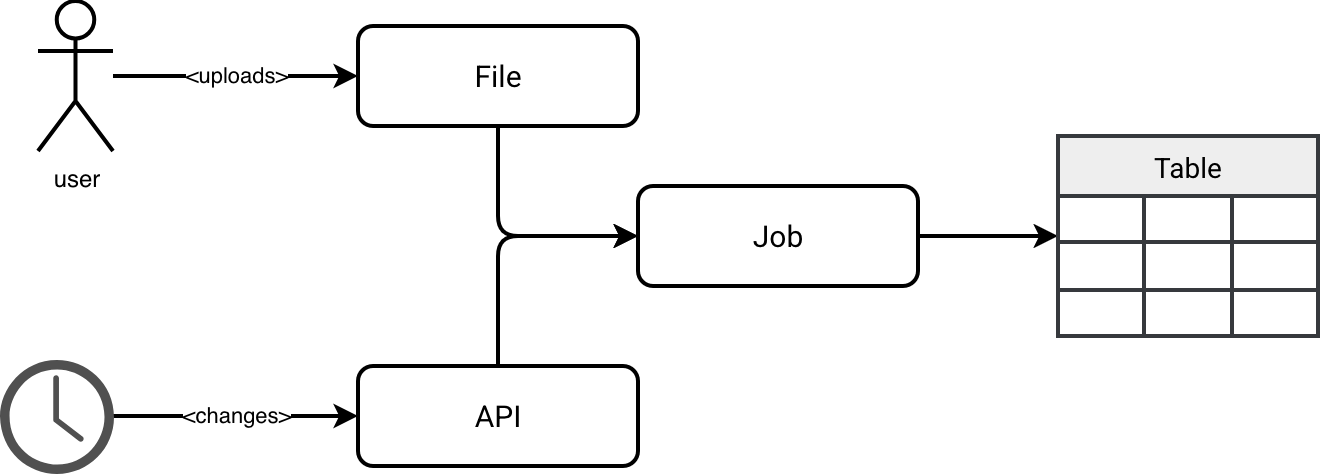
Let's see now what possible solutions are.
📌 Naming
The blog post uses the names I identified for the Data Engineering Design Patterns book.
Fan-out trigger
In this approach you split the problem into two jobs:
- The first job that starts at a predefined schedule. It performs the table refresh.
- The second job that reacts to the file upload. It doesn't run any processing logic. Instead, this second job triggers the first one to perform the table refresh.
If you are worried about code duplication, please don't. Databricks Asset Bundles makes the implementation straightforward. Below you can see the definition of two jobs that share the same package (../dist/*.whl) and entrypoint (entry_point: refresh_sales):
resources:
  jobs:
    refresh_sales_trigger:
      name: refresh_sales_trigger
      trigger:
        file_arrival:
          url: '/Volumes/wfc/sales_data'
      tasks:
        - task_key: refresh_sales
          environment_key: Default
          python_wheel_task:
            package_name: wfc
            entry_point: refresh_sales
            parameters:
              - '--environment=${bundle.environment}'
              - '--mode=file'
      environments:
        - environment_key: Default
          spec:
            client: "4"
            dependencies:
              - ../dist/*.whl
    refresh_sales_schedule:
      name: refresh_sales_schedule
      schedule:
        quartz_cron_expression: "0 0 10 * * ?"
        timezone_id: UTC
      tasks:
        - task_key: refresh_sales
          environment_key: Default
          python_wheel_task:
            package_name: wfc
            entry_point: refresh_sales
            parameters:
              - '--environment=${bundle.environment}'
              - '--mode=schedule'
      environments:
        - environment_key: Default
          spec:
            client: "4"
            dependencies:
              - ../dist/*.whl
Note that I used a consistent naming convention for both jobs to ensure they are grouped together in the Databricks UI. This makes them much easier to find, provided they remain on the same results page.

External trigger
An alternative approach uses an external trigger. Volumes on Unity Catalog are backed by your cloud provider's object store services, such as AWS S3 if you run Databricks on AWS. For that reason you can leverage your cloud provider's features to react to the upload events and trigger the corresponding job on Databricks. In that case, Databricks will be responsible by managing the CRON-based trigger only.
But you can also decide to do the opposite. Databricks can manage the file trigger and you can delegate the CRON trigger to your external data orchestrator like Apache Airflow. When to use what? One of the important criteria will be the type of the volume which, as a reminder, can be managed or external. The managed volumes are created within the Unity Catalog location while the external volumes are external to the Unity Catalog location. Therefore, they can exist in any arbitrary object store.
Next, let's look at triggering events within your object store. Even though managed volumes reside in your object store and are technically accessible via your Infrastructure as Code stack, it's much simpler to integrate tools with resources you manage directly - which is where external volumes come in. If you follow me, for our scenario we would define the Databricks job with CRON-based trigger and let cloud events (e.g. S3 events) handle trigger upon upload scenario.
External trigger via orchestrator
The third solution that differs slightly from the previous one requires a data orchestrator layer to schedule your Lakeflow jobs. In that configuration Databricks doesn't manage any triggers on the job and the triggering responsibility is delegated to your data orchestrator.
Rejected solutions
If you are tempted to use one of the following approaches, think twice since they may not be the most optimized to this particular scenario of 2 triggers:
- Streaming Lakeflow Jobs. In this setup, a streaming job would run continuously to handle incoming files and refresh the table with API data once per day. However, this is rarely the most cost-optimal strategy. If your requirement is to refresh the table at most once daily, maintaining a 24-hour streaming cluster is an unnecessary waste of resources..
- A conditional job triggered every 10 minutes. This offers a slight resource optimization, but believe me, it's a nightmare to monitor. In this scenario, the Lakeflow job is configured with a 10-minute trigger; it starts, checks for updated API data or new files, and shuts down if there's nothing to do. While this saves some money compared to the previous solution, it still wastes resources and makes monitoring significantly harder. The Databricks UI only shows the five most recent runs on the Jobs & Pipelines page. If you need to isolate a refresh failure, you'll have to put in much more effort in searching for the failed job than a simple click of a button.
Gotchas
To be fair, I've made this sound like a perfect world, but even the recommended setup isn't without its flaws. Let's see:
- The Fan-out trigger introduces a small amount of operational overhead. When your file upload job fails, you need to be aware that the root cause might not be the file itself, but rather a failure in the triggered downstream job.
- The External trigger also adds an additional operational overhead. Now your data platform logic is split in two places - Databricks for data processing and your cloud provider for intercepting file events.
- The External trigger and External orchestrator bring also the security aspect to the table. Now your Lakeflow Jobs are exposed so you need to correctly manage the authentication.
- Beyond the architectural complexity, External trigger and External orchestrator require more technical expertise. Implementing this approach means managing a broader stack, such as Terraform for infrastructure, serverless functions for event handling, or external orchestration tools. Even if these tools aren't overly complex, they still represent an extra layer of technology that needs to be mastered.
If you ask me for a rule of thumb, my recommendation would be to go with the Fan-out trigger for simplicity. Remember your job will not be creating things only but also maintaining them over time. Having the triggering logic in a single place - even though it means somehow duplicating jobs instead of duplicating the triggering logic - should make your life easier.
Data Engineering Design Patterns

Looking for a book that defines and solves most common data engineering problems? I wrote
one on that topic! You can read it online
on the O'Reilly platform,
or get a print copy on Amazon.
I also help solve your data engineering problems contact@waitingforcode.com 📩