

Controlling the code style has never been more important. Your coding agent may generate the code but you'll be the reviewer and the owner. Without consistent and clever coding rules your understanding will be difficult. One of ways to help you in that task are linters and code formatters, or simply Ruff that does both things!
What would it take for you to trust your Databricks pipelines in production?
A 3-day bug hunt on a 3-person team costs up to €7,200 in lost engineering time. This workshop teaches you to prevent that — unit tests, data tests, and integration tests for PySpark and Databricks Lakeflow, including Spark Declarative Pipelines.

Konieczny
Ruff and Apache Spark
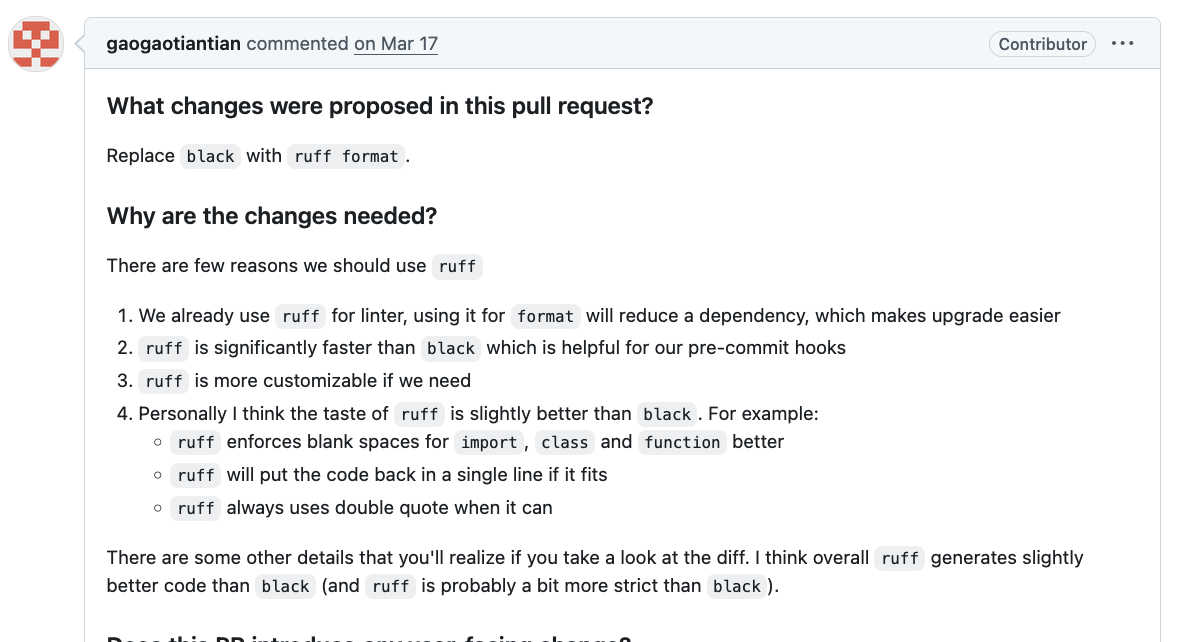
Apache Spark community has decided to use Ruff for the 4.2.0 release and onwards. Author of this change, Tian Gao, justified the decision of using ruff because of:
How does Ruff impact Apache Spark development cycle? First and foremost, for linting and formatting. The Github repository has two scripts for the linting and formatting called lint-python and reformat-python. They are responsible, respectively, for validating code and reformatting the code, as explains the next schema:
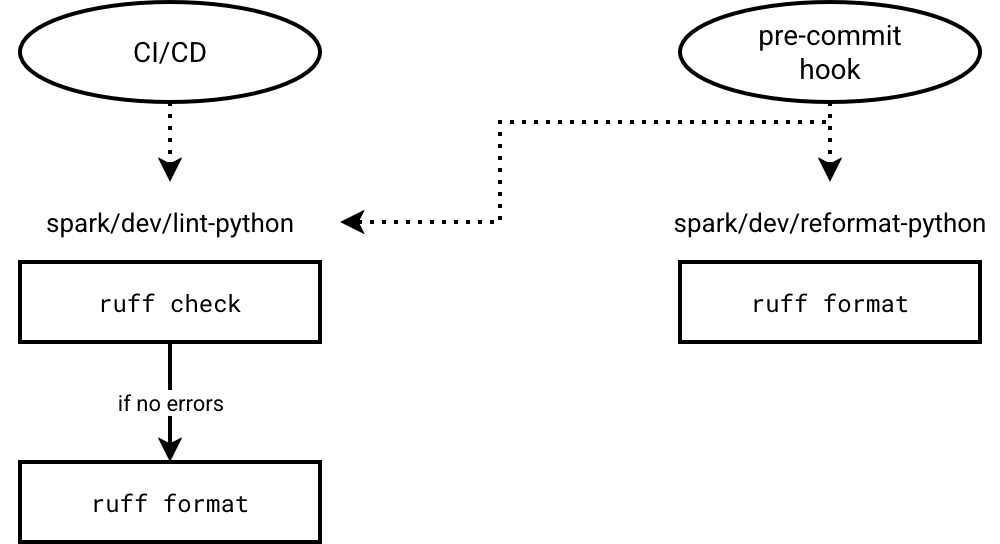
As you can see, two self-explanatory commands are enough to leverage ruff for gatekeeping your code quality:
- check to apply linting rules on the Python files in the configured path(s).
- format to format all Python files with formatting issues.
Linting files
Linting (checking) the files starts by selecting the linting rules defined in the following configuration sections:
[tool.ruff.lint]
select = ["E4", "E7", "E9", "F"]
extend-select = ["B"]
ignore = ["F841"]
The organization lets you select whole groups of rules (a list of all rules is available in the rules doc) and selectively ignore the ones that don't make sense to you. Besides, you can decide to use default rules by omitting the select statement and add some additional ones with the extended select configuration. If you don't want to explicitly overwrite the default rules but only add additional ones on top of them, the extended select is the option you should be looking for.
Other encountered problems
Despite the extension possibility, the documentation recommends preferring explicit rules:
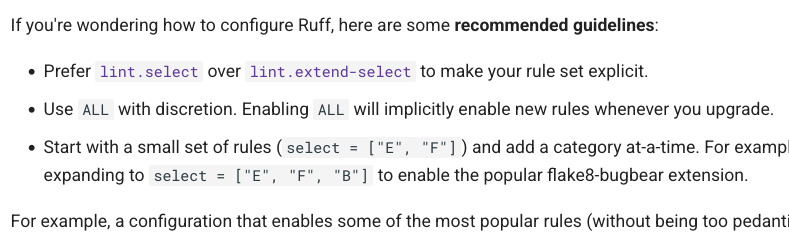
Once you have defined the list of rules, you can also enable automatic fixes for the broken rules with the --fix flag. Ruff divides the fixes as safe and unsafe. The difference is crucial as the unsafe fixes can break your code while fixing the linting errors. It's not the case of the safe fixes that are considered as not harmful. On top of that, you can also specifically enable the list of fixable and not fixable rules not with the following config:
[tool.ruff.lint]
fixable = ["E", "F"]
unfixable = ["F401"]
Ultimately, to integrate ruff with your CI/CD workflow, you need to evaluate the return codes for the check action. By default, ruff will return 0 if there is no error with/without fixes, 1 if the errors exist, or 2 if there is an unexpected runtime issue.
Formatting files
Knowing that ruff can automatically fix the errors, you are wondering why you need a dedicated formatting step. Technically, both are different. The linting is about code quality issues, so the semantics and correctness of the code. On the other hand, the format is about style, so what the code looks like. Compared with painting, if you had to paint a straight line and instead made a curved shape, it's like committing a linting error. If you were asked to draw this line red but used blue instead, it's the formatting error. The line is still the line but the look and feel (color) is not great.
Ruff's formatter follows Black's formatting rules (more in the doc) but lets you customize a few things in the format section:
[tool.ruff.format]
exclude = ["generated"]

docstring-code-format = true
docstring-code-line-length = 60
indent-style = "tab"
line-ending = "lf"
nested-string-quote-style = "preferred"
preview = true
skip-magic-trailing-comma = true
quote-style = "single"
The format command supports two modes: in-place replacement and validation. The replacement is the default but you can turn it into a validation mode by simply specifying a --check flag (ruff format ? ruff format --check).
Ruff rules
Before you integrate ruff to your Declarative Automation Bundle-based project, you need to evaluate the rules that make the most sense for you. It doesn't mean you should ignore community recommendations, but instead evaluate them based on your preferences.
Here is the list of - subjectively speaking - useful rules to enable for the linter:
- F - Pyflakes, so logical errors that would actually break your program such as undefined names, bad string formatting, or import issues.
- E - pycodestyle, so all formatting problems that may put you into trouble.
- UP - pyupgrade, so everything that can help your code base follow the most recent style standards.
- B - flake8-bugbear, so detection for r eal bugs masquerading as style, like mutable default arguments.
- C90 (mccabe) or PLR0912, so detection for too complex code.
- PERF - Perflint for catching possible performance issues.
- I - isort, so correctly sorted imports.
- G - flake8-logging-format, so useful rules to enforce lazy logging style.
- SIM - flake8-simplify, so simplifying control flows.
- S - flake8-bandit, so security issues detection.
- DTZ - flake8-datetimez, so enforcing time zone setting for dates.
- PTH - flake8-use-pathlib, so preferred pathlib for dealing with file system paths.
- N - pep8-naming for detecting wrong naming patterns.
- PLR - Pylint refactor for flagging code snippets to refactor, e.g. because of too many arguments, or magic numbers.
Ruff and Declarative Automation Bundles
How to integrate Ruff and Declarative Automation Bundles (DAB)? It depends - you know it already, one of my favorite answers ^_^ If you need to block the DAB's deployment in case of linting errors, you should integrate the linter to the deployment endpoint. Below you can find an example of the Poe task to call within the DAB (cf. more on Poe with Databricks you will find here):
[tool.poe.tasks.validate_code]
help ="Lints and checks for formatting issues."
shell = """
ruff check
ruff format --check
"""

[tool.poe.tasks._build_internal]
shell = """
rm -rf ./dist
uv build --sdist --wheel
"""


[tool.poe.tasks.build_valid_wheel]
sequence = [
    "validate_code", "_build_internal"
]
But I must admit, linter as part of the DAB deployment is a rare setup. After all, you don't want to be blocked when you deploy the bundle on a sandbox environment to test your work quickly. Instead, you should be blocked while you promote the code to higher branches such as the main or release branch. In that scenario you need to add the linter to the CI/CD pipeline. Additionally, you can activate the linting as a pre-commit hook locally. It will help you debug the issues because you won't need to interact with the remote Git repository. Instead, your interaction will be fully local and after solving all linting issues you'll be sure the CI/CD pipeline doesn't fail because of them. Below you can find an example of the pre-commit hook calling a linting and formatting checks task that can be shared between the pre-commit hook and the CI/CD workflow:
repos:
  - repo: local
    hooks:
      - id: lint
        verbose: true
        name: Validate code
        entry: poe validate_code
        language: system
        fail_fast: true
        pass_filenames: false
As you can see, the hook calls the validate_code Poe task we created previously. Your CI/CD pipeline can also leverage the same task for validating things in the pipeline.
Alternatives
Ruff linter and formatter should considerably improve your developer experience and add an extra security layer for the AI-generated code. But if you feel it's not enough, you can extend it with sqlfluff for controlling SQL code.
And if you are looking for something more specific to Databricks, two years ago Serge Smertin from Databricks Labs released a pylint-plugin for Databricks targeting some specific rules such as: global SparkSession access or leaked PAT tokens in the code. That being said, the project seems not being active these days but it's worth checking from time to time the Labs space for possible successors.
In this blog post we went from discovering ruff from an Apache Spark standpoint to applying some common sense rules to Declarative Automation Bundle files for Databricks. Even though ruff is supposed to be THE tool for linting and formatting in Python, if you perform those actions with alternative tools, it's fine as long as it helps you keep the code base sane and your new colleagues - humans or LLMs - happy to work with the project!
Data Engineering Design Patterns

Looking for a book that defines and solves most common data engineering problems? I wrote
one on that topic! You can read it online
on the O'Reilly platform,
or get a print copy on Amazon.
I also help solve your data engineering problems contact@waitingforcode.com 📩
Read also about Ruff and Declarative Automation Bundles here:
Related blog posts:
- Lakeflow Jobs, when it can and can't be a default data orchestration setup?
- Medallion layers, do you need them all?
- Python script tasks on Databricks