

YAML has long been the default for configuring Databricks Asset Bundles (DABs). But what if you could ditch the YAML boilerplate and define your infrastructure entirely in Python?
What would it take for you to trust your Databricks pipelines in production?
A 3-day bug hunt on a 3-person team costs up to €7,200 in lost engineering time. This workshop teaches you to prevent that — unit tests, data tests, and integration tests for PySpark and Databricks Lakeflow, including Spark Declarative Pipelines.

Konieczny
If you haven't run databricks bundle init for long time, here is what it shows:
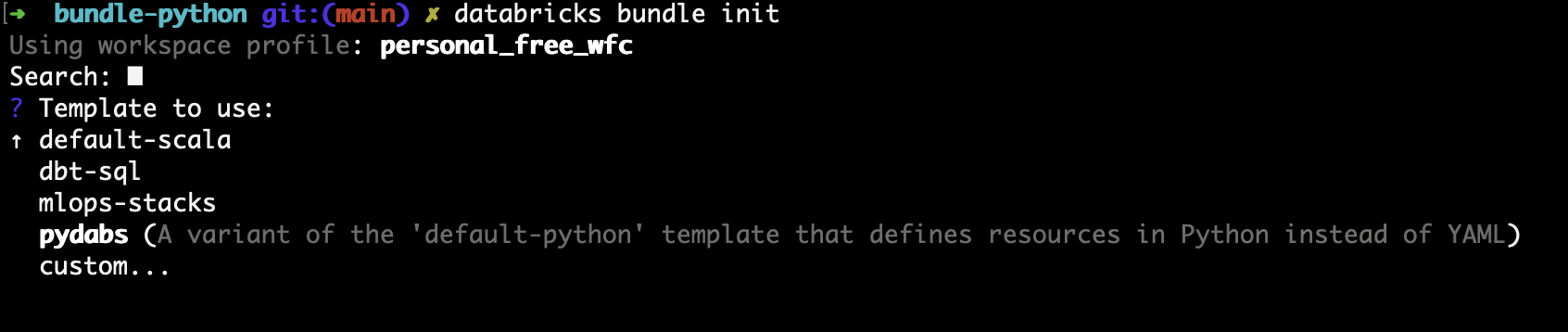
Amazed? Let's check what's inside!
Inside pydabs
The example generates a structure with the following files:
└── wfc_pydabs
    ├── AGENTS.md
    ├── CLAUDE.md
    ├── README.md
    ├── databricks.yml
    ├── fixtures
    ├── pyproject.toml
    ├── resources
    │   ├── __init__.py
    │   ├── sample_job.py
    │   └── wfc_pydabs_etl_pipeline.py
    ├── src
    │   ├── wfc_pydabs
    │   │   ├── __init__.py
    │   │   ├── main.py
    │   │   └── taxis.py
    │   └── wfc_pydabs_etl
    │       ├── README.md
    │       ├── explorations
    │       │   └── sample_exploration.ipynb
    │       └── transformations
    │           ├── sample_trips_wfc_pydabs.py
    │           └── sample_zones_wfc_pydabs.py
    └── tests
        ├── conftest.py
        └── sample_taxis_test.py
The main difference with the classical YAML-based solution? Of course the Python files in the resources directory but, more importantly, a different import method in the databricks.yml. In addition to the classical include, it has a Python command:
python:
  venv_path: .venv
  # Functions called to load resources defined in Python. See resources/__init__.py
  resources:
    - "resources:load_resources"

include:
  - resources/*.yml
When you look at the referenced resources/__init__.py, you will see a call to the bundle loading method:
from databricks.bundles.core import (
    Bundle,
    Resources,
    load_resources_from_current_package_module,
)


def load_resources(bundle: Bundle) -> Resources:
    """
    'load_resources' function is referenced in databricks.yml and is responsible for loading
    bundle resources defined in Python code. This function is called by Databricks CLI during
    bundle deployment. After deployment, this function is not used.
    """

    # the default implementation loads all Python files in 'resources' directory
    return load_resources_from_current_package_module()
If you try to call the bundle methods at this stage, you will encounter an error:
?  wfc_pydabs git:(main) ? databricks bundle validate

Using profile: personal_free_wfc
Error: failed to get Python interpreter path: can't find ".venv/bin/python3", check if virtualenv is created
The error is self-explanatory, so let's create the virtualenv from uv:
?  wfc_pydabs git:(main) ? uv sync
Using CPython 3.12.12
Creating virtual environment at: .venv
Resolved 70 packages in 4.15s
      Built wfc-pydabs @ file:///Users/bartosz/workspace/wfc/databricks-playground/bundle-python/wfc_pydabs
Prepared 40 packages in 40.66s
Installed 61 packages in 281ms
 + appnope==1.0.0
...
+ wfc-pydabs==0.0.1 (from file:///Users/bartosz/workspace/wfc/databricks-playground/bundle-python/wfc_pydabs)
?  wfc_pydabs git:(main) ? databricks bundle validate
Using profile: personal_free_wfc
Name: wfc_pydabs
Target: dev
...
Validation OK!
Now the validation succeeds and when you call the summary command to see the deployed resources, you should see the jobs present in the resources:
?  wfc_pydabs git:(main) ? databricks bundle summary
Using profile: personal_free_wfc
Name: wfc_pydabs
Target: dev
...
  Path: /Workspace/Users/waitingforcodecom@gmail.com/.bundle/wfc_pydabs/dev
Resources:
  Jobs:
    sample_job:
      Name: [dev waitingforcodecom] sample_job
      URL:  (not deployed)
  Pipelines:
    wfc_pydabs_etl:
      Name: [dev waitingforcodecom] wfc_pydabs_etl
      URL:  (not deployed)
First questions
From that quick demo a few questions arose. First, why does databricks.yml still reference the YAML files from resources? After commenting them and running the validate+summary, the bundle still passes:
?  wfc_pydabs git:(main) ? databricks bundle validate
Using profile: personal_free_wfc
Name: wfc_pydabs
Target: dev
...
Validation OK!
?  wfc_pydabs git:(main) ? databricks bundle summary
Using profile: personal_free_wfc
Name: wfc_pydabs
Target: dev
...
Resources:
  Jobs:
    sample_job:
      Name: [dev waitingforcodecom] sample_job
      URL:  (not deployed)
  Pipelines:
    wfc_pydabs_etl:
      Name: [dev waitingforcodecom] wfc_pydabs_etl
      URL:  (not deployed)
From here I was wondering "maybe I can use both YAML and Python for declaring the resources?". Let's uncomment the commented snippet and add a simple YAML job to test that. The resources/ directory looks now like that:
?  wfc_pydabs git:(main) ? ls resources
__init__.py                __pycache__                sample_job_yaml.job.yml         sample_job.py              wfc_pydabs_etl_pipeline.py
Both summary and validate work:
?  wfc_pydabs git:(main) ? databricks bundle validate
Using profile: personal_free_wfc
Name: wfc_pydabs
Target: dev
...

Validation OK!
?  wfc_pydabs git:(main) ? databricks bundle summary
Using profile: personal_free_wfc
Name: wfc_pydabs
Target: dev
...
Resources:
  Jobs:
    sample_job:
      Name: [dev waitingforcodecom] sample_job
      URL:  (not deployed)
    sample_job_yaml:
      Name: [dev waitingforcodecom] sample_job_yaml
      URL:  (not deployed)
  Pipelines:
    wfc_pydabs_etl:
      Name: [dev waitingforcodecom] wfc_pydabs_etl
      URL:  (not deployed)
Pretty neat! We can colocate both worlds and slowly start shifting existing pipelines over to this more dynamic, Python-based style. Before I show you how powerful it is, though, I have one last question to answer: Does that eternal dilemma between Databricks features via databricks-connect and unit testing via delta-spark still hold up? You can never have both working, unless you do stuff like explained in my How to use Databricks Connect with PySpark in the same Git repo? tip.
The dilemma is still valid. The init command included the Databricks modules as dev dependencies:
[dependency-groups]
dev = [
    "pytest",
    "ruff",
    "databricks-dlt",
    "databricks-connect>=15.4,<15.5",
    "ipykernel",
    "databricks-bundles==1.13.0",
]
So to run unit tests you need an extra dependency group:
[dependency-groups]
bundles = ["databricks-bundles==1.13.0"]
dev = [
    { include-group = "bundles" },
    "databricks-connect==19.*",
]
test = [
    { include-group = "bundles" },
    "pyspark==4.2.0",
    "pytest",
]

[tool.uv]
conflicts = [
    [{ group = "dev" }, { group = "test" }],
]
Automating with Python
The huge difference between YAML and Python is the dynamic character. In the past to make your bundle dynamic you had to write a wrapper, possibly with a templating system like Jinja, to generate bundle files at runtime. Today, with the Python DAB it is not needed anymore. Let's take an example of a bronze-to-silver data loading jobs where the single difference are the tables and name. With Python DAB you can write it like:
TABLES = ["orders", "customers"]


def load_resources(bundle: Bundle) -> Resources:
    resources = Resources()

    for table in TABLES:
        job = Job.from_dict(
            {
                "name": f"bronze_to_silver_{table}",
         # ...
            }
        )
        resources.add_resource(f"bronze_to_silver_{table}", job)

    return resources
You can go even further and create a DAB generation factory where you take care of carefully annotating all the resources with some common attributes, such as notification parameters or tags. Below is an example using mutators that add tags:
@job_mutator
def add_demo_tags(bundle: Bundle, job: Job) -> Job:
    return replace(job, tags={**job.tags, "blog": "pydabs", "target": bundle.target})
Demo
If you prefer a more visual demonstration, here is a short video:
Python DAB is an interesting solution for the projects that require some extra flexibility. It comes with its own challenges but despite them, remains a serious candidate for the new DAB default.
Data Engineering Design Patterns
Looking for a book that defines and solves most common data engineering problems? I wrote
one on that topic! You can read it online
on the O'Reilly platform,
or get a print copy on Amazon.
I also help solve your data engineering problems contact@waitingforcode.com 📩
Read also about Python Declarative Automation Bundle aka PyDAB here:
Related blog posts:
- Table update trigger for Lakeflow Jobs
- Lakeflow Jobs, when it can and can't be a default data orchestration setup?
- Medallion layers, do you need them all?