

You're likely familiar with the classic development workflow using main and develop branches to promote code from development to production. But did you know there's an alternative that uses only a single main branch? If not, this post is a great opportunity to learn how it works.
What would it take for you to trust your Databricks pipelines in production?
A 3-day bug hunt on a 3-person team costs up to €7,200 in lost engineering time. This workshop teaches you to prevent that — unit tests, data tests, and integration tests for PySpark and Databricks Lakeflow, including Spark Declarative Pipelines.

Konieczny
This single branch workflow is called Trunk-based development. To put it short, trunk-based development is a version control strategy where you merge small updates into a single shared branch, called the trunk, to minimize merge complexity.
As a result, your development strategy is more straightforward when compared to the Gitflow approach:
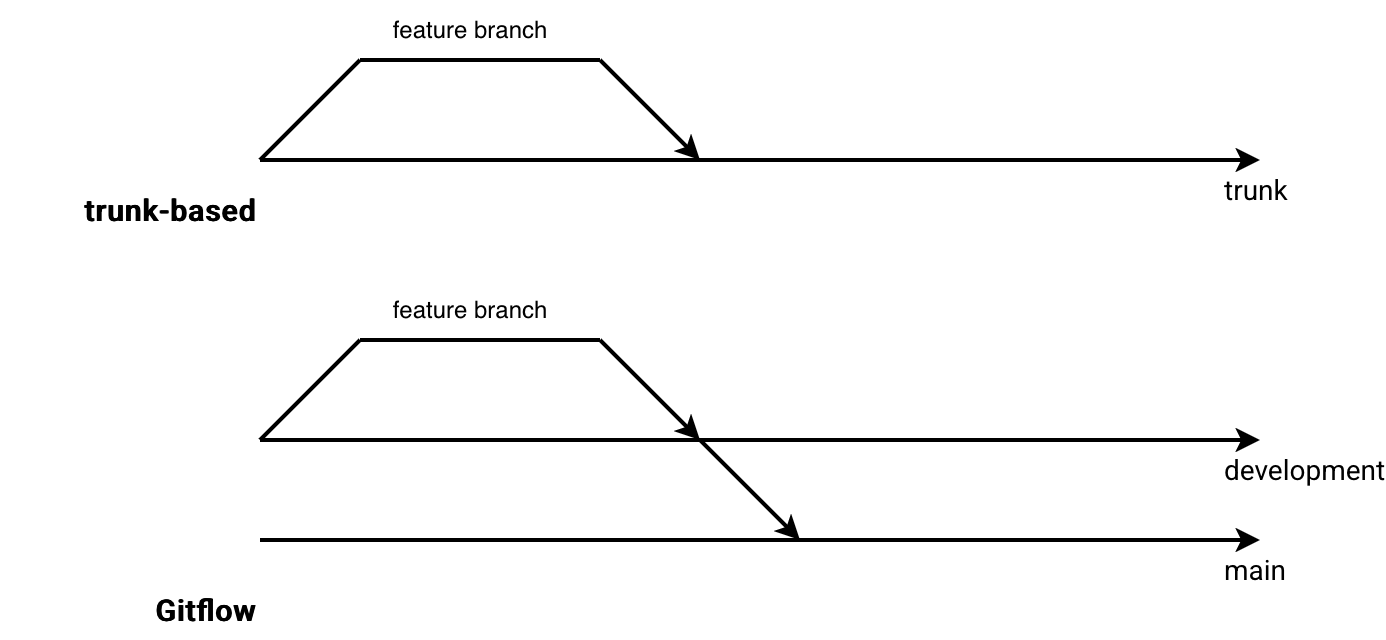
That's only the high-level view. To better grasp the differences with Gitflow, we need to recall some basics about this development strategy.
Gitflow 101
To characterize Gitflow we could use the following terms:
- Core branches. Typically develop and main, so the places where you merge respectively, your work-in-progress from the feature branches, and all validated work from the develop branch.
- Release branches. They're created from the develop branch before releasing things on production. Only bug fixes are allowed here. Once the feature is fully tested, the release branch gets merged to main and develop.
- Hotfix branches. If you release a buggy release, you need to fix the issue from a dedicated hotfix branch created from the main branch.
Overall, to deliver features to production may involve many actions summarized in the next diagram:
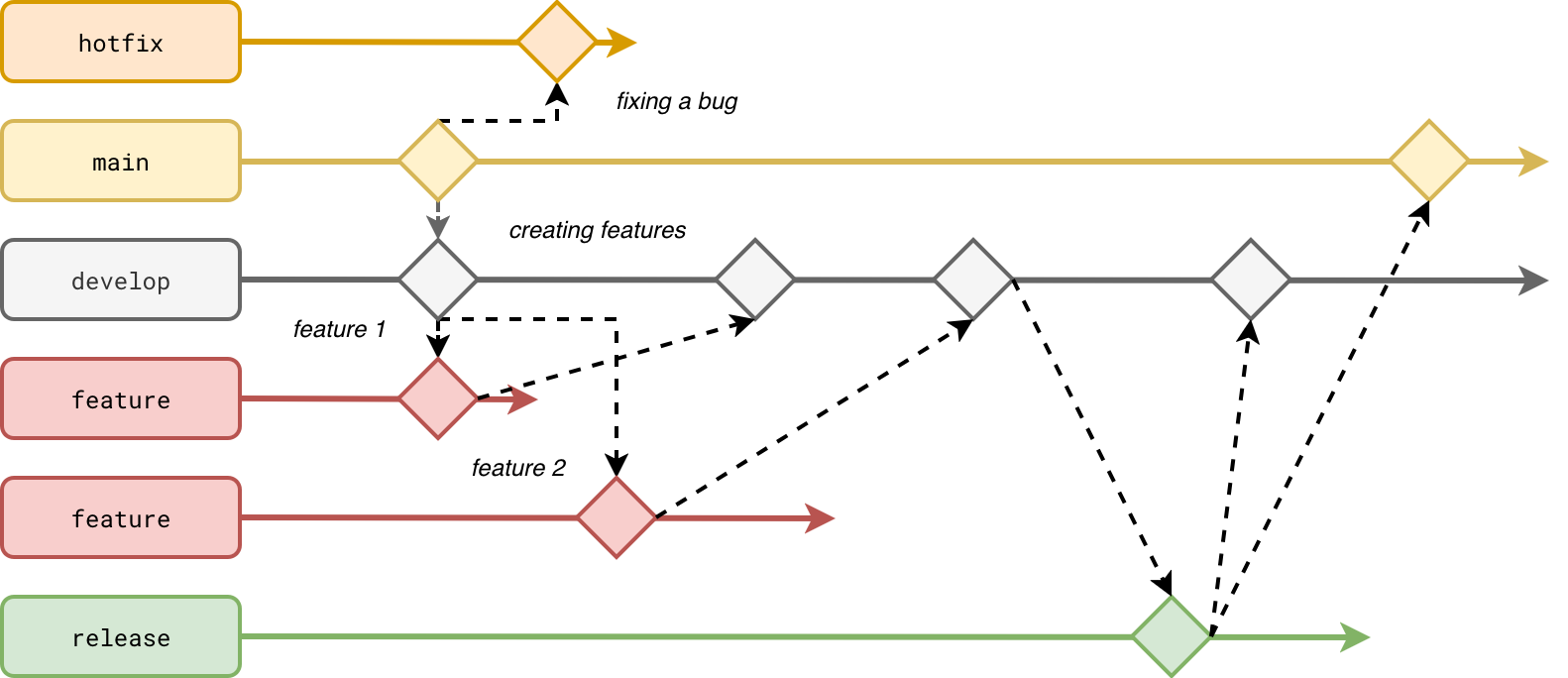
Is it bad? If you are comfortable with this workflow, not at all! In the end there is a human - you and your team - that delivers things on production. If Gitflow helps you guarantee a good quality of the releases, there is nothing wrong with it.
By the way, Gitflow is a valid choice for development workflow:
- It gives a clear separation of concerns. Your work in progress is on develop, your candidates on feature and the changes about to be released are on the release branch. You don't need a complex documentation to understand this, the naming convention is clear enough.
- Easy bug fixing. Each release can be tagged and if you need to change something explicitly for the currently released code on production, you create a hotfix branch and do not disrupt other work.
- Release buffer. The release branches can be considered as code freezers. The development lifecycle can continue on the develop branch while the changes are being tested on the staging environment from the release branch. Again, more branches mean here a better work isolation.
The isolation brings a lot of flexibility and safety, but it's also one of the biggest weaknesses of the Gitflow model:
- A bit complex CI/CD process. A feature must pass through various branches which can lead to complex CI/CD workflows.
- Merge hells caused by many long-living release branches. A production bug fix must go to the release, main, and develop branches at the same time. It shouldn't be a big deal as long as the change is compatible with all current work. Unfortunately, it's not always the case.
Trunk-based alternative
You saw it previously, many branches add some flexibility but they also make things complex. From that constant a natural alternative appears, the Trunk-based development where engineers collaborate from a single long-living common branch called trunk (main). Having this single branch involves:
- Quick iterations. The longer you're working on your feature branch, the more difficult merge can be. Trunk-based approach favors many small merges to the main branch.
- Test coverage. Even though tests are also important for the Gitflow-based workflows, the tests are even more important here. You don't have any buffer branches like the release branches so whatever you merge to the main branch should be ready to be deployed on production.
- Code quality. Again, this point is also valid for the Gitflow model but Trunk-based development makes it even more visible. Simply because all the changes go directly to main and can make it to production, you should take care of the code quality. In the Gitflow model there are many more gateways for improving the code quality as the code moves in many directions, e.g. from the feature branch to develop, or from the release branch to main. In the Trunk-based model every change always goes to the main branch and there is a single Pull Request to improve the code.
Overall, the development workflow presented previously for Gitflow can be now summarized to this:
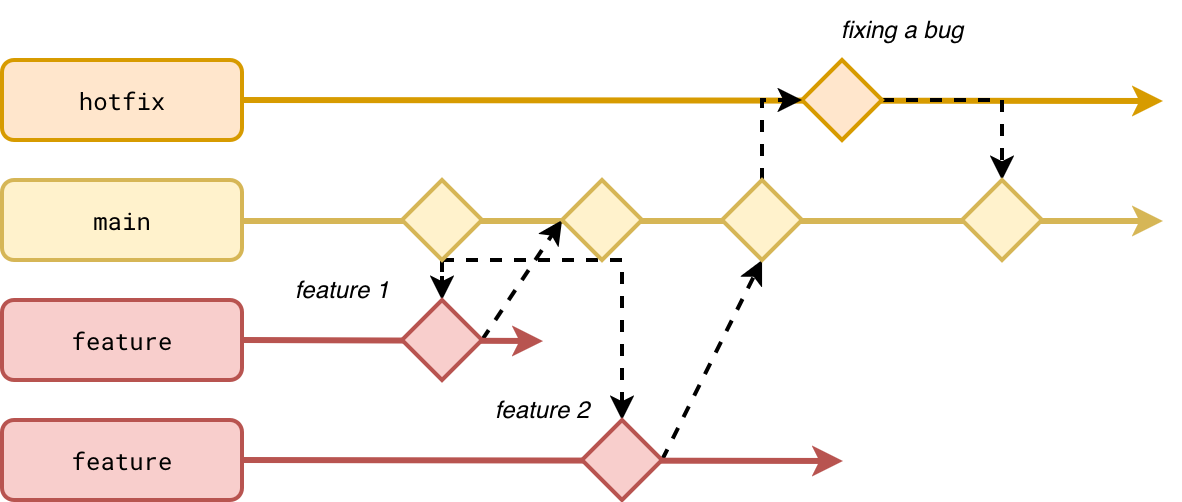
As you can see, fixing bugs is considered as developing a feature, i.e. creating a branch from the trunk and merging it back. It's worth adding that the deployment strategy doesn't consist of blindly pushing the code from the main branch to your production environment. You can apply a more standardized workflow targeting various environments despite having a single deployable branch:
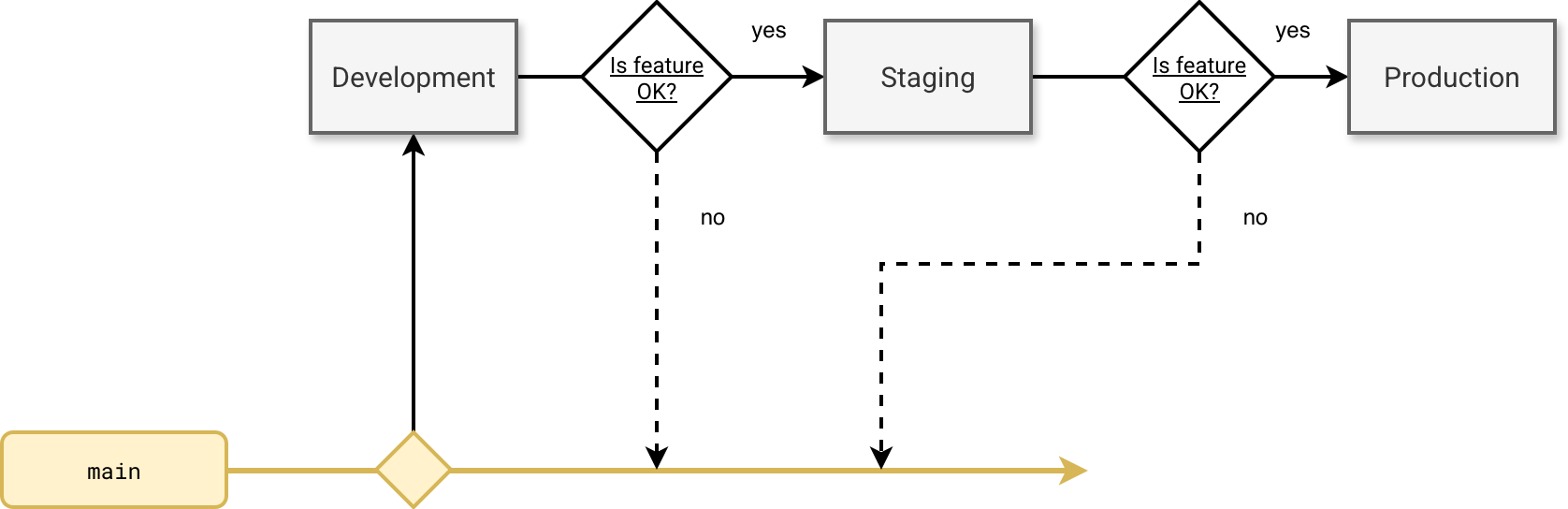
If you don't try to bypass the deployment guards, there is no risk your code will reach the Production environment without any control. Whenever your feature tests detect some issues, you need to return to the main branch to fix them.
Unfortunately this single branch-based is a double-edged sword and some real-world scenarios may require some extra effort:
- What if you need to fix a bug and your colleagues have merged some breaking changes in the main branch? - if you tagged your releases, you can create a temporary hotfix branch but continue the development lifecycle on the main branch. That way your hotfix branch acts like the release branches from the Gitflow workflow.
- What if you are working on a feature that will typically last more than the couple of days from the recommended feature branch duration? - Here the biggest issue to solve will be merge conflicts. Since you have only one source of truth, there is less risk doing it wrong than with Gitflow where changes can be pushed to different branches.
- What if you have 10 engineers working on new features at the same time? How do you guarantee the main branch will still be fully correct for deployment? - Here the Gitflow model with a release branch is a good trade-off between non blocking work and blocking code format for the deployment. In trunk-based the code can potentially change between your tests on staging and the deployment to production. If your deployment job always takes the fresh main branch (hope it does keep the commit reference for deployment), you risk deploying changes that might not be tested. The problem is illustrated below:
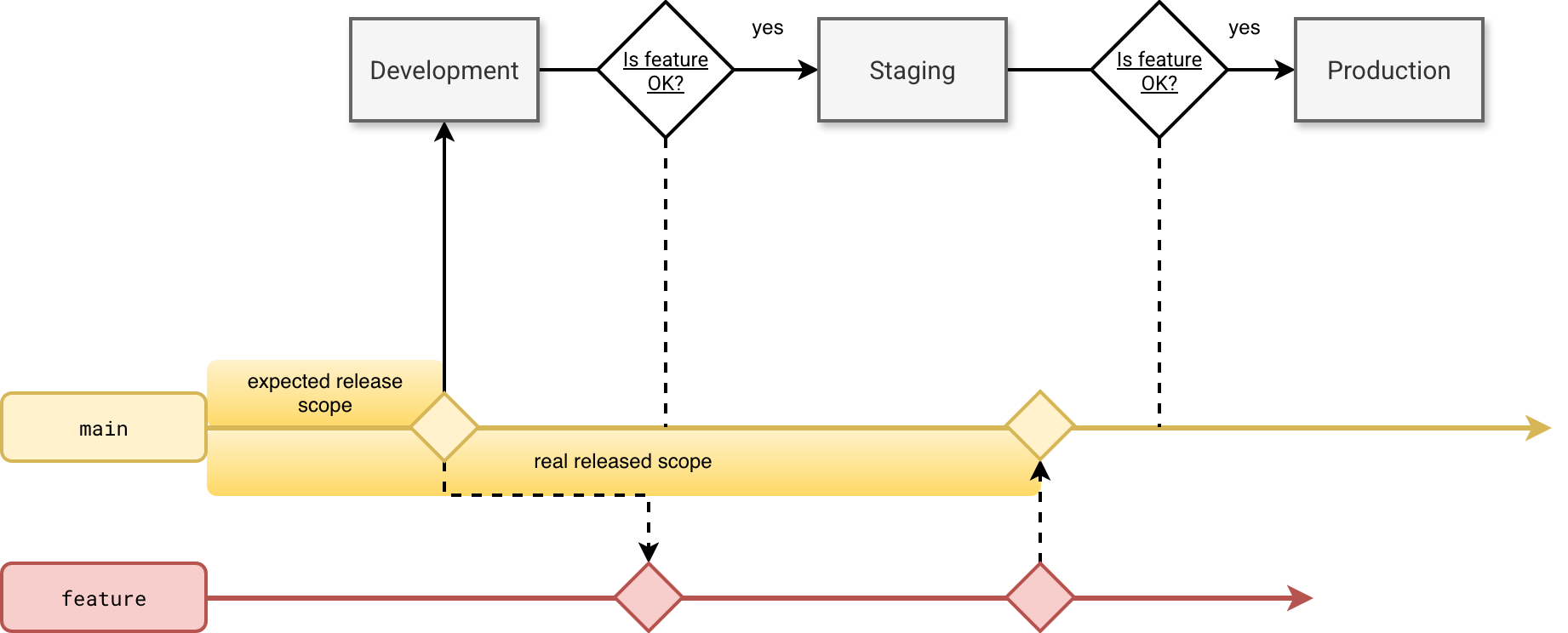
A solution here might be creating a pre-release tag on a commit and deploying the code from it instead of the most recent commit on the main branch. Trunk-based development also allows creation of the release branches but they are considered more often as a snapshot of the trunk instead of a regular base of work.
Trunk-based development and a data project?
Now the question that might be the most interesting for you. Should I use Trunk-based workflows in my data engineering projects? The answer is - as always you'll tell me - it depends.
When it comes to people, trunk-based should be a relatively good option for engineering teams where all team members have a good overall understanding of their technical scope. Besides - and here I'm not considering people in terms of years of experience which is often quoted in the trunk-based development context - team members should own the project from their development to the final release stage. They should be conscious enough to raise an alert about a deployment in progress but the trunk contains commits not planned in the delivery. They also should be reactive enough. It won't be possible to create short-living branches if the code review takes ages.
In addition, engineers should be aware that any change merged to the trunk should be ready to be deployed to production. Put differently, you should test as much as possible on your local environment or on the sandbox environment. You shouldn't consider merging to the main branch and deploying to the development environment as part of your incremental development strategy. Otherwise not finalized code can make it to production.
Long story short, if managing branches is an issue, your team is well structured and self-aware, trunk-based development can be a good option to try. If not, it's always good to know it. Who knows, maybe in a few months your new project will be trunk-based?
Data Engineering Design Patterns

Looking for a book that defines and solves most common data engineering problems? I wrote
one on that topic! You can read it online
on the O'Reilly platform,
or get a print copy on Amazon.
I also help solve your data engineering problems contact@waitingforcode.com 📩
Read also about Trunk-based development and data engineering here:
Related blog posts:
- DAMP, aka Descriptive And Meaningful Phrases
- Tips to discover internals of an Open Source framework internals - Apache Spark use case
- Let it crash model