

Some time ago I had an unpleasant surprise for a MERGE query that despite the small table to merge, and the liquid clustering enabled on the target table, was taking ages. The solution came from a Photon's feature called the Dynamic File Pruning.
What would it take for you to trust your Databricks pipelines in production?
A 3-day bug hunt on a 3-person team costs up to €7,200 in lost engineering time. This workshop teaches you to prevent that — unit tests, data tests, and integration tests for PySpark and Databricks Lakeflow, including Spark Declarative Pipelines.

Konieczny
The reason for my slow MERGE was reading all the files from this 5 TB table. Turning the Photon engine on reduced the execution time from infinite (killed query) to 3 minutes... After comparing the execution plan for Apache Spark and Photon query planners, I found the former didn't apply any pruning while Photon used Databricks' feature called Dynamic File Pruning (DFP).
DFP has been present in Databricks Runtime for almost 6 years now (2020) to help skipping irrelevant data during joins, even when those joins involve columns that aren't partitioned. The feature has been enabled by default from Databricks Runtime 6.1 and as of today, it supports these three configuration parameters:
- spark.databricks.optimizer.dynamicFilePruning to disable the pruning; I don't recommend unless you want to compare the execution plans and queries performance with and without the feature
- spark.databricks.optimizer.deltaTableSizeThreshold and spark.databricks.optimizer.deltaTableFilesThreshold to control the size of the table involved in the join. If the size is smaller than 10 GB or 10 files, the DFP won't trigger because the query planner may consider other ways to optimize your query.
Overwriting properties on serverless
The DFP properties cannot be modified on serverless. When you try to change them, you will see this error:

Even though I've started this blog post by quoting the MERGE operation, the DFP feature also applies for UPDATE and DELETE operations. Same as for the MERGE, you have to turn the Photon engine on. In addition to these writing operations, the DFP also works for SELECT statement, e.g. for a star schema join.
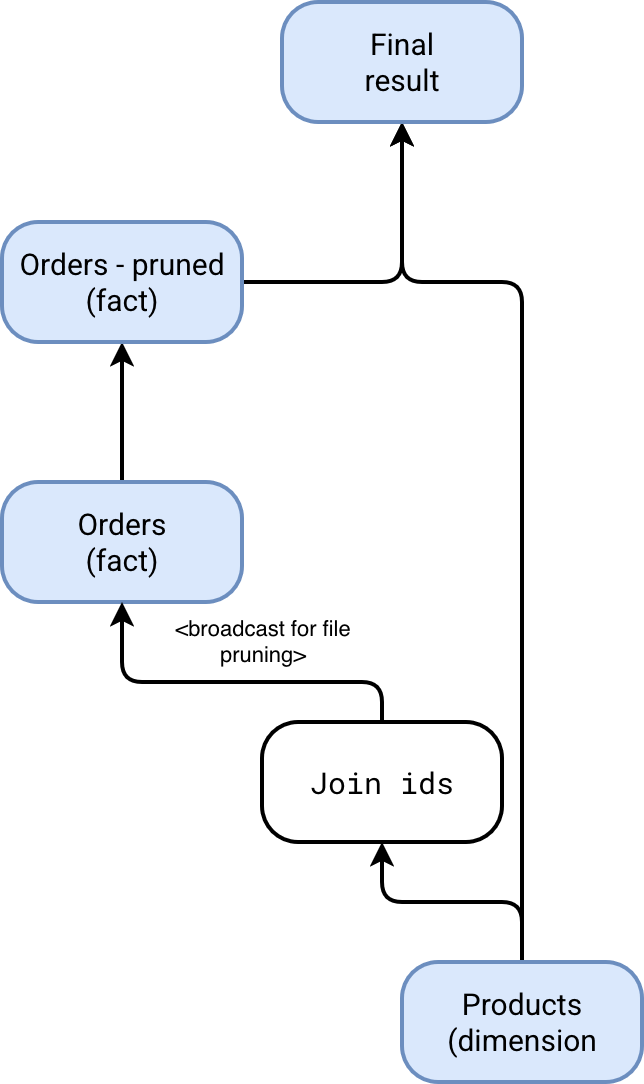
There is probably one remaining question in your head after reading this introduction, how does DFP work? A good illustration here is a query joining a fact and dimension table, let's say orders and products. In that case, the DFP will broadcast all keys used in the join condition to the fact table and dynamically prune irrelevant files by analyzing the statistics present for each column:
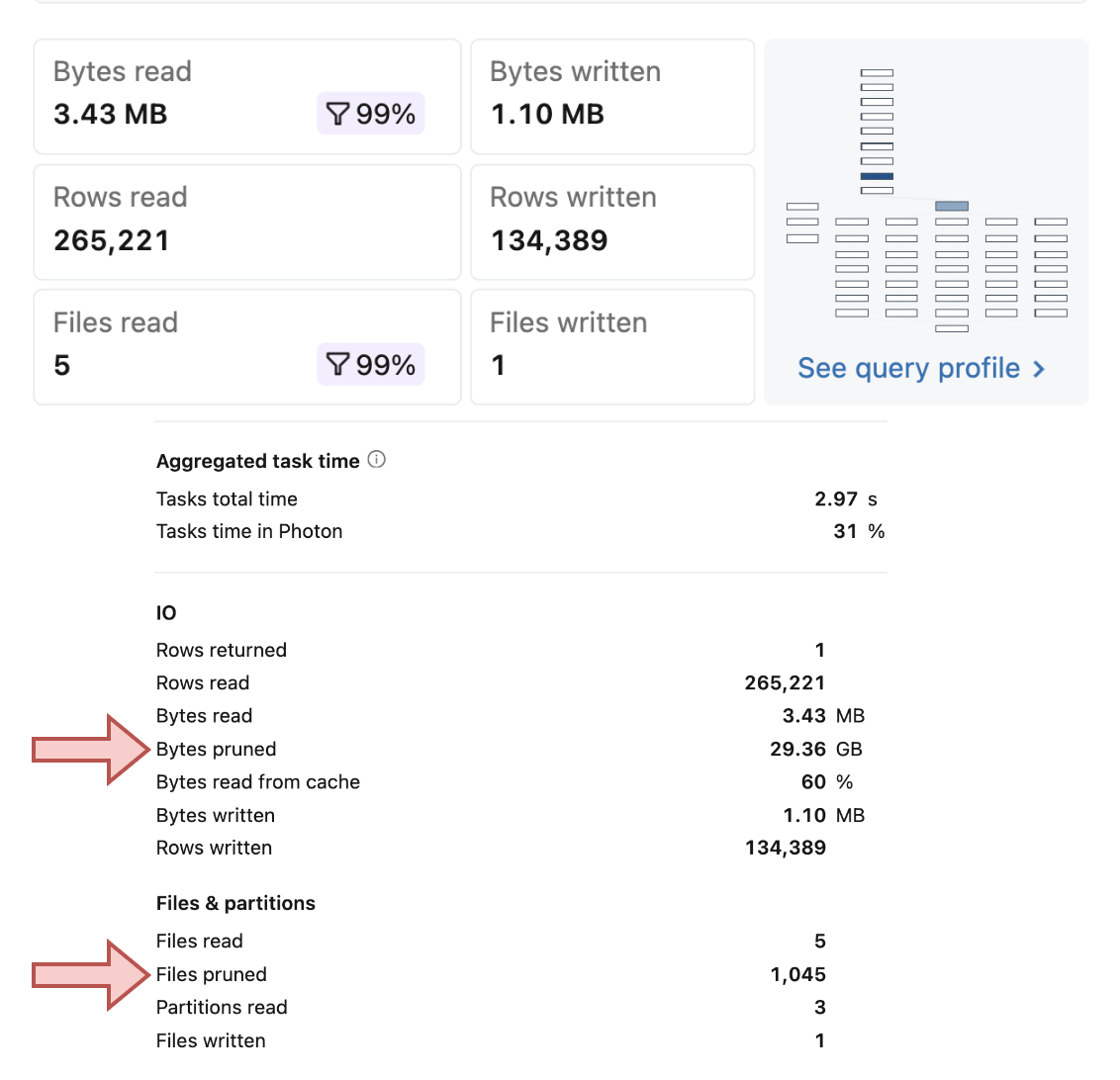
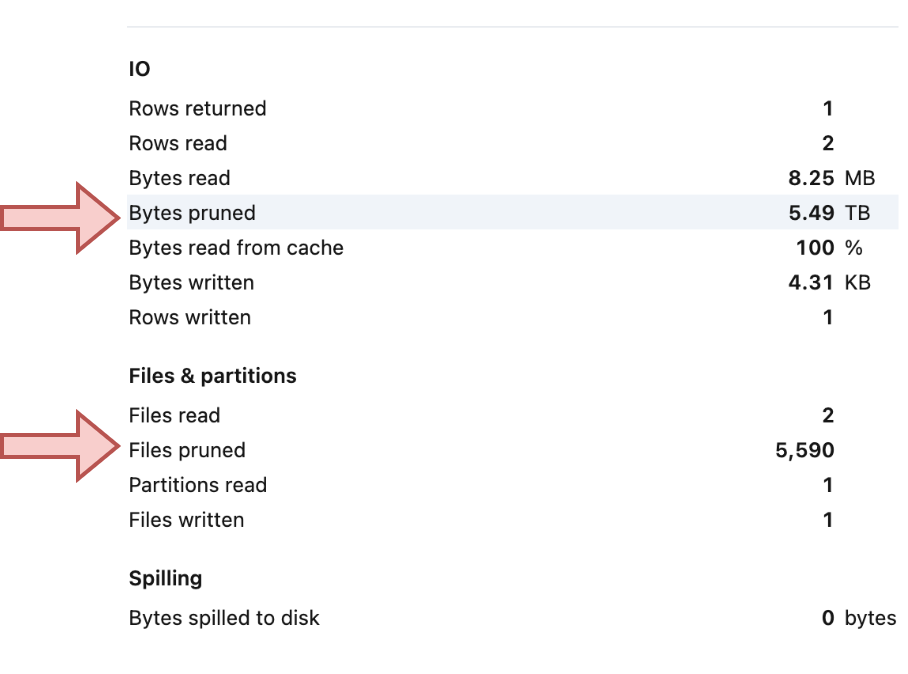
Overall, when you use the Dynamic File Pruning, your writing queries should show significant difference between the really read files and the pruned ones. Here are two examples showing this imbalanced ratio on a liquid clustered table of different size:
Dynamic File Pruning can work wonders, significantly reducing the execution time of your read and write operations. Even though Photon consumes more DBUs than standard compute, the reduction in query time may ultimately make it a more cost-effective option for frequent updates.
Data Engineering Design Patterns

Looking for a book that defines and solves most common data engineering problems? I wrote
one on that topic! You can read it online
on the O'Reilly platform,
or get a print copy on Amazon.
I also help solve your data engineering problems contact@waitingforcode.com 📩
Read also about Dynamic File Pruning and MERGE on Databricks here:
Related blog posts:
- Lakeflow Jobs, when it can and can't be a default data orchestration setup?
- Medallion layers, do you need them all?
- Python script tasks on Databricks