

Enforcing team conventions is never an easy task. In my experience, I've moved from clearly defined collaboration conventions on a wiki page to code review checklists, but neither has made my life easier. The only tools that have truly helped are the Git hooks I've been using for over a decade.
What would it take for you to trust your Databricks pipelines in production?
A 3-day bug hunt on a 3-person team costs up to €7,200 in lost engineering time. This workshop teaches you to prevent that — unit tests, data tests, and integration tests for PySpark and Databricks Lakeflow, including Spark Declarative Pipelines.

Konieczny
My personal use of the hooks evolved from manually added instructions, ultimately automated from a Make task, to automatically installed scripts from dev dependencies. But before I show you the latest and greatest applied to a Declarative Automation Bundles use case, I owe you a few words of introduction.
Git hooks 101
A hook is a specific point in a program's execution where the software allows you to intercept the process to trigger custom code without modifying the original program. In Git it translates by defining a special behavior that may block your local commit or push to the remote branch. The full list of hooks is available in the hooks documentation but to better illustrate what going one, let's focus on hooks applied to probably two most popular Git operations, the commit and push:
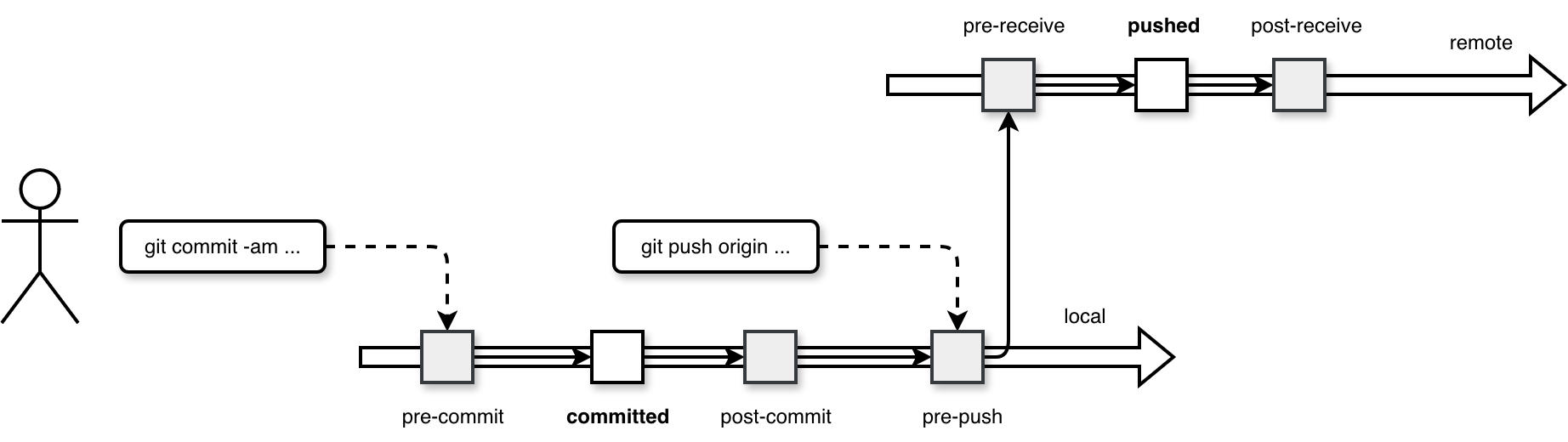
As you can see in the diagram, whenever you execute a Git operation, the underlying setup invokes some additional code that may prevent your changes from being committed or pushed (the pre- hooks).
Hooks setup
Technically hooks are a separate directory in your Git setup. Here is an example of empty directory for the code snippets used for my Data Engineering Design Patterns book:
.git/hooks
|-- applypatch-msg.sample
|-- commit-msg.sample
|-- fsmonitor-watchman.sample
|-- post-update.sample
|-- pre-applypatch.sample
|-- pre-commit.sample
|-- pre-merge-commit.sample
|-- pre-push.sample
|-- pre-rebase.sample
|-- pre-receive.sample
|-- prepare-commit-msg.sample
|-- push-to-checkout.sample
`-- update.sample
When you want to add a new hook, you simply put it to the .git/hooks directory. The file name must correspond to the hook you are about to set up, i.e. for a pre-commit hook you will create a .git/hooks/pre-commit file. Consequently, if you need to run multiple scripts for one hook, you need to orchestrate them within the corresponding hook file. Or, if you are a Python user, you can install the pre-commit package and delegate the orchestration to this framework.
Pre-commit and Python
The pre-commit library is an additional abstraction for Git hooks that makes their declaration familiar to Python users. Instead of creating and copying hooks manually, you need to create a .pre-commit-config.yaml file with the list of all hooks to run. Next you execute the pre-commit install command to generate a new pre-commit hook file. The hook file simply invokes the steps defined in the YAML file. Below is an example of the generated hook content:
#!/usr/bin/env bash
# File generated by pre-commit: https://pre-commit.com
# ID: 138fd403232d2ddd5efb44317e38bf03

# start templated
INSTALL_PYTHON=/Users/bartosz/workspace/wfc/python-examples/.venv/bin/python
ARGS=(hook-impl --config=.pre-commit-config.yaml --hook-type=pre-commit)
# end templated

HERE="$(cd "$(dirname "$0")" && pwd)"
ARGS+=(--hook-dir "$HERE" -- "$@")

if [ -x "$INSTALL_PYTHON" ]; then
    exec "$INSTALL_PYTHON" -mpre_commit "${ARGS[@]}"
elif command -v pre-commit > /dev/null; then
    exec pre-commit "${ARGS[@]}"
else
    echo '`pre-commit` not found.  Did you forget to activate your virtualenv?' 1>&2
    exit 1
fi
Hooks and Declarative Automation Bundles
Since Git hooks are pretty flexible constructs, your imagination - and sometimes technical constraints - will limit you. That's why do not consider my example as a simple illustration and not as a demonstration of everything you can use hooks for in Databricks context.
One of DABs commands is validate:
databricks bundle validate --target dev --profile personal_free_edition
Name: poe_demo
Target: dev
Workspace:
  Host: https://XXXXXX.cloud.databricks.com
  User: contact@waitingforcode.com
  Path: /Workspace/Users/contact@waitingforcode.com/.bundle/poe_demo/dev

Validation OK!
When your DAB has some errors, such as an invalid syntax, the validate command will fail. Below is an error you get if you use an array of strings instead of an array of key-value pairs for tasks dependencies:
databricks bundle validate --target dev --profile personal_free_edition
Warning: expected map, found string
  at resources.jobs.sample_job.tasks[0].depends_on[0]
  in resources/sample_job.job.yml:8:15

Name: poe_demo
Target: dev
Workspace:
  Host: https://XXXXXX.cloud.databricks.com
  User: contact@waitingforcode.com
  Path: /Workspace/Users/contact@waitingforcode.com/.bundle/poe_demo/dev

Found 1 warning
You see my point, this error will hurt you only when you deploy the bundle. If you can do this only from your CI/CD pipeline, this syntax error means possibly one additional fix commit before you can actually test the deployed version. Of course, you can also run this validation manually and fix the error but you need to remember that. On another hand, if you include the validate command as part of the pre-commit hook, Git will do it for you (as long as you remember installing the hook 🙃).
Let's see how include this validation step as part of the development process. First, we need to add an additional dev dependency:
[dependency-groups]
dev = [
    # ...
    "pre-commit==4.5.1"
]
The next step is to create the .pre-commit-config.yaml file with the DAB validation step:
repos:
  - repo: local
    hooks:
      - id: dab-validation
        verbose: true
        name: Validate Dab
        entry: poe validate_dab
        language: system
        fail_fast: true
        pass_filenames: false
The hooks invokes a Poe task executing this shell command:
[tool.poe.tasks.validate_dab]
help ="Validates Declarative Automation Bundle, including warnings detection."
shell = """
    bundle_outcome=$(databricks bundle validate -t dev  --profile personal_free_edition)
    echo $bundle_outcome | grep 'warning' &> /dev/null
    if [ $? == 0 ]; then
      echo "? A warning detected in the bundle: ";
      echo $bundle_outcome;
      exit 1
    else
      echo "? Bundle is valid"
    fi
"""
interpreter = 'bash'
The next step is to install the hook with uv run pre-commit install:
(pre-commit-hook) ?  pre-commit-hook git:(main) ? uv run pre-commit install
      Built pre-commit-hook @ file:///Users/bartosz/workspace/wfc/databricks-playground/pre-commit-hook
Uninstalled 1 package in 0.97ms
Installed 1 package in 1ms
pre-commit installed at .git/hooks/pre-commit
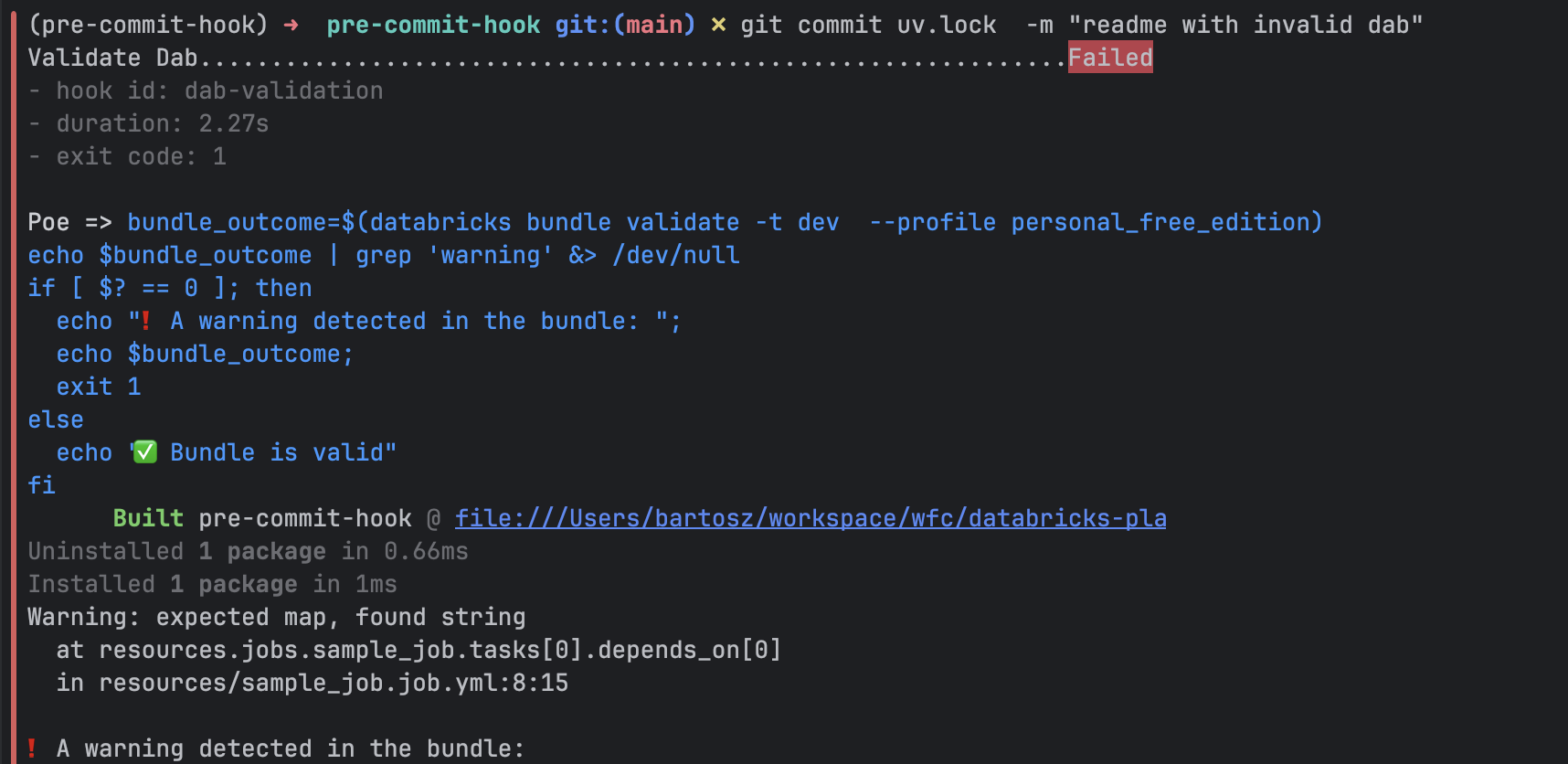
Now, if you try to commit our invalid DAB definition, you'll be blocked by the hook:
Git hooks are a well-established extension in software engineering projects, and they absolutely have a place in a data engineering context. After all, we also write code, make style mistakes, and break unit tests. However, hooks shouldn't replace a CI/CD pipeline. They are designed to make the development process easier by reducing feedback loops. But since they can be skipped, all your code quality requirements should still be enforced at the final gate to production: your CI/CD pipeline.
Data Engineering Design Patterns

Looking for a book that defines and solves most common data engineering problems? I wrote
one on that topic! You can read it online
on the O'Reilly platform,
or get a print copy on Amazon.
I also help solve your data engineering problems contact@waitingforcode.com 📩