

It's the 3rd blog post of the series dedicated to Lakeflow Spark Declarative Pipelines. Today we're going to see a topic that amazed me when I first came to the data engineering and data warehousing world, Slowly Changing Dimensions (SCD).
What would it take for you to trust your Databricks pipelines in production?
A 3-day bug hunt on a 3-person team costs up to €7,200 in lost engineering time. This workshop teaches you to prevent that — unit tests, data tests, and integration tests for PySpark and Databricks Lakeflow, including Spark Declarative Pipelines.

Konieczny
SCD 101
As of this writing, Lakeflow Spark Declarative Pipelines (LSDP) support the first two SCD types:
- SCD Type 1 which generally consists of overwriting the values of the row
- SCD Type 2 which keeps the historical values and identifies them with an end_date column. For the value representing the current state, the end_date column is NULL.
To see the SCD in action and better understand how it works in LSDP, we're going to use the example of blog posts that may change categories.
Setup - Change Data Capture
Before we run the LSDP pipelines, we need to create a table where data producers will write all the changes:
CREATE TABLE workspace.default.blog_posts_raw (
    id STRING,
    title STRING,
    category STRING,
    operation STRING,
    date_changed TIMESTAMP
);

INSERT INTO workspace.default.blog_posts_raw VALUES
    ('sdp_intro', 'Spark Declarative Pipelines, the introduction', 'Apache Spark', 'INSERT', NOW()),
    ('sdp_further', 'Spark Declarative Pipelines, going further', 'Apache Spark', 'INSERT', NOW()),
    ('sdp_internals', 'Spark Declarative Pipelines, internals', 'Apache Spark', 'INSERT', NOW());
The structure of the table simulates the output that could be generated by a database with Change Data Capture enabled. The key part here is the operation column that identifies a row as new, modified, or deleted.
SCD Type 1 - Change Data Capture
Once you created the table, it's time to write the code for the SCD Type 1:
@dp.view
def blog_posts():
  return spark.readStream.table("workspace.default.blog_posts_raw")

dp.create_streaming_table("blog_posts_scd_type_1")

dp.create_auto_cdc_flow(
  target = "blog_posts_scd_type_1",
  source = "blog_posts",
  keys = ["id"],
  sequence_by = F.col("date_changed"),
  apply_as_deletes = F.expr("operation = 'DELETE'"),
  except_column_list = ["operation", "date_changed"],
  stored_as_scd_type = 1
)
Magic! The code is purely declarative and all the data reconciliation work is handled by LSDP runner. To make the SCD output reliable, the key parts here are:
- keys that defines the primary key composition of the table
- sequence_by that defines the order of changes
- except_column_list that removes the columns used to manage CDC from the output SCD table
- apply_as_deletes that specifies the event that is going to remove the row from the SCD table
- stored_as_scd_type that configures the output of the function as SCD Type 1 table
Other options
You can find other options in the documentation of the create_auto_cdc_flow and create_auto_cdc_from_snapshot_flow.
Let's examine the outcome of executing a script that first updates the existing records and subsequently deletes one:
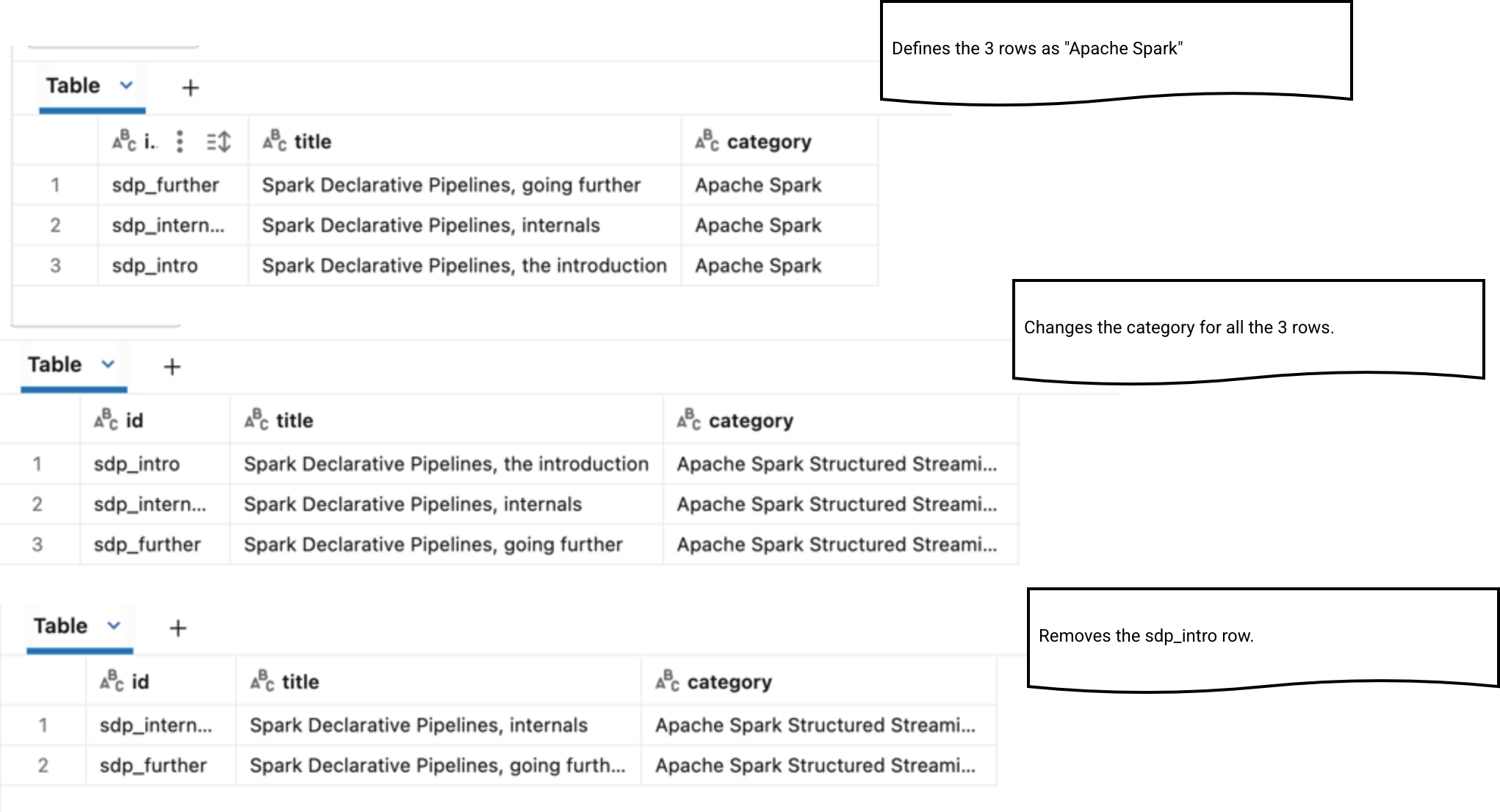
As you can see, the operation performs updates in-place, i.e. without preserving the history, exactly like SCD Type 1 requires. The same hard rule applies to the delete where the row is physically deleted from the SCD table.
SCD Type 2 - Change Data Capture
When it comes to the SCD Type 2, the setup code is very similar to the SCD Type 1 code:
dp.create_auto_cdc_flow(
  target = "blog_posts_scd_type_2",
  source = "blog_posts",
  keys = ["id"],
  sequence_by = F.col("date_changed"),
  apply_as_deletes = F.expr("operation = 'DELETE'"),
  except_column_list = ["operation", "date_changed"],
  stored_as_scd_type = 2
)
The single difference is the stored_as_scd_type that we set here to 2. Under-the-hood this configuration leads to a creation of a SCD table with start and end date validity columns for the saved rows. Since now, the LSDP runner will materialize each row change - including removal - as setting the end date value to the current time, and creating a new row without an end date defined if the operation is an update. If the change is a delete, the new row won't be created. Let's see how the SCD Type 2 table behaves after running the same code snippet as before:
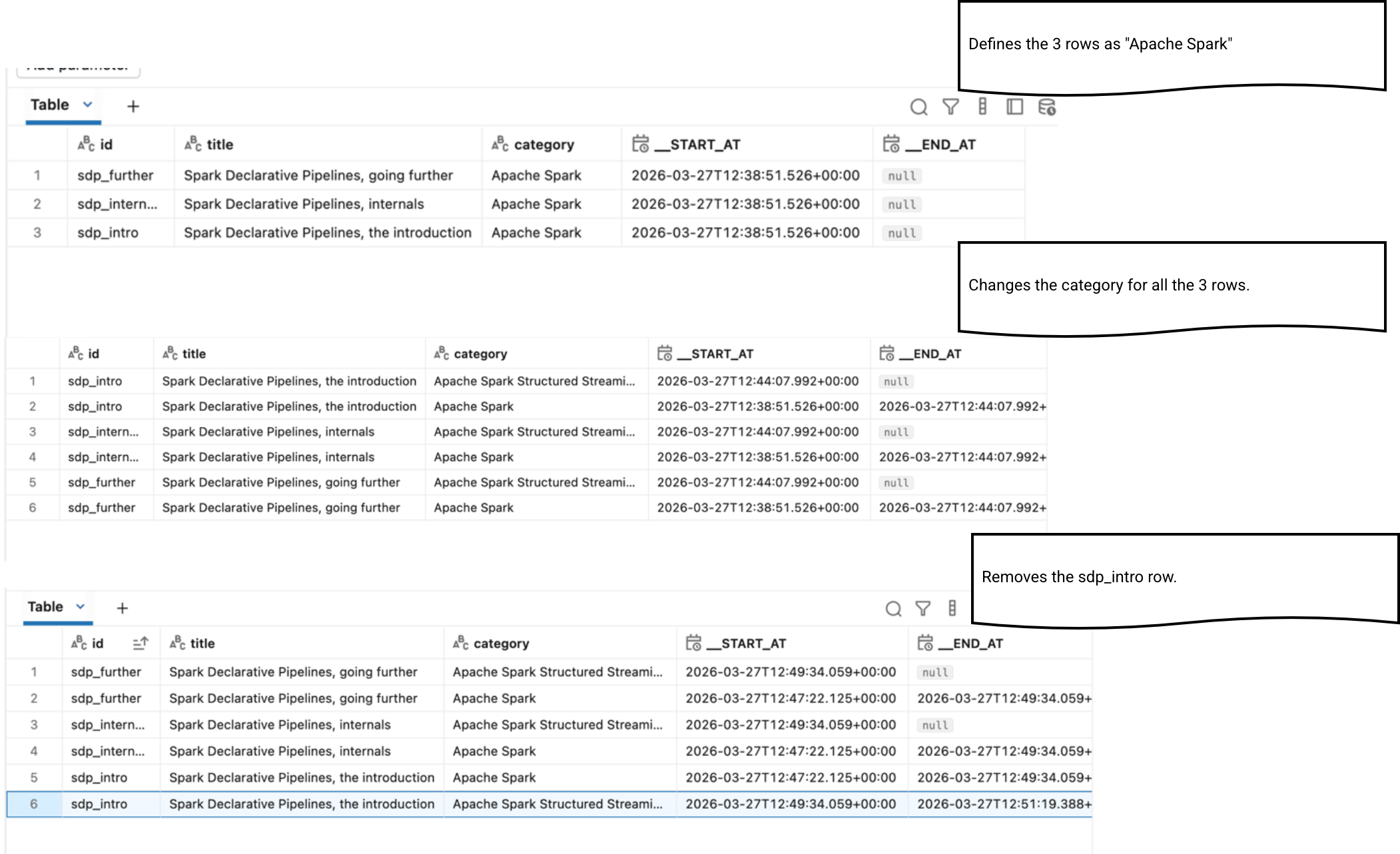
SCD Type 1 - Snapshot
Change Data Capture is a natural source for tracking changes. But, it's not available by default on databases. If you are in this unlucky group of users, you can still leverage LSDP capabilities for managing the SCD tables for you. We say then the LSDP operates on snapshots because it compares the current snapshot version with the previous one.
To see it in action, let's continue with our blogging example but without the operation and change_date columns:
DROP TABLE IF EXISTS workspace.default.blog_posts_raw;
CREATE TABLE workspace.default.blog_posts_raw (
    id STRING,
    title STRING,
    category STRING
);

INSERT INTO workspace.default.blog_posts_raw VALUES
    ('sdp_intro', 'Spark Declarative Pipelines, the introduction', 'Apache Spark'),
    ('sdp_further', 'Spark Declarative Pipelines, going further', 'Apache Spark'),
    ('sdp_internals', 'Spark Declarative Pipelines, internals', 'Apache Spark');
When it comes to the LSDP code, it also changes. The create_auto_cdc_flow method becomes:
dp.create_auto_cdc_from_snapshot_flow(
  target = "blog_posts_scd_type_1_snapshot",
  source = "blog_posts",
  keys = ["id"],
  stored_as_scd_type = 1
)
After performing the same set of changes like for the CDC example, we should see this:
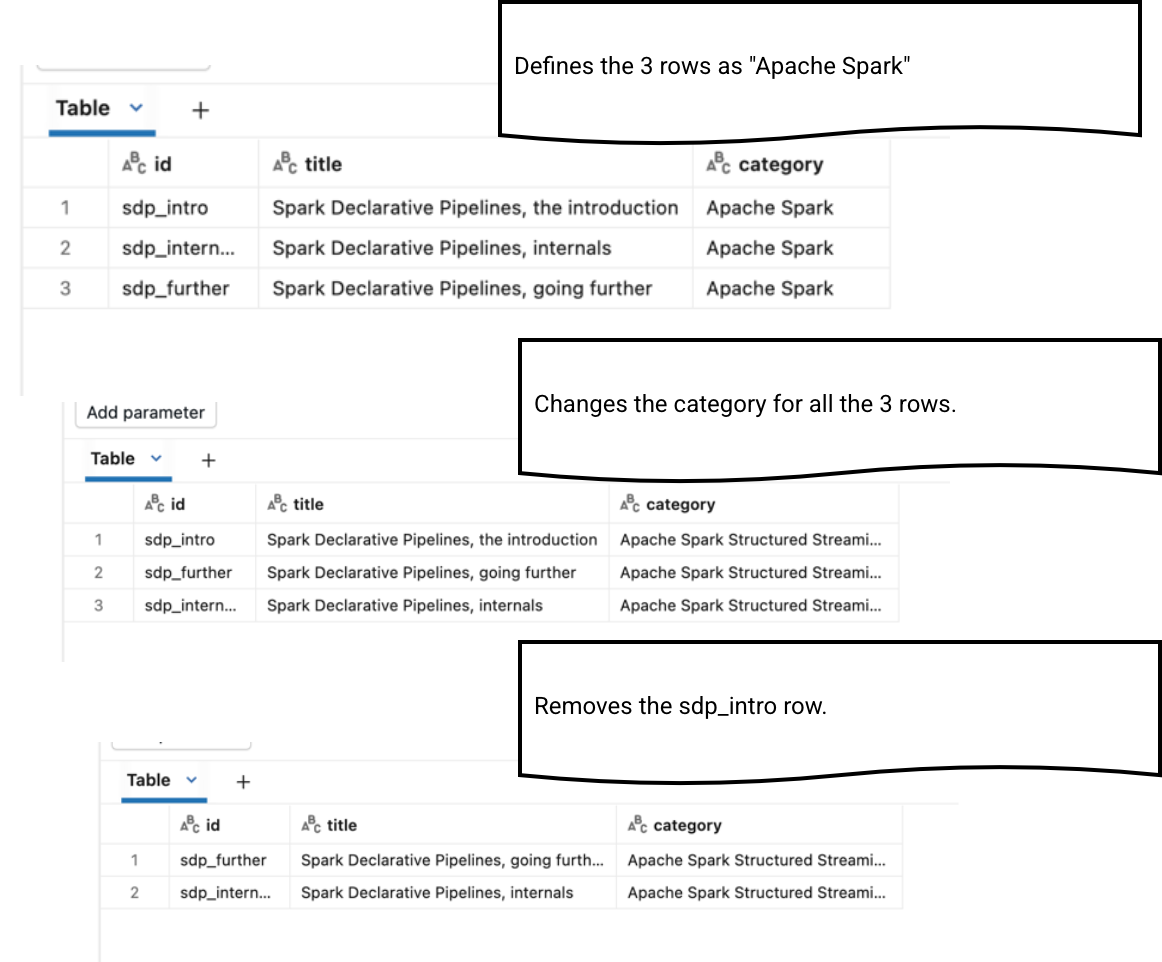
SCD Type 2 - Snapshot
When it comes to the SCD Type 2, the change columns still exist and the code snippet is the same as before. The single change is the SCD type attribute set to 2. After running the pipeline you should see the same workflow as for the CDC-based table:
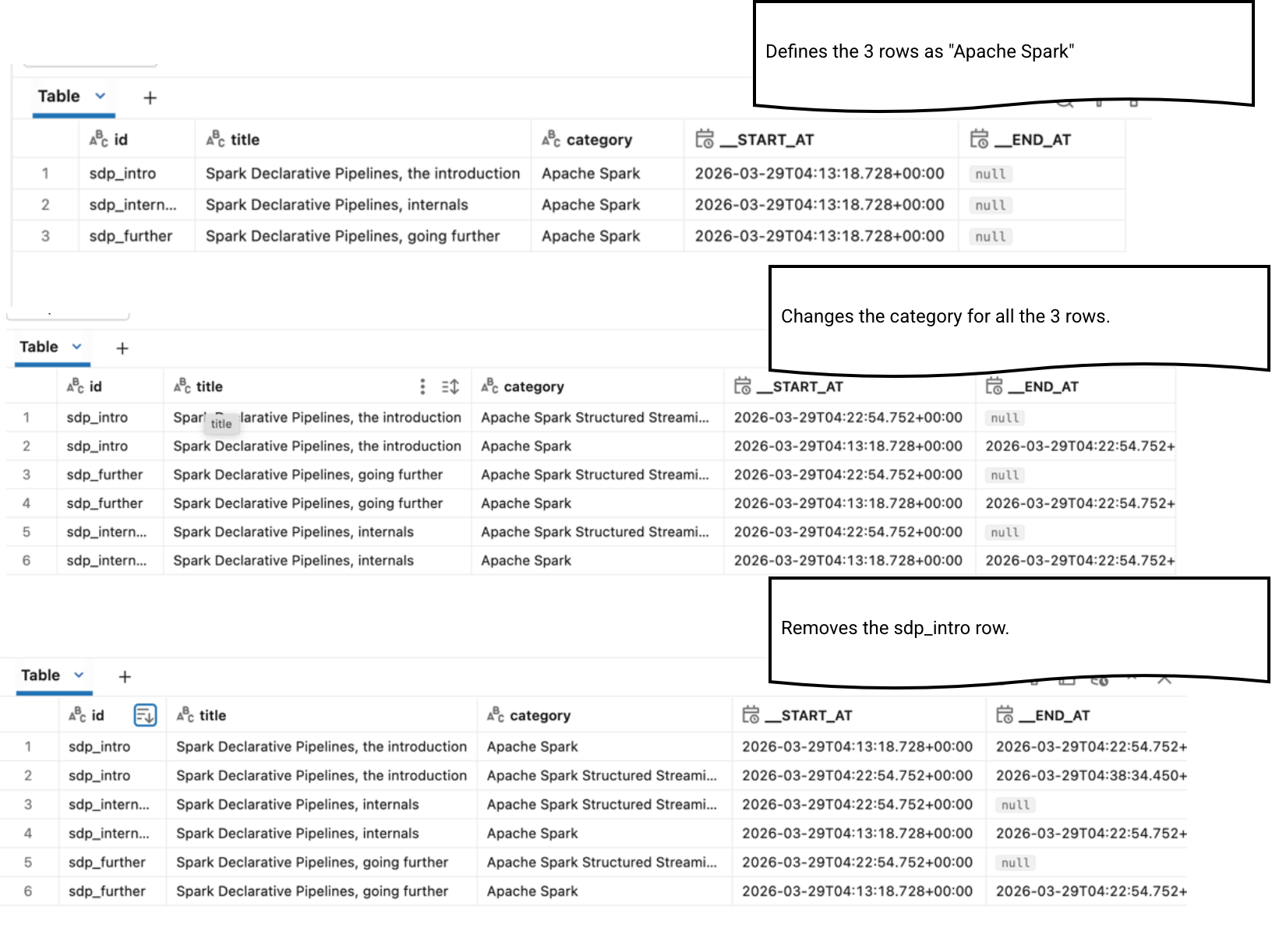
When it comes to the execution plan, the SCD Type 1 simply compares the existing table with the new table:
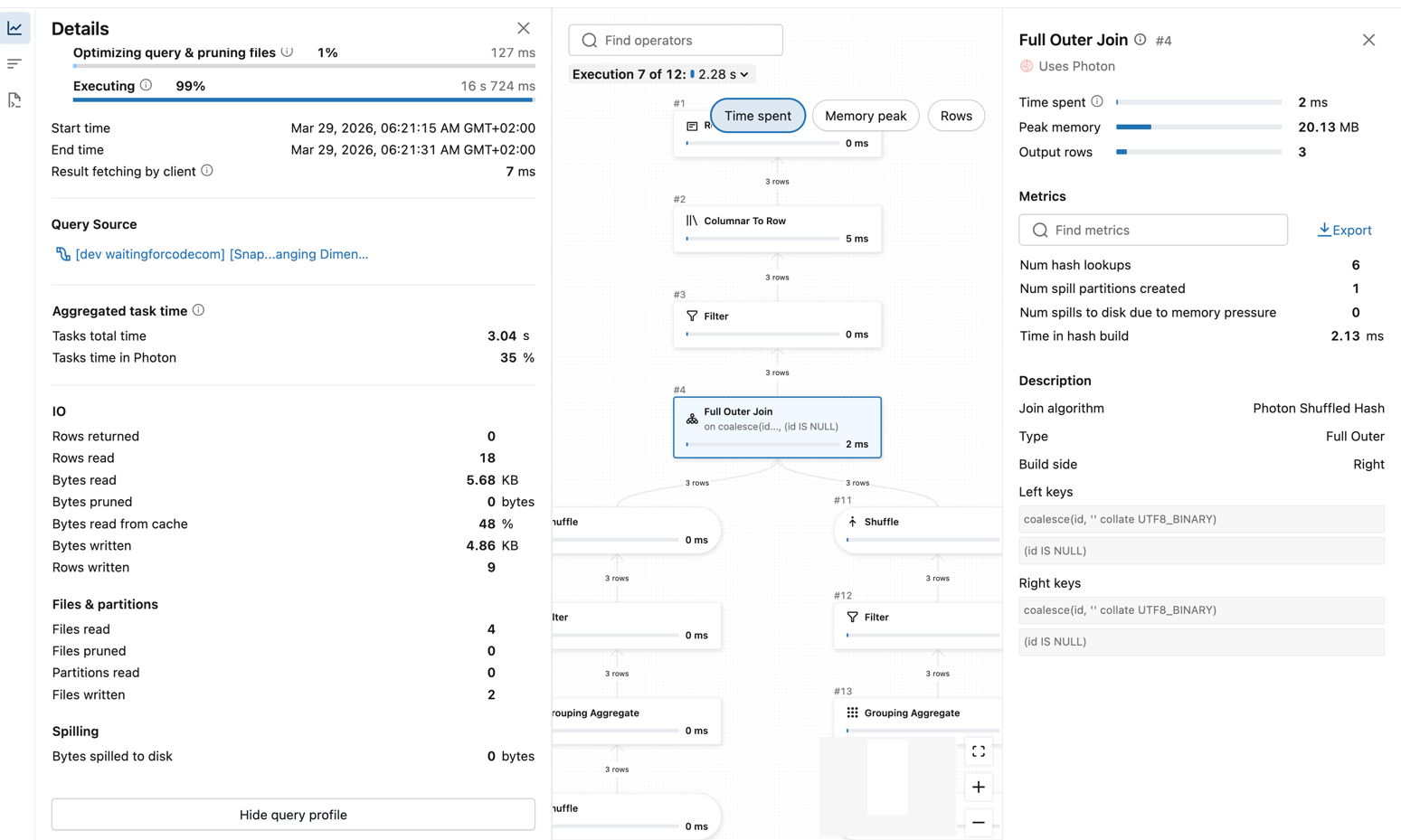
The SCD Type 2 is also based on this table-to-table comparison. The main difference here is the source table snapshot retrieval that includes an additional filter on the end date column:
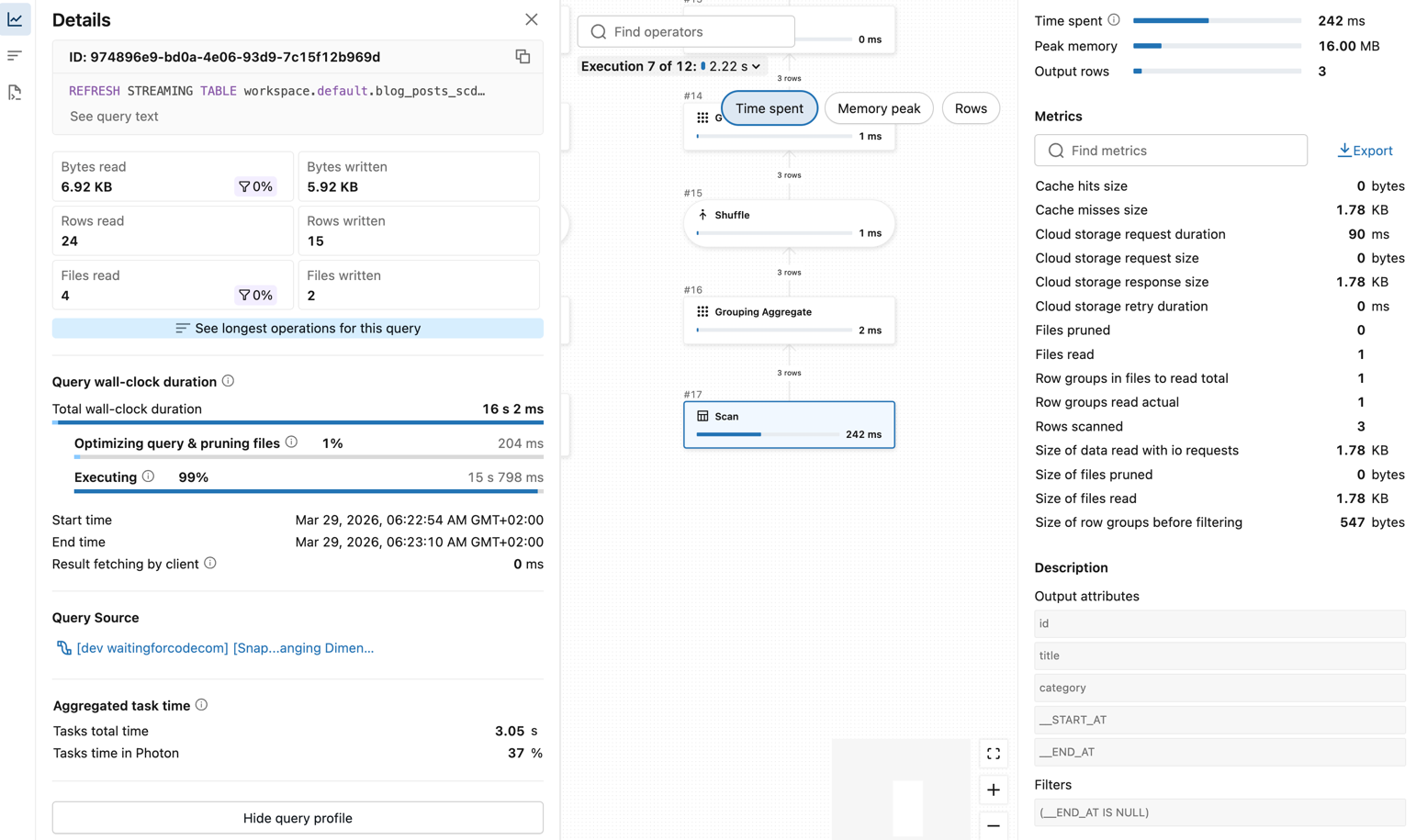
SCD and duplicates
Besides the join between the SCD table and the input data table, the execution plan above also shows an aggregation step on both sides:
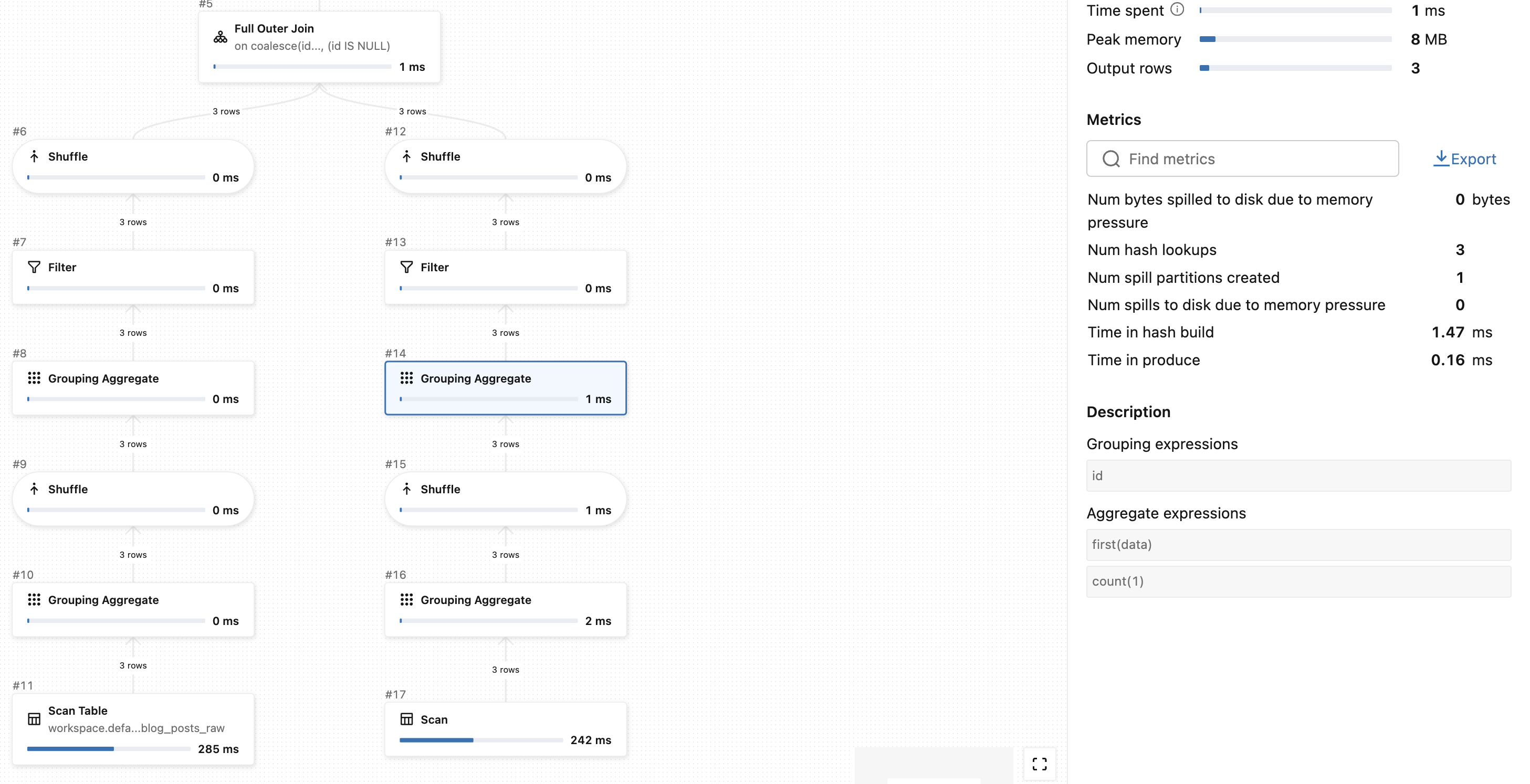
As you can see, the LSDP runner executes a query like SELECT FIRST(data), COUNT(1) ... FROM ... GROUP BY id. Remember, the FIRST(...) function returns the first occurrence found in each group. Does it mean the SCD table creation is not deterministic? Let's check this with the data. For the sake of simplicity let's keep the SCD state from the previous part and slightly modify the input table to:
TRUNCATE TABLE workspace.default.blog_posts_raw;
INSERT INTO workspace.default.blog_posts_raw VALUES
('sdp_further', 'Spark Declarative Pipelines, going further', 'Apache Spark Structured Streaming'),
('sdp_internals', 'Spark Declarative Pipelines, internals', 'Apache Spark Structured Streaming'),
('sdp_internals', 'Spark Declarative Pipelines, THE internals', 'Apache Spark Structured Streaming');
The table now contains two entries for the sdp_internals with two different titles. Let's run the pipeline creating the SCD Type 1 table now. It should fail with this error:

The failing step is the one where the runner aggregates rows:
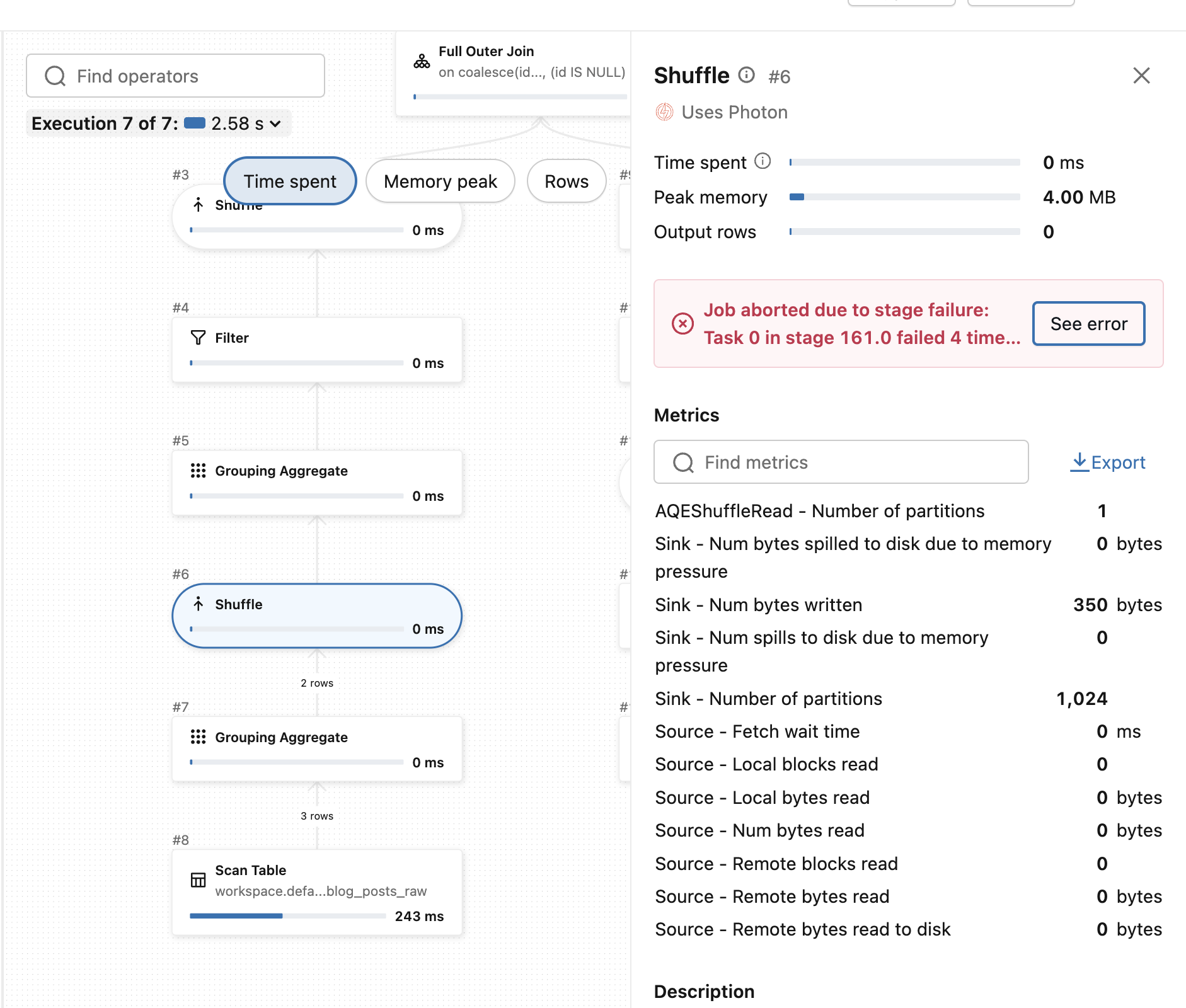
The same error occurs when you run the job for SCD Type 2; you might be thinking the issue won't exist here because the data is versioned but if you take a step back, you'll realize the versioning doesn't define data correctness. If our table had two versions for the same id, the runner cannot determine the precedence rules.
In this last blog post - at least as of today - about Lakeflow Spark Declarative Pipelines we discovered how to simplify Slowly Changing Dimensions on Databricks with a fully declarative approach. This SCD management feature illustrates the real power of the declarative premise. Although not having to define checkpoint location, or having to skip the awaitTermination call didn't impress me, this SCD native management really did!
Data Engineering Design Patterns

Looking for a book that defines and solves most common data engineering problems? I wrote
one on that topic! You can read it online
on the O'Reilly platform,
or get a print copy on Amazon.
I also help solve your data engineering problems contact@waitingforcode.com 📩
Read also about Lakeflow Spark Declarative Pipelines and Slowly Changing Dimensions here:
Related blog posts:
- Enzyme and Materialized Views on Databricks - better understanding from the SIGMOD-Companion paper
- Lakeflow Spark Declarative Pipelines, flows, private tables, and configuration
- Lakeflow Spark Declarative Pipelines, introduction and incremental refreshes
- Spark Declarative Pipelines internals
- Spark Declarative Pipelines, going further