

One of the biggest changes to the Apache Spark Structured Streaming API over the past few years is undoubtedly the introduction of the declarative API, AKA Spark Declarative Pipelines. This post kicks off a three-part series dedicated to this new functionality. By the end of these articles, you will be able to effectively leverage declarative programming in your workflows and gain a deeper understanding of what happens under the hood when you do.
What would it take for you to trust your Databricks pipelines in production?
A 3-day bug hunt on a 3-person team costs up to €7,200 in lost engineering time. This workshop teaches you to prevent that — unit tests, data tests, and integration tests for PySpark and Databricks Lakeflow, including Spark Declarative Pipelines.

Konieczny
🗒 A few notes
Spark Declarative Pipelines has been developed as part of SPARK-51727 by: Aakash Japi, Anish Mahto, Calili dos Santos Silva, Dongjoon Hyun, Jacek Laskowski, Jacky Wang, Jon Mio, Jungtaek Lim, Peter Toth, Sandy Ryza, Sanford Ryza, Wenchen Fan, Yang Jie, Yuheng Chang
Besides myself and this series of blog post, you can also watch Spark Declarative Pipelines (SDP) Explained in Under 20 Minutes by Sandy Ryza. Concise and straight to the point!
If you want to contribute to the project, there is an open discussion on the next steps on Reddit.
Even though SDP supports SQL as the declaration API, I'm going to stick with Python for the sake of simplicity.
Declarative programming
Understanding Spark Declarative Pipelines (SDP) without understanding the difference between the declarative and imperative programming paradigms would be hard. That's why let's recall some stuff you might have learned years ago while preparing your CS degree.
The main difference between the declarative and imperative approaches is your intent towards the code. With the declarative paradigm you declare what your program should look like. A great example here is SQL. You declare a few SELECT statements, data sources, or maybe filters but currently you don't say anything about how this declaration should execute. It's your database engine - or Catalyst if you run Apache Spark, or Photon if you run an optimized Apache Spark on Databricks workflows - decide how to execute it. That's the summarized definition of the declarative programming, i.e. you focus on the intent and do not care on the physical execution.
When it comes to imperative programming, you tell how to do things. So in our SQL example, SELECT ... FROM would become an instruction like:
with open(commit_log) as log:
  while lines in log:
    read(line)
The perception level is different. With the imperative paradigm you act as a computer which is not always the best thing as most of the time you won't know how to optimize your intent.
So, let's get back to Structured Streaming. In this declarative vs. imperative context, you can consider the imperative programming as the Structured Streaming API where you explicitly define the data sources, data sinks, and connect them with transformations, such as:
raw_events = spark.readStream.format("my_table") # ...
raw_events_with_payload = raw_events.select(col("value").cast("string").alias("payload"))
dim_users = spark.read.table("catalog.dim.users")
enriched = raw_events.join(dim_users, "user_id")

(enriched.writeStream.format("delta").option("checkpointLocation", "/checkpoints/enriched_events")
.trigger(availableNow=True).toTable("catalog.silver.enriched_events"))
On another hand, the declarative way abstracts all the glue (join) and technical parts (trigger, checkpoint):
@pipelines.materialized_view
def dim_users():
    return spark.read.table("catalog.dim.users")

@pipelines.table
def streamed_events():
  raw = spark.readStream.table("catalog.bronze.raw_events")
  return raw
Consequently, your job becomes a set of declarations that Apache Spark Structured Streaming combines into a single streaming job. But since we're touching the technical details here, let's stop this declarative vs. imperative comparison and move to the first of many internal sections.
SDP in action
SDP is part of an additional package, spark-pipelines. If you like analyzing the code source and you imported only spark-sql, don't be surprised you don't find any references to the SDP. This separate package distinction also applies to the way of deploying SDP jobs. They provide an additional CLI which is spark-pipelines:
object SparkPipelines extends Logging {
  def main(args: Array[String]): Unit = {
    val pipelinesCliFile = args(0)
    val sparkSubmitAndPipelinesArgs = args.slice(1, args.length)
    SparkSubmit.main(
      constructSparkSubmitArgs(pipelinesCliFile, sparkSubmitAndPipelinesArgs).toArray)
  }
  // ...
Surprisingly, it invokes the same execution method under-the-hood as the good old spark-submit. However, unlike the spark-submit, the SparkPipelines enforces the API mode to Spark Connect and requires a remote origin for execution:
object SparkPipelines extends Logging {
  private def splitArgs(args: Array[String]): (Seq[String], Seq[String]) = {
    sparkSubmitArgs += "--conf"
    sparkSubmitArgs += s"$SPARK_API_MODE=connect"
    sparkSubmitArgs += "--remote"
    sparkSubmitArgs += remote
However, a seasoned Apache Spark data engineer you are, you won't run your job from a Scala class, will you? Of course not, and for that reason Apache Spark comes with a CLI provided with the pyspark[pipelines] Python package. To make it work, you need to prepare a long list of dependencies first:
pyspark[pipelines]==4.1.0
pyyaml==6.0.3
pandas==3.0.1
pyarrow==23.0.1
grpcio==1.78.1
grpcio-status==1.78.0
googleapis-common-protos==1.72.0
zstandard==0.25.0
graphviz==0.21
If anything from this list is missing, when you try to run a SDP job, you will face runtime errors like:
(pyspark-4_1_0_with_pipelines) ➜ pyspark git:(master) ✘ spark-pipelines File "/Users/bartosz/_venvs/pyspark-4_1_0_with_pipelines/lib/python3.14/site-packages/pyspark/pipelines/cli.py", line 29, inimport yaml ModuleNotFoundError: No module named 'yaml'
⚙ SDP supports only Python and SQL API. You won't be able to run JVM-based pipelines.
Once you set things up, you can move on and prepare a simple flow. To keep things simple and local, we're going to process in-memory datasets, like the DataFrame from this snippet:
rate_data = (spark.readStream.option("rowsPerBatch", 5)
 .option("numPartitions", 2)
 .format("rate-micro-batch").load())
The next step after the pipeline definition is the spark-pipelines execution. To see what what are the run command parameters:
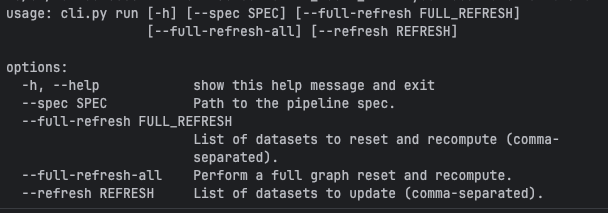
Besides some execution options you certainly notice an Path to the pipeline spec, don't you? Yes, with SDP you configure your pipeline from a YAML file that looks like that:
name: decorated_letters
storage: /tmp/wfc/sdp_101/checkpoints
libraries:
  - glob:
      include: transformations/**
The libraries path is where your declarations live. Besides, you find there a name, which is obviously a human-friendly short description of your pipeline, and also a storage. It's the required parameter that defines where checkpoint files should be stored (remember the good old option("checkpointLocation", checkpoint_dir)? that's exactly the same thing).
Besides these required parameters, you can also add additional ones, such as database and catalog for default database and catalog in the sinks, or yet configuration where you can put SparkSession configuration properties.
⚙ You can't create a SparkSession with the Spark Declarative Pipelines. It's the responsibility of the spark-pipelines that builds a SparkSession with the configuration properties you defined in the spec template:
# cli.py
def run(spec_path: Path, # ...
  ) -> None:
  # ...
  spark_builder = SparkSession.builder.config(
        "spark.sql.connect.serverStacktrace.enabled", "false"
    )
    for key, value in spec.configuration.items():
        spark_builder = spark_builder.config(key, value)

    spark = spark_builder.getOrCreate()
All you can do is to get the active session by calling SparkSession.active().
SDP, the high-level API
So far we have just prepared the environment. Now it's a great time to focus on the API. SDP jobs leverage Python decorators to annotate tasks either as:
- Materialized views @pipelines.materialized_view: They are designed to handle fully computed datasets. Consequently, they cannot be created from the incremental streaming datasets. When you try to create a materialized view with a flow referencing the readStream somewhere, you will get the following exception:
[INVALID_FLOW_QUERY_TYPE.STREAMING_RELATION_FOR_MATERIALIZED_VIEW] Flow `spark_catalog`.`default`.`rate_materialized_view` returns an invalid relation type. Materialized views may only be defined by a batch relation, but the flow `spark_catalog`.`default`.`rate_materialized_view` attempts to write a streaming relation to the materialized view `spark_catalog`.`default`.`rate_materialized_view`. SQLSTATE: 42000
- Tables @pipelines.table: or rather a streaming table. Designed to support incremental data processing, i.e. consuming new data as it arrives. A streaming table supports many writing flows.
- Temporary views @pipelines.temporary_view: temporary blocks that are often used as transformation inputs for other components in the pipeline.
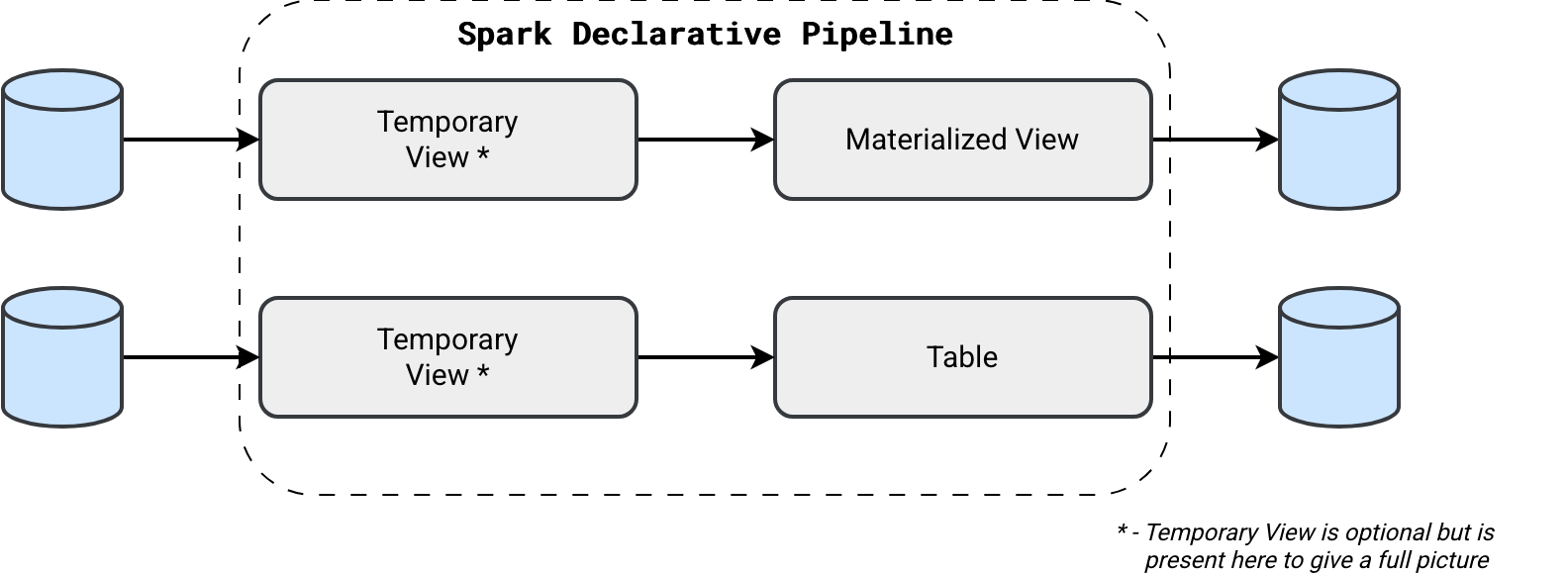
Concretely speaking, we could declare a Materialized View as:
from pyspark import pipelines, Row
from pyspark.sql import SparkSession

@pipelines.materialized_view(format='delta')
def in_memory_numbers():
    spark = SparkSession.active()

    old_letters = spark.read.table('in_memory_numbers_temporary_view')

    new_letters = spark.createDataFrame(
        data=[
            Row(id=1, letter='A'), Row(id=2, letter='B'), Row(id=3, letter='C')
        ]
    )

    return old_letters.unionByName(new_letters, allowMissingColumns=False)

@pipelines.temporary_view()
def in_memory_numbers_temporary_view():
    spark = SparkSession.active()
    return spark.createDataFrame(
        data=[
            Row(id=4, letter='D'), Row(id=5, letter='E'), Row(id=6, letter='F')
        ]
    )

@pipelines.materialized_view(format='delta')
def text_letters_materialized_view():
    spark = SparkSession.active()
    return spark.read.text('/opt/spark/data/files')
As you can see in the previous snippet, the temporary view is an optional step but it clearly helps separate the transformations from the main output. Same with- or without-temporary view approach you can use for streaming tables. But to not repeat the same example, let's check if we can use the good old method with Python functions to transform SDP DataFrames:
def add_processing_time(dataframe_to_decorate: DataFrame) -> DataFrame:
    return dataframe_to_decorate.withColumn("processing_time", F.current_timestamp())

@pipelines.table(format='delta')
def rate_data_with_processing_time():
    spark = SparkSession.active()
    rate_data = (spark.readStream.option("rowsPerBatch", 5)
      .option("numPartitions", 2)
      .format("rate-micro-batch").load())

    rate_data_with_processing_time_df = add_processing_time(rate_data)
    return rate_data_with_processing_time_df
For streaming tables, besides using a static declaration, you can also use a more dynamic one that will let you append the data continuously:
pipelines.create_streaming_table('rate_table_append_flow', format='delta')

@pipelines.append_flow(target='rate_table_append_flow')
def rate_source_1():
    spark = SparkSession.active()
    return (spark.readStream.option("rowsPerBatch", 5)
      .option("numPartitions", 2)
      .format("rate-micro-batch").load())


@pipelines.append_flow(target='rate_table_append_flow')
def rate_source_2():
    spark = SparkSession.active()
    return (spark.readStream.option("rowsPerBatch", 5)
      .option("numPartitions", 2)
      .option("startTimestamp", 1769968633000)
      .format("rate-micro-batch").load())
Demo time
After this introduction, let's see SDP in action:
And that's it! The blog post turned out longer than I had expected and to tell you what, I didn't cover everything I should have covered for the 101! But instead of annoying you with yet another detail today, I invite you to next week's blog post.
Data Engineering Design Patterns

Looking for a book that defines and solves most common data engineering problems? I wrote
one on that topic! You can read it online
on the O'Reilly platform,
or get a print copy on Amazon.
I also help solve your data engineering problems contact@waitingforcode.com 📩
Related blog posts:
- Enzyme and Materialized Views on Databricks - better understanding from the SIGMOD-Companion paper
- Lakeflow Spark Declarative Pipelines and Slowly Changing Dimensions
- Lakeflow Spark Declarative Pipelines, flows, private tables, and configuration
- Lakeflow Spark Declarative Pipelines, introduction and incremental refreshes
- Spark Declarative Pipelines internals