

Last week, we discovered Spark Declarative Pipelines as a new way of writing streaming pipelines. However, writing the pipelines is only half the battle; the other and perhaps more critical task is understanding exactly what happens once they are in motion. That is exactly what we are going to dive into today.
What would it take for you to trust your Databricks pipelines in production?
A 3-day bug hunt on a 3-person team costs up to €7,200 in lost engineering time. This workshop teaches you to prevent that — unit tests, data tests, and integration tests for PySpark and Databricks Lakeflow, including Spark Declarative Pipelines.

Konieczny
Triggers
The first thing you should be aware of are triggers. Technically, as of this writing at least, there is a single trigger for the whole pipeline. That's the reason why your pipeline runs for all the available data and then stops. Here is the code snippet explaining that part:
class TriggeredGraphExecution(
    graphForExecution: DataflowGraph, env: PipelineUpdateContext,
    onCompletion: RunTerminationReason => Unit = _ => (), clock: Clock = new SystemClock()
) extends GraphExecution(graphForExecution, env) {

   override def streamTrigger(flow: Flow): Trigger = {
    Trigger.AvailableNow()
  }

   private val flowPlanner = new FlowPlanner(
    graph = graphForExecution,
    updateContext = env,
    triggerFor = streamTrigger
  )
The trigger is later passed to the API methods responsible for converting your SDP code into Structured Streaming API:
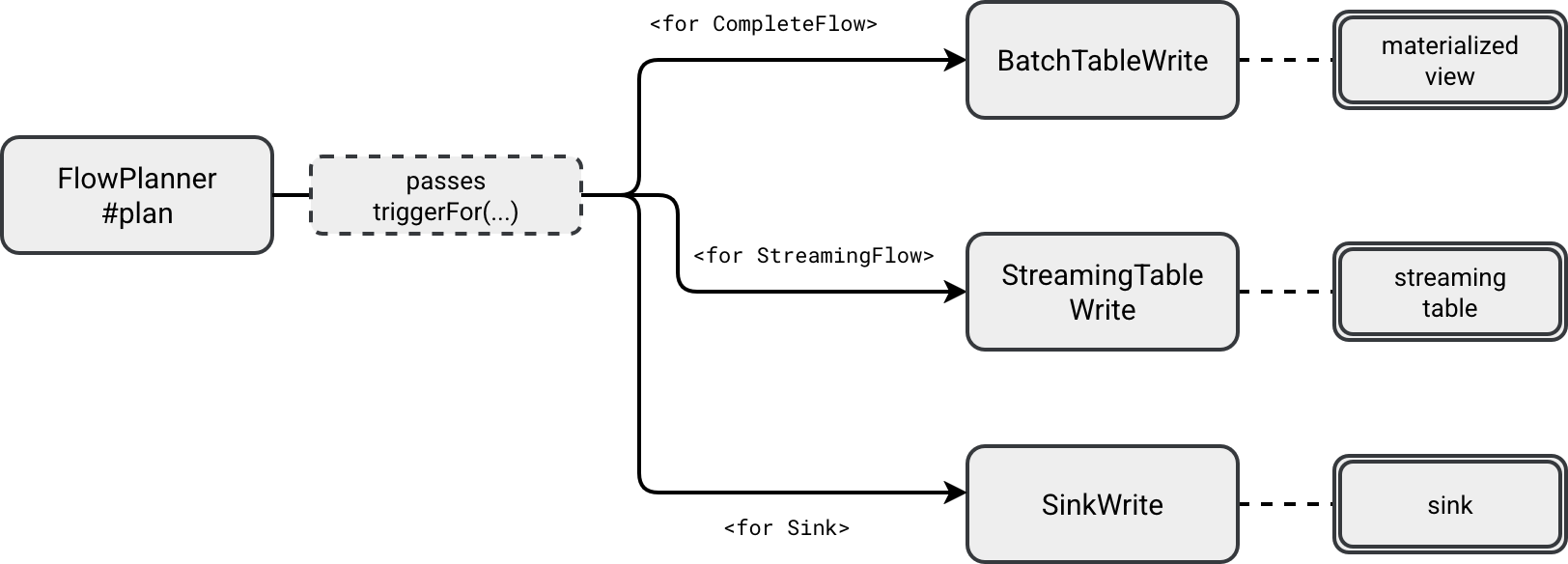
Each *Write receives the hardcoded available now trigger and puts it to the executed Structured Streaming job, like here for the StreamingTableWrite:
class StreamingTableWrite(
    val identifier: TableIdentifier, val flow: ResolvedFlow, val graph: DataflowGraph,
    val updateContext: PipelineUpdateContext, val checkpointPath: String,
    val trigger: Trigger,
    val destination: Table, val sqlConf: Map[String, String]
) extends StreamingFlowExecution {


 def startStream(): StreamingQuery = {
    val data = graph.reanalyzeFlow(flow).df
    val dataStreamWriter = data
      .writeStream
      .queryName(displayName)
      .option("checkpointLocation", checkpointPath)
      .trigger(trigger)
      .outputMode(OutputMode.Append())
    destination.format.foreach(dataStreamWriter.format)
    dataStreamWriter.toTable(destination.identifier.unquotedString)
  }
Checkpointing
From the previous snippet and last week's blog post you can also see another streaming primitive fully managed by SDP, the checkpoint. Sure, you still need to provide the checkpoint location with the storage property in the YAML, but besides the whole connection between the storage and checkpoint manager is done by SDP.
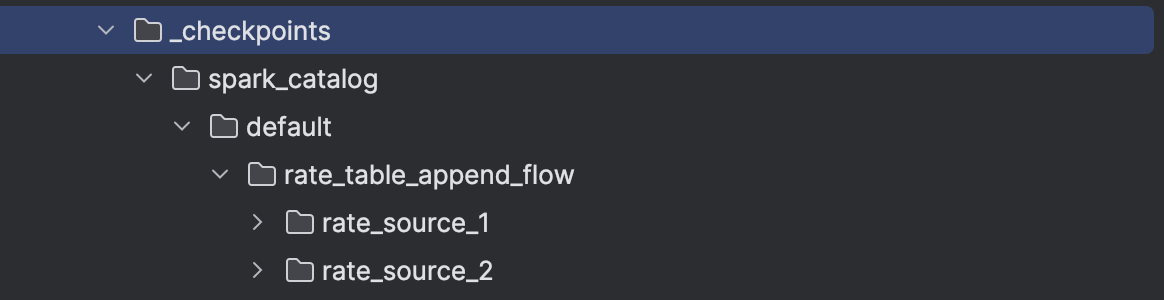
Consequently, whenever you start a new SDP flow, it will either create or use the existing checkpoint location defined as ${storage}/_checkpoints/${table}/${flow name}. For example, the following code:
pipelines.create_streaming_table('rate_table_append_flow', format='delta')

@pipelines.append_flow(target='rate_table_append_flow')
def rate_source_1():
  ...

@pipelines.append_flow(target='rate_table_append_flow')
def rate_source_2():
  ...
...would generate the checkpoint structure like:
Retries
Retries are another feature SDP manages for you. Here is the code that handles flow execution errors:
def startFlow(flow: ResolvedFlow): Unit = {
    val flowIdentifier = flow.identifier
    logInfo(log"Starting flow ${MDC(LogKeys.FLOW_NAME, flow.identifier)}")
    env.flowProgressEventLogger.recordPlanningForBatchFlow(flow)
    try {
      val flowStarted = planAndStartFlow(flow)
      // ...
       } catch {
          case NonFatal(ex) => recordFailed(flowIdentifier, ex)
        }
      }
The number of retries is configured with spark.sql.pipelines.maxFlowRetryAttempts property and defaults to 2. The execution decides each time whenever the exception should terminate the flow or retry it here:

To see the retries in action, you can run errors_sdp_materialized_view.py. After executing the pipeline with this change, the spark-pipeline will print the following failures:
2026-02-28 03:24:42: Starting run...
2026-02-28 03:24:44: Flow spark_catalog.default.text_letters_materialized_view is QUEUED.
2026-02-28 03:24:44: Flow spark_catalog.default.in_memory_numbers is QUEUED.
2026-02-28 03:24:44: Flow spark_catalog.default.in_memory_numbers is PLANNING.
2026-02-28 03:24:44: Flow spark_catalog.default.in_memory_numbers is STARTING.
2026-02-28 03:24:44: Flow spark_catalog.default.in_memory_numbers is RUNNING.
2026-02-28 03:24:44: Flow spark_catalog.default.text_letters_materialized_view is PLANNING.
2026-02-28 03:24:44: Flow spark_catalog.default.text_letters_materialized_view is STARTING.
2026-02-28 03:24:44: Flow spark_catalog.default.text_letters_materialized_view is RUNNING.
2026-02-28 03:24:44: Flow 'spark_catalog.default.in_memory_numbers' has FAILED.
Error: [CAST_INVALID_INPUT] The value 'A' of the type "STRING" cannot be cast to "BIGINT" because it is malformed. Correct the value as per the syntax, or change its target type. Use `try_cast` to tolerate malformed input and return NULL instead. SQLSTATE: 22018
2026-02-28 03:24:46: Flow spark_catalog.default.text_letters_materialized_view has COMPLETED.
2026-02-28 03:24:50: Flow spark_catalog.default.in_memory_numbers is PLANNING.
2026-02-28 03:24:50: Flow spark_catalog.default.in_memory_numbers is STARTING.
2026-02-28 03:24:50: Flow spark_catalog.default.in_memory_numbers is RUNNING.
2026-02-28 03:24:50: Flow 'spark_catalog.default.in_memory_numbers' has FAILED.
Error: [CAST_INVALID_INPUT] The value 'A' of the type "STRING" cannot be cast to "BIGINT" because it is malformed. Correct the value as per the syntax, or change its target type. Use `try_cast` to tolerate malformed input and return NULL instead. SQLSTATE: 22018
2026-02-28 03:25:01: Flow spark_catalog.default.in_memory_numbers is PLANNING.
2026-02-28 03:25:01: Flow spark_catalog.default.in_memory_numbers is STARTING.
2026-02-28 03:25:01: Flow spark_catalog.default.in_memory_numbers is RUNNING.
2026-02-28 03:25:01: Flow 'spark_catalog.default.in_memory_numbers' has FAILED.

pyspark.errors.exceptions.connect.NumberFormatException: [CAST_INVALID_INPUT] The value 'A' of the type "STRING" cannot be cast to "BIGINT" because it is malformed. Correct the value as per the syntax, or change its target type. Use `try_cast` to tolerate malformed input and return NULL instead. SQLSTATE: 22018
Same should happen for the streaming table. If you execute the errors_sdp_table_with_python_function.py, you should see the following errors:
r2026-02-28 04:27:21: Starting run...
2026-02-28 04:27:22: Flow spark_catalog.default.rate_data_with_processing_time is QUEUED.
2026-02-28 04:27:22: Flow spark_catalog.default.rate_data_with_processing_time is STARTING.
2026-02-28 04:27:22: Flow 'spark_catalog.default.rate_data_with_processing_time' has FAILED.
Error: Union between streaming and batch DataFrames/Datasets is not supported;
~Union false, false
:- ~Project [timestamp#3, value#4L, current_timestamp() AS processing_time#6]
:  +- ~StreamingRelationV2 org.apache.spark.sql.execution.streaming.sources.RatePerMicroBatchProvider@470e3bf7, rate-micro-batch, org.apache.spark.sql.execution.streaming.sources.RatePerMicroBatchTable@6c7fb42f, [rowsPerBatch=5, numPartitions=2], [timestamp#3, value#4L]
+- Project [cast(timestamp#18 as timestamp) AS timestamp#150, value#16L, cast(processing_time#17 as timestamp) AS processing_time#151]
   +- Project [timestamp#18, value#16L, processing_time#17]
      +- LocalRelation [value#16L, processing_time#17, timestamp#18]

2026-02-28 04:27:22: Flow 'spark_catalog.default.rate_data_with_processing_time' has FAILED.
Error: Union between streaming and batch DataFrames/Datasets is not supported;
~Union false, false
:- ~Project [timestamp#3, value#4L, current_timestamp() AS processing_time#6]
:  +- ~StreamingRelationV2 org.apache.spark.sql.execution.streaming.sources.RatePerMicroBatchProvider@470e3bf7, rate-micro-batch, org.apache.spark.sql.execution.streaming.sources.RatePerMicroBatchTable@6c7fb42f, [rowsPerBatch=5, numPartitions=2], [timestamp#3, value#4L]
+- Project [cast(timestamp#18 as timestamp) AS timestamp#150, value#16L, cast(processing_time#17 as timestamp) AS processing_time#151]
   +- Project [timestamp#18, value#16L, processing_time#17]
      +- LocalRelation [value#16L, processing_time#17, timestamp#18]

2026-02-28 04:27:27: Flow spark_catalog.default.rate_data_with_processing_time is STARTING.
2026-02-28 04:27:27: Flow 'spark_catalog.default.rate_data_with_processing_time' has FAILED.
Error: Union between streaming and batch DataFrames/Datasets is not supported;
~Union false, false
:- ~Project [timestamp#3, value#4L, current_timestamp() AS processing_time#6]
:  +- ~StreamingRelationV2 org.apache.spark.sql.execution.streaming.sources.RatePerMicroBatchProvider@470e3bf7, rate-micro-batch, org.apache.spark.sql.execution.streaming.sources.RatePerMicroBatchTable@6c7fb42f, [rowsPerBatch=5, numPartitions=2], [timestamp#3, value#4L]
+- Project [cast(timestamp#18 as timestamp) AS timestamp#155, value#16L, cast(processing_time#17 as timestamp) AS processing_time#156]
   +- Project [timestamp#18, value#16L, processing_time#17]
      +- LocalRelation [value#16L, processing_time#17, timestamp#18]

2026-02-28 04:27:27: Flow 'spark_catalog.default.rate_data_with_processing_time' has FAILED.
Error: Union between streaming and batch DataFrames/Datasets is not supported;
~Union false, false
:- ~Project [timestamp#3, value#4L, current_timestamp() AS processing_time#6]
:  +- ~StreamingRelationV2 org.apache.spark.sql.execution.streaming.sources.RatePerMicroBatchProvider@470e3bf7, rate-micro-batch, org.apache.spark.sql.execution.streaming.sources.RatePerMicroBatchTable@6c7fb42f, [rowsPerBatch=5, numPartitions=2], [timestamp#3, value#4L]
+- Project [cast(timestamp#18 as timestamp) AS timestamp#155, value#16L, cast(processing_time#17 as timestamp) AS processing_time#156]
   +- Project [timestamp#18, value#16L, processing_time#17]
      +- LocalRelation [value#16L, processing_time#17, timestamp#18]

2026-02-28 04:27:37: Flow spark_catalog.default.rate_data_with_processing_time is STARTING.
2026-02-28 04:27:38: Flow 'spark_catalog.default.rate_data_with_processing_time' has FAILED.
Error: Union between streaming and batch DataFrames/Datasets is not supported;
~Union false, false
:- ~Project [timestamp#3, value#4L, current_timestamp() AS processing_time#6]
:  +- ~StreamingRelationV2 org.apache.spark.sql.execution.streaming.sources.RatePerMicroBatchProvider@470e3bf7, rate-micro-batch, org.apache.spark.sql.execution.streaming.sources.RatePerMicroBatchTable@6c7fb42f, [rowsPerBatch=5, numPartitions=2], [timestamp#3, value#4L]
+- Project [cast(timestamp#18 as timestamp) AS timestamp#160, value#16L, cast(processing_time#17 as timestamp) AS processing_time#161]
   +- Project [timestamp#18, value#16L, processing_time#17]
      +- LocalRelation [value#16L, processing_time#17, timestamp#18]

2026-02-28 04:27:38: Flow 'spark_catalog.default.rate_data_with_processing_time' has FAILED more than 2 times and will not be restarted.
Error: Union between streaming and batch DataFrames/Datasets is not supported;
~Union false, false
:- ~Project [timestamp#3, value#4L, current_timestamp() AS processing_time#6]
:  +- ~StreamingRelationV2 org.apache.spark.sql.execution.streaming.sources.RatePerMicroBatchProvider@470e3bf7, rate-micro-batch, org.apache.spark.sql.execution.streaming.sources.RatePerMicroBatchTable@6c7fb42f, [rowsPerBatch=5, numPartitions=2], [timestamp#3, value#4L]
+- Project [cast(timestamp#18 as timestamp) AS timestamp#160, value#16L, cast(processing_time#17 as timestamp) AS processing_time#161]
   +- Project [timestamp#18, value#16L, processing_time#17]
      +- LocalRelation [value#16L, processing_time#17, timestamp#18]
SDP manages retries with an exponential backoff strategy. The runner continuously checks for the planned retry time for the retryable flows with the following filter:
 private val backoffStrategy = ExponentialBackoffStrategy(
    maxTime = (env.spark.sessionState.conf.watchdogMaxRetryTimeInSeconds * 1000).millis,
    stepSize = (env.spark.sessionState.conf.watchdogMinRetryTimeInSeconds * 1000).millis
  )
// ...
val queuedForRetry =
        flowsQueuedForRetry().filter(nextRetryTime(_) <= clock.getTimeMillis())
The two parameters involved in the retry configuration are spark.sql.pipelines.execution.watchdog.maxRetryTime and spark.sql.pipelines.execution.watchdog.minRetryTime.
States
You saw it in previous snippets, a SDP pipeline has a state. All states are referenced in org.apache.spark.sql.pipelines.graph.TriggeredGraphExecution.StreamState:
object StreamState {
    case object QUEUED extends StreamState
    case object RUNNING extends StreamState
    case object EXCLUDED extends StreamState
    case object IDLE extends StreamState
    case object SKIPPED extends StreamState
    case object TERMINATED_WITH_ERROR extends StreamState
    case object CANCELED extends StreamState
    case object SUCCESSFUL extends StreamState
}
The desired state for any SDP pipeline is the SUCCESSFUL but before any pipeline reaches this point, it has to move through other stages. The following schema illustrates how a pipeline can behave depending on various runtime and processing outcomes:
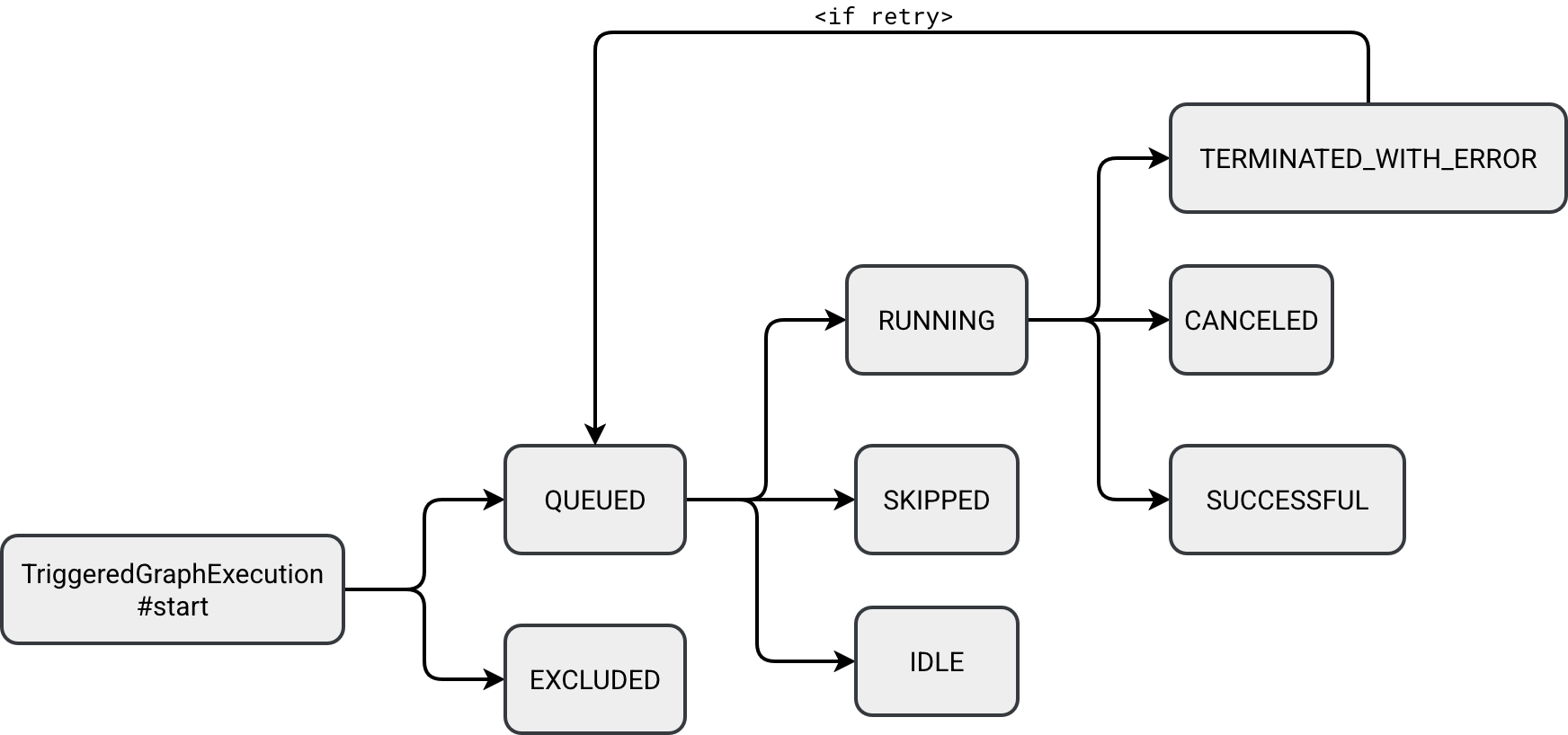
All states are self-explanatory besides three:
- EXCLUDED: this state marks an operator as being excluded from the physical execution, for example because it's only a logical view like a temporary view that is going to be inlined further in the pipeline.
- SKIPPED: in case of a DAG with many children nodes, children nodes can be marked as skipped if their upstream dependency fails. Unlike the EXCLUDED state, it's active on runtime only.
- IDLE: each SDP flow has a flag called once. When it's set to true, it means the SDP runner should avoid rerunning the flow because it's designed to run only once per execution. It's the case of the @pipelines.append_flow.
Concurrency
An operation can not execute not only because of errors but also because of the underlying concurrency. SDP comes with a dedicated parameter called spark.sql.pipelines.execution.maxConcurrentFlows to control the number of concurrently running flows:
val PIPELINES_MAX_CONCURRENT_FLOWS = {
    buildConf("spark.sql.pipelines.execution.maxConcurrentFlows")
      .internal()
      .doc("Max number of flows to execute at once. Used to tune performance for triggered " +
          "pipelines. Has no effect on continuous pipelines.")
      .version("4.1.0").intConf
      .createWithDefault(16)
  }
If you try to run a workflow with more flows than the configured concurrency, SDP will log an error from this function. The code is part of a continuously running while loop:
private def topologicalExecution(): Unit = {
  // ...
  while (!Thread.interrupted() && !allFlowsDone) {
    val (runningFlows, availablePermits) = concurrencyLimit.synchronized {
        (flowsWithState(StreamState.RUNNING).size, concurrencyLimit.availablePermits)
    }
    if ((runningFlows + availablePermits) < env.spark.sessionState.conf.maxConcurrentFlows) {
      val errorStr =
       s"The max concurrency is ${env.spark.sessionState.conf.maxConcurrentFlows}, but " +
       s"there are only $availablePermits permits available with $runningFlows flows running. " +
       s"If this happens consistently, it's possible we're leaking permits."
       logError(errorStr)
       if (Utils.isTesting) {
        throw new IllegalStateException(errorStr)
      }
    }
The class responsible for managing concurrency is a Semaphore:
private val concurrencyLimit: Semaphore = new Semaphore(
    env.spark.sessionState.conf.maxConcurrentFlows
)
There is no parameter configuring how long a flow can wait to acquire the execution slot.
Selective and refreshes
After investigating what's inside SDP, let's move to the higher level and see how to control refreshes. Running spark-pipelines run --help shows what do I mean here:
usage: cli.py run [-h] [--spec SPEC] [--full-refresh FULL_REFRESH]
                  [--full-refresh-all] [--refresh REFRESH]

options:
  -h, --help            show this help message and exit
  --spec SPEC           Path to the pipeline spec.
  --full-refresh FULL_REFRESH
                        List of datasets to reset and recompute (comma-
                        separated).
  --full-refresh-all    Perform a full graph reset and recompute.
  --refresh REFRESH     List of datasets to update (comma-separated).
So far we have been delegating the refresh logic to the runner but as you can see, the API gives you some fine grained control to:
- List datasets to fully refresh (reset and update)
- Force refresh on all datasets
- List datasets to refresh (update)
Since the first and third options are a bit confusing, let's see what does it mean to refresh a dataset or to fully refresh a dataset.

The refreshFlows returns a list of FlowsForTables that match the datasets present in the input parameter. That answers how SDP knows what flows should run. However, the question about the difference between full refresh and a refresh is still in our minds.
When you take another look at the code you should find a method called State#reset. It's the method called by the runner in the beginning to reset the state:

The reset consists of setting the new checkpoint location and truncating the table:
// Checkpointing
object State extends Logging {
  private def reset(flow: ResolvedFlow, env: PipelineUpdateContext, graph: DataflowGraph): Unit = {
    // ...
    val checkpointDir = new Path(flowMetadata.latestCheckpointLocation)
    val fs1 = checkpointDir.getFileSystem(hadoopConf)
    if (fs1.exists(checkpointDir)) {
        val nextVersion = checkpointDir.getName.toInt + 1
        val nextPath = new Path(checkpointDir.getParent, nextVersion.toString)
        fs1.mkdirs(nextPath)
// ...

// Truncating
object DatasetManager extends Logging {`
  private def materializeTable( ...) = {
    // ...
    if ((isFullRefresh || !table.isStreamingTable) && existingTableOpt.isDefined) {
     context.spark.sql(s"TRUNCATE TABLE ${table.identifier.quotedString}")
    }
    // ...
Dry run
The last useful thing you're going to learn today is the dry run. It's a great way to validate your declarations before submitting the job to your compute environment. All the magic happens in the PipelineHandler#startRun where depending on the dry-run command, the handler will either exclusively resolve the graph, or additionally submit it for execution:
if (cmd.getDry) {
  pipelineUpdateContext.pipelineExecution.dryRunPipeline()
} else {
  pipelineUpdateContext.pipelineExecution.runPipeline()
}
For example, if you try to submit an empty pipeline, the dry-run should return an error message like this:
pyspark.errors.exceptions.connect.AnalysisException: [RUN_EMPTY_PIPELINE] Pipelines are expected to have at least one non-temporary dataset defined (tables, persisted views) but no non-temporary datasets were found in your pipeline.
Please verify that you have included the expected source files, and that your source code includes table definitions (e.g., CREATE MATERIALIZED VIEW in SQL code, @dp.table in python code). SQLSTATE: 42617
Think about this like about analysis step in the Apache Spark SQL query planning. You don't run anything yet but simply validates whether your pipeline from the logical standpoint makes sense.
Fitting everything beyond a "Hello World" example into one post was a challenge. That explains the quick pivots from triggers to retries and states to dry-runs. But these foundations are essential before we explore the internals you'll need to debug real-world issues in production.
Data Engineering Design Patterns

Looking for a book that defines and solves most common data engineering problems? I wrote
one on that topic! You can read it online
on the O'Reilly platform,
or get a print copy on Amazon.
I also help solve your data engineering problems contact@waitingforcode.com 📩
Related blog posts:
- Enzyme and Materialized Views on Databricks - better understanding from the SIGMOD-Companion paper
- Lakeflow Spark Declarative Pipelines and Slowly Changing Dimensions
- Lakeflow Spark Declarative Pipelines, flows, private tables, and configuration
- Lakeflow Spark Declarative Pipelines, introduction and incremental refreshes
- Spark Declarative Pipelines internals