

I am a big fan of many data engineering tools and Apache Airflow is one of them. I particularly enjoy their native way of asserting dataset readiness with the sensor capabilities. And today I'm glad to see the same approach on Lakeflow Jobs!
What would it take for you to trust your Databricks pipelines in production?
A 3-day bug hunt on a 3-person team costs up to €7,200 in lost engineering time. This workshop teaches you to prevent that — unit tests, data tests, and integration tests for PySpark and Databricks Lakeflow, including Spark Declarative Pipelines.

Konieczny
Sensors aka the Readiness Marker pattern
I like the sensor-like idea so much that I dedicated a data engineering design pattern called the Readiness Marker to them. In a nutshell - and for the details I invite you to the book - it's a way to assert your pipeline's readiness for processing the upstream dataset. Historically you could do it with:
- Time-based partitions - if the next partition is created, you may assume the completeness of the previous partition.
- Files - if a specific file is produced - looking at you the Apache Spark's _SUCCESS - you can assume the data producer completed successfully.
- Job status - if you check the upstream job status and the result meets your expectations, you can assume the completeness of the writing operation.
These are only one of the most common examples but there are others. One of the "others" is now part of Lakeflow Jobs - the SQL condition on trigger.
SQL Condition on job trigger
To better understand what you can do, let's analyze the screenshot from the Lakeflow Jobs UI:
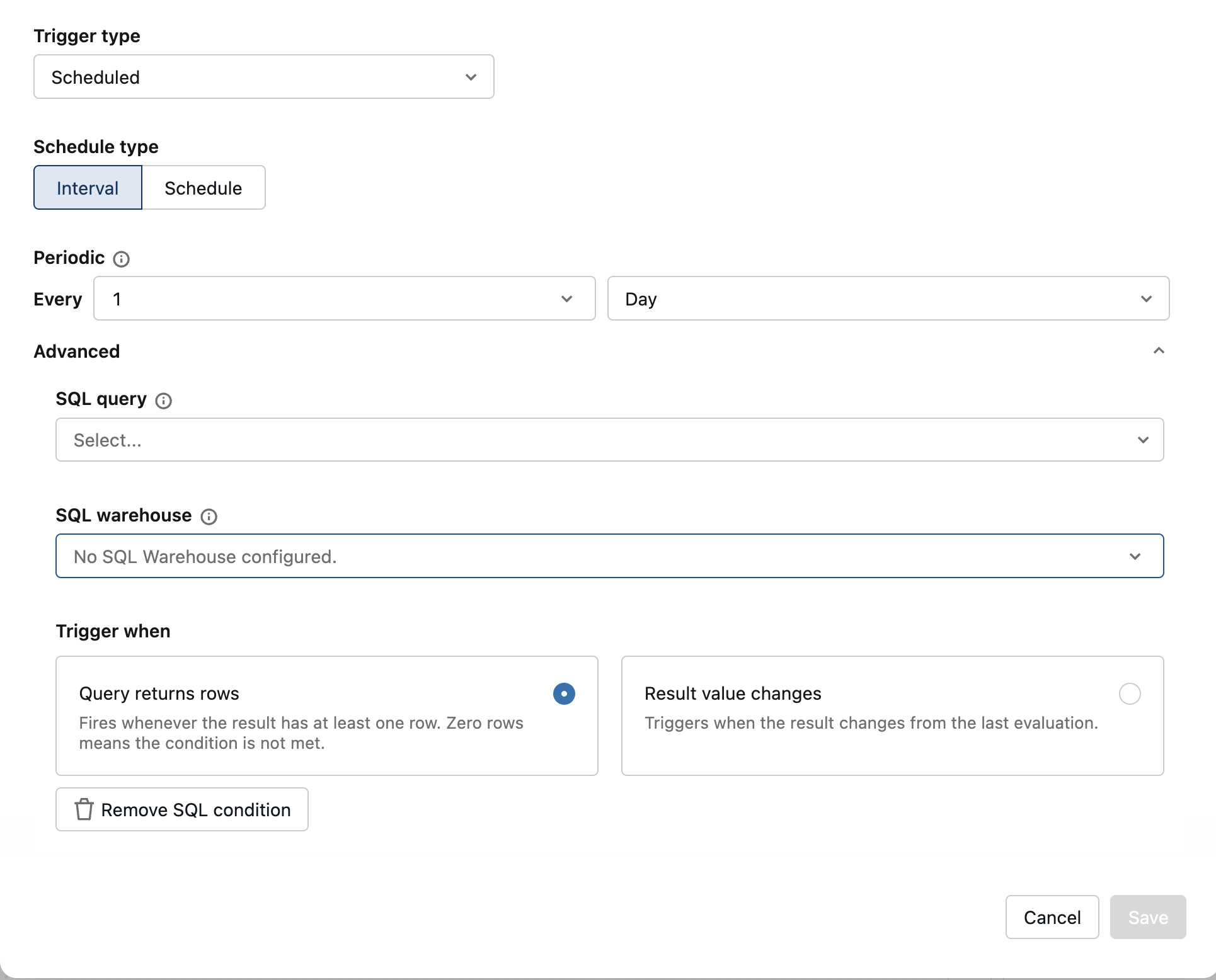
You can see these details when you click on the "Advanced" options for all triggers but the continuous one. From the screenshot you can see the most important components of the trigger that are:
- SQL Query - the query you are going to evaluate when the configured trigger starts you job.
- SQL Warehouse - the SQL Warehouse that is going to run your query. Using the serverless offering instead of classic compute here gives you some additional reactivity. You don't want to wait additional minutes before your trigger can evaluate the SQL condition, do you?
- Trigger when - here you have two choices:
- Query returns rows - your trigger will proceed if the SQL Query returns at least one row. Beware of dummy aggregates like COUNT or SUM that might always return a row. If you have to use them, define a starting threshold with the HAVING clause.
- Result value changes - your trigger compares the results generated by the new SQL Query execution with the results saved previously. Your result is limited here to a single cell (1 row and 1 column) of at most 1 MiB size. If you have some complex results, a deterministic hashing function such as SHA2 can be your friend.
Your SQL Query must be able to complete within 5 minutes. Passing that time, it's marked as timed out and the run is skipped. The next trigger reevaluates the query but if it times out again, another run is skipped. You should be careful while creating the SQL condition queries.
Another requirement for the SQL Query is the number of statements. Even if your condition has many statements, the Lakeflow evaluator will only take the last query into account. As a general rule of thumb it is then easier to reason in terms of a single query, exactly like the trigger name suggests.
Referencing the query
So far so good, it sounds easy, doesn't it? Technically yes, but things can go complex once you hit the automation step. If your query is part of a different process or bundle, you can use a variable substitution:
variables:
  condition_query_id:
    lookup:
      query: 'wait_for_new_orders'

# ... use later as ${var.condition_query_id}
But what to do if your query is part of the bundle? If you use the PyDABs approach, you can include the query creation as part of a mutator that would run before creating the job. That way you can manipulate everything - queries and jobs - with the single databricks bundle deploy statement:
@cache
def get_saved_query_ids(warehouse_id: str, bundle_target: str) -> dict[str, str]:
    return create_condition_queries(workspace_client=WorkspaceClient(), warehouse_id=warehouse_id,
                                    bundle_target=bundle_target)


@job_mutator
def get_condition_query_ids(bundle: Bundle, job: Job) -> Job:
    if os.environ.get('DO_NOT_RUN_MUTATOR') == 'true':
        return job
    query_name = next(query_name for query_name in CONDITION_QUERIES if job.name.endswith(query_name))
    sql_condition = job.trigger.sql_condition
    warehouse_id = bundle.resolve_variable(sql_condition.warehouse_id)
    bundle_target = bundle.target
    query_id = get_saved_query_ids(warehouse_id=warehouse_id, bundle_target=bundle_target)[query_name]
    return replace(job, trigger=replace(job.trigger, sql_condition=replace(sql_condition, sql_query_id=query_id)))
If you use YAML - which is probably the case of most of you - you need to run a dedicated script before deploying the bundle. To avoid dealing with the authentication, you can use the scripts in DAB and execute your query from a Python script:
databricks bundle run create_condition_queries -t ${env}
No worries if it sounds mysterious, the next paragraph will shed some light on that!
Demo
If you don't believe my words - and you can as the code is the single source of truth - below is a quick demo on this SQL Conditions feature:
SQL Condition trigger is a powerful addition to the Lakeflow orchestration capabilities. Even though you may need some extra work to do while including queries to the bundle, it is still worth the effort!
Data Engineering Design Patterns

Looking for a book that defines and solves most common data engineering problems? I wrote
one on that topic! You can read it online
on the O'Reilly platform,
or get a print copy on Amazon.
I also help solve your data engineering problems contact@waitingforcode.com 📩
Read also about SQL Condition triggers on Databricks here:
Related blog posts:
- Python Declarative Automation Bundle aka PyDAB
- Table update trigger for Lakeflow Jobs
- Lakeflow Jobs, when it can and can't be a default data orchestration setup?