

If you are old experienced enough, you should remember Apache Spark Structured Streaming file sink where the commit log stores already written files in a dedicated file. Delta Lake uses a similar concept to guarantee idempotent writes, but with less storage overhead.
What would it take for you to trust your Databricks pipelines in production?
A 3-day bug hunt on a 3-person team costs up to €7,200 in lost engineering time. This workshop teaches you to prevent that — unit tests, data tests, and integration tests for PySpark and Databricks Lakeflow, including Spark Declarative Pipelines.

Konieczny
⚠ Not only writer
Delta Lake writer only guarantees writing idempotency! If your data processing logic is not idempotent, your results will be incorrect because you will ignore writing the results that have changed between two consecutive executions. In that case a better alternative will be the MERGE operation, as long as the rows' ids don't change, even when there are retrieS.
Configuration
There are two possible ways to configure the idempotent writer:
- Local, individual for each writer, with txnVersion and txnAppId options.
- Global, for all writers invoked within a given SparkSession, with spark.databricks.delta.write.txnAppId, spark.databricks.delta.write.txnVersion, and spark.databricks.delta.write.txnVersion.autoReset.enabled.
Depending on how you want to control the idempotency, whether it's individually for some of the writers, or globally across all writers in the job, you will respectively prefer the local or the global configuration. But there is a gotcha with the global configuration. In both cases you need to provide a numerical and incrementing txnVersion. If it's not a number, the write will fail while when you don't provide an incrementing number, the written data will be ignored. To understand why, you need to know what happens under-the-hood. The next schema summarizes the internal behavior of the idempotent writer:
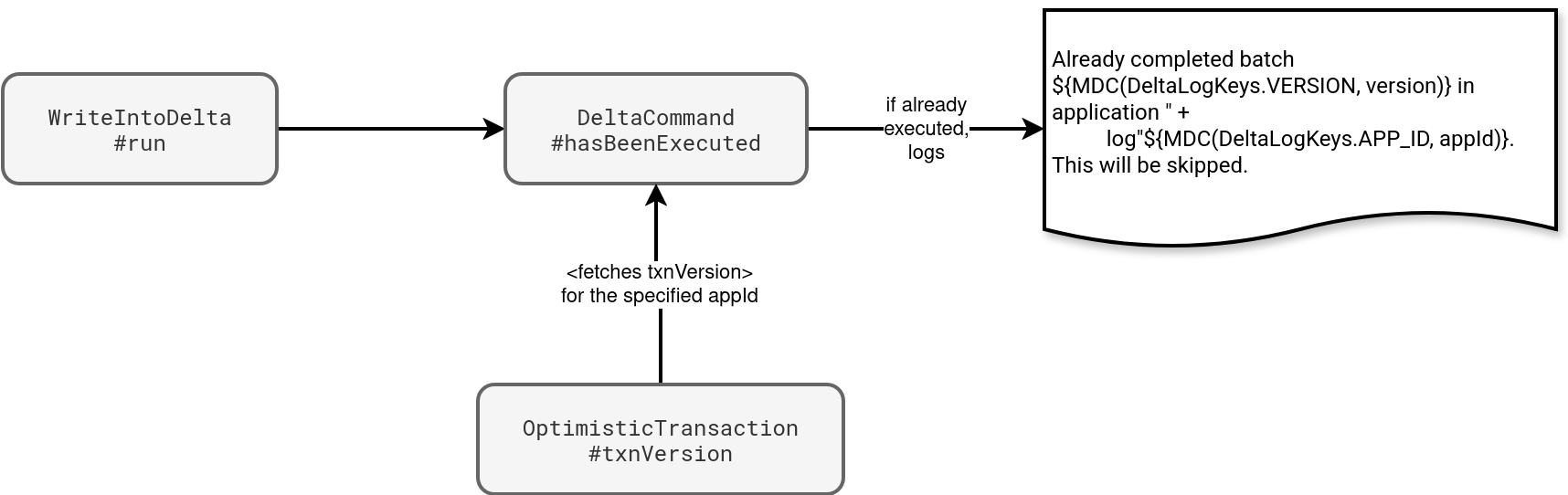
As you can see, before Delta Lake starts writing the data files, it first checks the specified txnAppId and txnVersion against a mapping created from the commit logs. The mapping stores the most recent transaction version for each application interacting with the table. Consequently, your writer will only succeed if the txnVersion is greater than the value present in the table.
Independently on how you configure, you must keep in mind the mapping is global for the table. Consequently, for many writers you should take care of setting unique app ids. Otherwise, the writers might be silently ignored. It's worth mentioning the application id can also be null and this missing value can also lead to surprising behavior.
Auto-reset
If you decide to implement the idempotent writers with the SparkSession-scoped, you must be aware of an additional configuration property, the spark.databricks.delta.write.txnVersion.autoReset.enabled. When you enable it, Delta Lake will remove the txnVersion after each write. As a result, if your job has many writers, only the first will succeed, unless you explicitly set a new txnVersion.
When by mistake you specify both SparkSession-scoped and writer configuration, Delta Lake will prefer the writer ones. You can see it in the DeltaCommand#getTxnVersionAndAppId, used to retrieve the id and version before each write:
  private def getTxnVersionAndAppId(
    sparkSession: SparkSession,
    options: Option[DeltaOptions]): (Option[Long], Option[String], Boolean) = {
    var txnVersion: Option[Long] = None
    var txnAppId: Option[String] = None
    for (o <- options) {
      txnVersion = o.txnVersion
      txnAppId = o.txnAppId
    }
    var numOptions = txnVersion.size + txnAppId.size
    // ...
    var fromSessionConf = false
    if (numOptions == 0) {
      txnVersion = sparkSession.sessionState.conf.getConf(
        DeltaSQLConf.DELTA_IDEMPOTENT_DML_TXN_VERSION)
      txnAppId = sparkSession.sessionState.conf.getConf(
        DeltaSQLConf.DELTA_IDEMPOTENT_DML_TXN_APP_ID)
      numOptions = txnVersion.size + txnAppId.size
      // ...
      fromSessionConf = true
    }
    (txnVersion, txnAppId, fromSessionConf)
  }
Streaming sink
The idempotent writer works for the batch API only. When you write a Delta Lake table with the streaming API, Delta Lake takes care of setting the app id and transaction version. Your settings, even at the SparkSession level, will be ignored. The next schema shows where these two values come from:
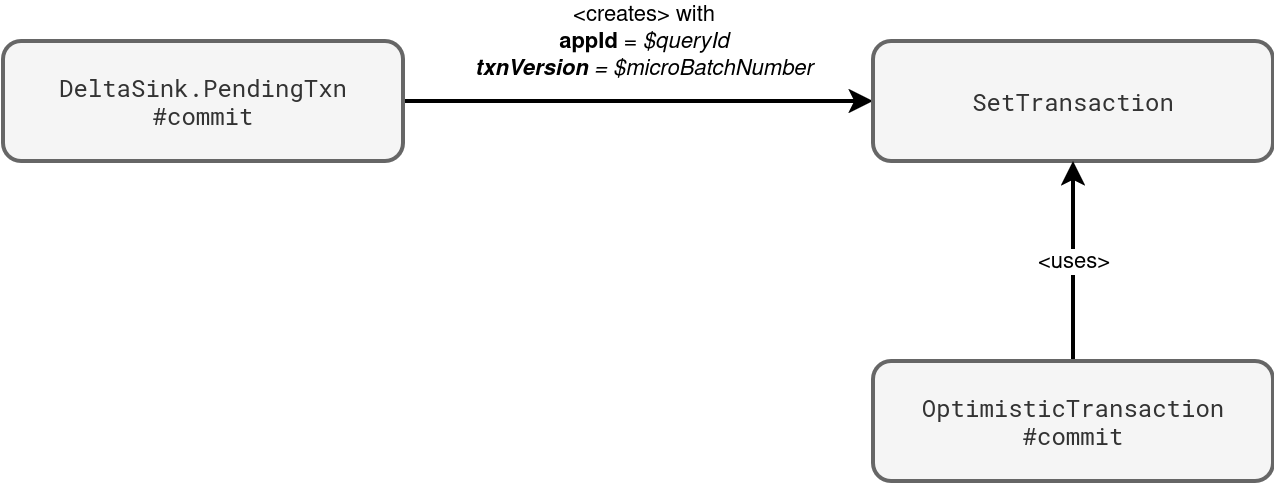
You will also find these details in the commit logs, in the txn part:
{"txn":{"appId":"4f469844-8519-4121-89c0-60a8453f660f","version":0,"lastUpdated":1759419766775}}
⚠ Query id != query name
While query name is the property you can set to easily identify your job in Spark UI, the query id is automatically managed by Apache Spark. It's an auto-generated UUID.
It's worth adding that if you try to reprocess the dataset by removing checkpoint files, the reprocessing will skip the batches corresponding to the removed files because the query id is also checkpointed in the file called metadata in your checkpoint location:
cat /tmp/checkpoint_demo6/metadata
{"id":"960b3316-d6fa-4217-9e4a-89ccd164a1f7"}
Idempotent writer is a good candidate if you need to protect yourself against writing the same data twice, or performing costly MERGE-based deduplication logic otherwise. It also greatly integrates with the foreachBatch sink where you can get the batch number natively for streaming writers. However, there are some gotchas good to know such as always incrementing txnVersion and a global table-based mapping between the app ids and the most recent transactions.
Data Engineering Design Patterns

Looking for a book that defines and solves most common data engineering problems? I wrote
one on that topic! You can read it online
on the O'Reilly platform,
or get a print copy on Amazon.
I also help solve your data engineering problems contact@waitingforcode.com 📩
Read also about Idempotent writer here:
Related blog posts:
- Commit log decorator with userMetadata property
- Truncating a Delta Lake table, aka metadata-only operations
- Tables cloning in Delta Lake