

There are days like that. You inherit a code and it doesn't really work as expected. While digging into issues you find usual weird warnings but also several new things. For me one of these things was the "Generated method too long to be JIT compiled..." info message.
What would it take for you to trust your Databricks pipelines in production?
A 3-day bug hunt on a 3-person team costs up to €7,200 in lost engineering time. This workshop teaches you to prevent that — unit tests, data tests, and integration tests for PySpark and Databricks Lakeflow, including Spark Declarative Pipelines.

Konieczny
JIT-compiled?
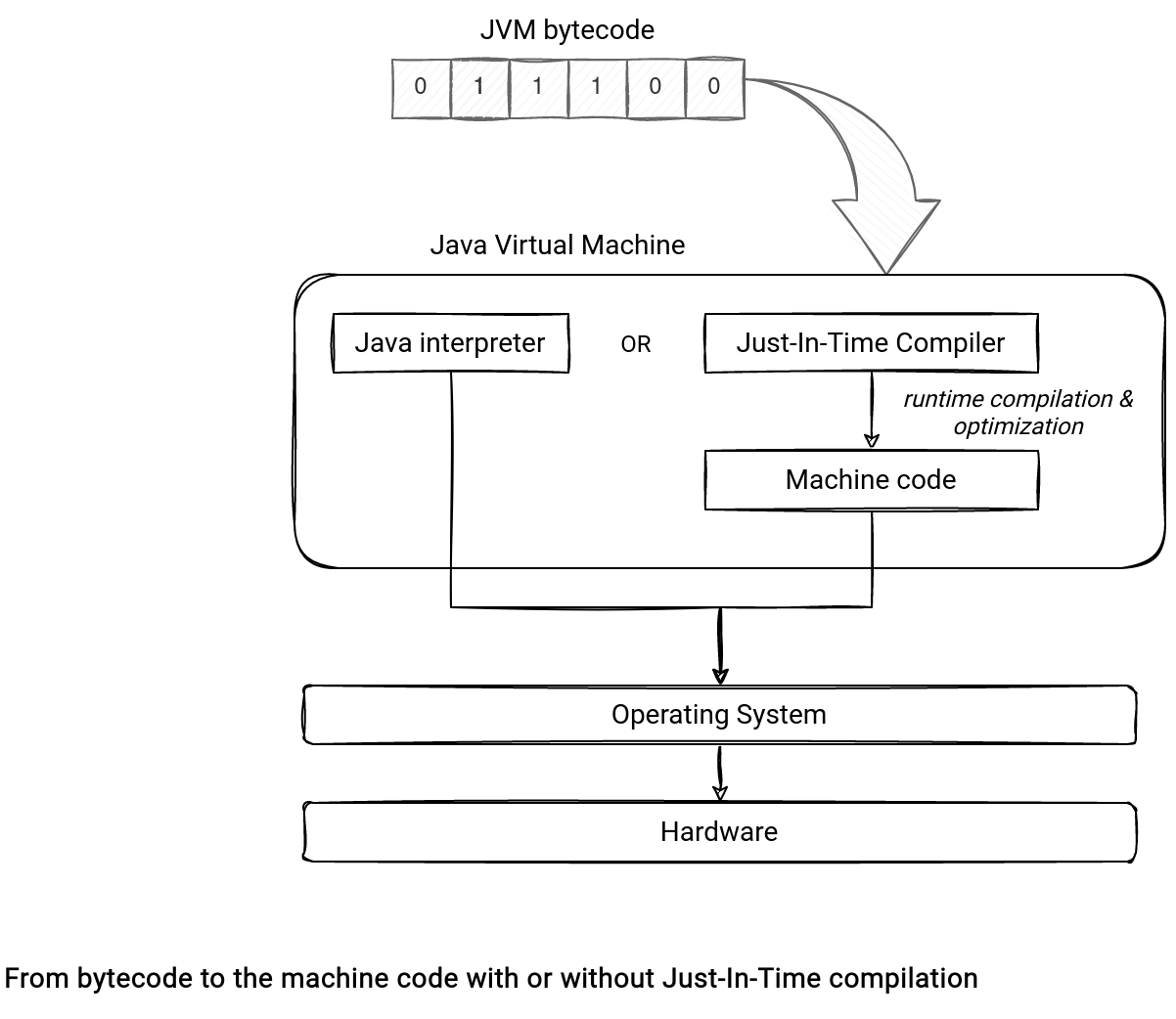
First, what does it mean that a method (or a code in general) is JIT-compiled? To understand this term we need to recall some basics about the JVM. Each JVM-based (Scala, Java, ...) application is compiled first into a bytecode representation. This representation is later used by the JVM in 2 different ways:
- When there is no JIT compilation enabled, the Java Interpreter translates this code into machine native code.
- When the JIT compilation is turned on, the process follows a different path. Instead of translating the code directly, the JVM uses an internal JIT compiler to perform a runtime compilation of the bytecode. Put another way, the JIT compiler translates the bytecode to the machine code directly without interpreting it each time.
This magic happens at runtime and depends on several factors, such as the number of method calls. As you can see, the JIT compiler monitors what happens inside the JVM during the execution. It clearly explains enough why the JIT stands for Just-In-Time compilation!
Additionally to the native code compilation and direct calls, JIT provides several other optimizations, such as code reorganization or memory tuning. I'm explaining some of them in the JVM JIT optimizations blog post.
Why too long?
That's the theory but as usual, the practice might be different. Sometimes the method won't be JIT-compiled, even if the JIT is enabled at the JVM level! Why? One of the reasons is the method size. Compiling big methods are runtime involves the following:
- The compilation task will be heavier and require more Code Cache area to store the compiled code. The Code Cache is the place where the JVM persists the code already compiled to the machine code.
- If there is no free space in the Code Cache, any subsequent compilation tries will fail for that reason - even though these functions are more popular than the compiled huge method.
- Not to mention that long methods are simply harder to understand than small functions.
That's why methods longer than 8000 byte code instructions are skipped in the compilation step. This behavior is not strict, though. You can turn it off by disabling the DontCompileHugeMethods JVM flag but it might have serious global implications.
CodeGenerator in Apache Spark
Apache Spark relies on the JIT compilation in the CodeGenerator class that compiles the code generated by the WholeStageCodegenExec physical operator. Let's take a look at what happens when it has to compile a simple if-else statement:
As you can see, it calls Janino compiler to create the Java bytecode and return the bytecode statistics. It's inside this statistics-related task where the first warning appears:
object CodeGenerator extends Logging {
// ...
  private def updateAndGetCompilationStats(evaluator: ClassBodyEvaluator): ByteCodeStats = {
// ...
            if (byteCodeSize > DEFAULT_JVM_HUGE_METHOD_LIMIT) {
              logInfo("Generated method too long to be JIT compiled: " +
                s"${cf.getThisClassName}.${method.getName} is $byteCodeSize bytes")
            }
// ...
But it's not the single bytecode protection in the whole stage code generation. The second one can invalidate the whole generated code if the bytecode size is larger than spark.sql.codegen.hugeMethodLimit (65535 by default, 8000 recommended if the job runs on HotSpot JVM). When it happens, you'll find another message in the logs:
case class WholeStageCodegenExec(child: SparkPlan)(val codegenStageId: Int)
    extends UnaryExecNode with CodegenSupport {
// ...
  override def doExecute(): RDD[InternalRow] = {
// ...
    if (compiledCodeStats.maxMethodCodeSize > conf.hugeMethodLimit) {
      logInfo(s"Found too long generated codes and JIT optimization might not work: " +
        s"the bytecode size (${compiledCodeStats.maxMethodCodeSize}) is above the limit " +
        s"${conf.hugeMethodLimit}, and the whole-stage codegen was disabled " +
        s"for this plan (id=$codegenStageId). To avoid this, you can raise the limit " +
        s"`${SQLConf.WHOLESTAGE_HUGE_METHOD_LIMIT.key}`:\n$treeString")
      return child.execute()
    }
When the whole-stage codegen is disabled, each of the defined transformations is executed separately. I blogged about this topic in the why of code generation in Apache Spark SQL.
The JIT compilation and the whole stage code generation aren't the end of the world and your job may be running correctly. However, the performances will very probably suffer and you might need to refactor your code to take full advantage of these JVM optimizations.
Data Engineering Design Patterns

Looking for a book that defines and solves most common data engineering problems? I wrote
one on that topic! You can read it online
on the O'Reilly platform,
or get a print copy on Amazon.
I also help solve your data engineering problems contact@waitingforcode.com 📩
Read also about Generated method too long to be JIT compiled here:
- Performance Improvements via JIT Optimization What is the rationale for JIT to not compile huge methods? -XX:-DontCompileHugeMethods Our approach to fast Avro serialization and deserialization in JVM Understanding and Improving Code Generation
Related blog posts:
"Generated method too long to be JIT compiled" is a log message that might indicate the lack of JIT compilation of an Apache Spark job. It's also an interesting concept that deserved a deeper look in the new blog post ? https://t.co/lXAaNqHT0a
— Bartosz Konieczny (@waitingforcode) November 19, 2022